
Welcome to Parent Pixels, a parenting newsletter filled with practical advice, news, and resources to support you and your kids in the digital age. This week:
🏛️ California Gov. Newsom signed extensive social media restrictions into law: The Golden State made history last week when Gov. Newsom signed a package of 13 digital safety bills into law. It’s the most comprehensive set of online child safety protections any US state has passed. Some highlights:
The bills come at a time when social media and AI companies are facing greater pressure to protect their youngest and most vulnerable users. California’s new laws, which go into effect in 2027, are the strictest in the nation — and may set a new standard for these companies in the US. OpenAI actually gave its last-minute support for SB 1119, but we’ll see if any companies appeal the new safeguards and delay implementation.
🇪🇺 The EU is moving toward a social media ban: European Commission President Ursula von der Leyen announced that the European Union is developing bloc-wide rules to restrict social media access for children. The proposal is no social media under 13, and no personal accounts under age 15. Children aged 13 and 14 could have “mini accounts” with parental supervision, limited features, and strict one-hour daily time limits.
The proposed Kids Act would also reverse the burden of proof by requiring platforms to prove they are safe for minors, rather than requiring families to prove harm. It still needs approval from individual EU member states, so it could take years to become law, but the direction is clear.
“I am aware that many perceive the power of big tech as overwhelming and impossible to roll back. I disagree,” Von der Leyen said. “Europe has the power to act. It is us who decide the rules, not Big Tech.”
Meanwhile, the UK (which isn’t part of the EU and passed a social media ban this year that takes effect in 2027), announced it will require Apple and Google to block explicit images on kids’ phones. The move follows earlier pressure on both companies to enable these protections by default. It’s a big message from Europe to big tech companies: it’s past time to set common-sense rules on kids’ phones and social media.
🇦🇺 Australia introduces algorithm opt-out for social media users: Australia was the first country to pass a social media ban for teens, and now, they’re coming for the algorithm. The Australian government announced new legislation that would give users the ability to opt out of algorithm-driven content entirely. Dubbed the “my feed, my way” plan, users who opt out would see content only from accounts they’ve actively chosen to follow and none of the recommendations and engagement-driven suggestions that have collectively turned our brains to algorithmic mush. Platforms would face fines of more than A$100m for non-compliance.
New laws will also require platforms to protect minors from specific harmful content categories including eating disorder promotion, misogynistic content, and content that glorifies dangerous behavior.
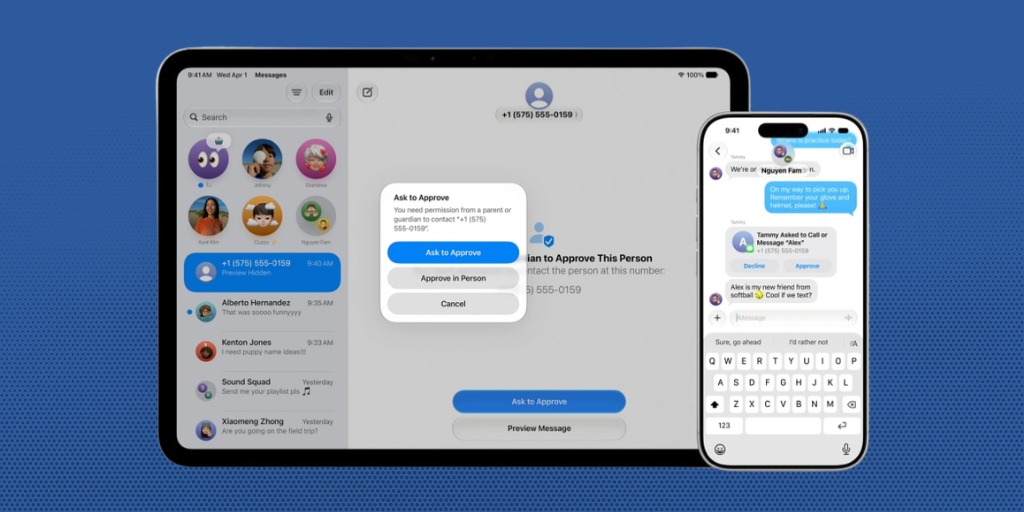
📱 Meet the new parental controls on Apple’s iOS 27: There are some new child safety features waiting for you on the latest iOS update. Here’s what to check out:
As always, these parental controls work best when they’re paired with BrightCanary, which shows you what your child is actually saying and searching (not just how long they spent on an app). Learn more about how BrightCanary works.
We’re several weeks into the school year, which means routines are settled, social dynamics are in full swing, and your child has probably been spending more time on their phone than you’d like. Now’s a good time to check in. Try these conversation starters:
📱 Wirecutter published a comprehensive tech guide walking parents through managing screens at every age, from early childhood through teen years. One thing we’d add to their list: BrightCanary monitoring for extra peace of mind.
💙 What do young people actually like about social media? Research from the UK government found that 82% of young people aged 10–21 say social media helps them feel more connected to others. Internet Matters shares the surprising benefits of social media (and why this topic is always more nuanced than we’d think).
🎗️ September is National Suicide Prevention Awareness Month. Learn more about what to do if your child receives a message promoting self-harm, and read about the latest data on how social media can impact teen mental health.
If your child experiences a mental health crisis, here are some resources for immediate support:

Welcome to Parent Pixels, a parenting newsletter filled with practical advice, news, and resources to support you and your kids in the digital age. This week:
⚖️ Meta settles for $17.1B, agreeing to make sweeping changes for teens: Relatively soon after we published our last newsletter, news broke that Meta agreed to make major changes to its apps in a settlement that ended what would have been a lengthy lawsuit. Meta agreed to pay up to $17.1 billion to states (although $5 billion of the payout is contingent on Snap, TikTok, and YouTube also agreeing to settlements and product changes), and it will step up protections for teens on Instagram and Facebook. The changes include:
Many of the safety features were already available if the user opted-in, but with these changes, they’ll be enabled by default on teen accounts. The updates will roll out over the next few months.
However … this doesn’t mean that Instagram and Facebook are now totally safe for teens to use carte blanche. As Arturo Béjar, an ex-Facebook employee and whistleblower, said, “The limitations that are in the agreement are the equivalent of saying: ‘Well, you can smoke as many cigarettes as you can in two hours a day’. It doesn’t make the cigarettes any safer.”
Parents still need to stay involved with what their kids do online, educate them about the risks, and monitor their activity. As Melanie Hempe writes on Be ScreenStrong, “A patched product is still a dangerous one.” And it doesn’t take very long to find headlines about platforms making big news about parental controls … only for those same parental controls to fail. (This happened when we tested ChatGPT’s safety notifications and Grok’s Kids Mode.)
🛍️ Your child might be buying products from fake influencers: New research from Online Risk Labs shows that Temu, one of the most heavily advertised brands on Instagram and Facebook, spent up to $962 million on ads run through creator accounts — and most of its top creators are likely fake.
These are polished-looking accounts with hundreds of thousands of followers, posting AI-generated videos of products with links to buy. Your child could watch an entire ad about beauty products and have no idea the person doesn’t exist. Kids are already more likely to trust influencer recommendations than traditional ads, and they’re less equipped than adults to spot the red flags of a fake account. An AI-generated creator is the perfect pathway to impulse purchases, comparison traps, and even scams.
Some parents aren’t aware of how easy it is to purchase products on social media platforms, so if your child has access to their own money, set limits on what they can purchase within apps (you can do that for free with Apple Screen Time), and talk to them about staying vigilant and critical when they see ads and sponsored content online. Just because a product sounds amazing, or someone looks persuasive, doesn’t mean it’s real or trustworthy.
The Meta settlement is a good opening for a chat with your child about why these protections matter in the first place. Here are five ways in:
😬 Just over half (53%) of U.S. adults say they’re spending too much time on their smartphone. The percentage was highest among adults 18–29 (70%), followed by adults 30-49 (64%).
📱 From October 2022 to March 2023, the FBI reported a 20% increase in sextortion cases involving minors. We spoke with Clayton Cranford, a leading child safety expert, former law enforcement officer, and founder of Cyber Safety Cop, to understand what parents need to know.
🌯 Something to share in the group chat: restaurants are using AI-generated menus and food pictures, and the results are … unsettling.
Welcome to Parent Pixels, a parenting newsletter filled with practical advice, news, and resources to support you and your kids in the digital age. This week:
⚖️ The Meta trial just started. Here’s why it’s a big deal.
Update as of 8/26/26: After we circulated this newsletter, news broke that Meta agreed to pay up to $17.1 B in a landmark settlement over social media addiction claims, effectively ending the bellwether trial referenced below. They also issued a call to TikTok and YouTube to join them in the implementation of their new child safety settings and announced the implementation of new safety updates across Meta properties, including a two-hour time limit for teen users, no overnight access, hidden likes and reactions for minors by default, and blocked “extreme makeup filters” for teens. More to come on this.
Another week, another lawsuit against Meta — but this is a big one. California, Colorado, Kentucky, and New Jersey opened trial against Meta in Oakland last week in what may be the most consequential legal challenge (aka: most expensive) to a social media company in history. Potential damages could reach $1.4 trillion, which is roughly equal to Meta’s entire 2025 annual revenue. The states allege that Meta intentionally designed Facebook and Instagram to be addictive for younger users, collected data on children under 13 without parental consent, and misled the public about the safety of its products.
This isn’t Meta’s first rodeo in court. In March, the company was ordered to pay nearly $1 billion to the state of New Mexico for allowing child sexual exploitation on its platforms. Separately, Meta was found liable for deliberately designing addictive products that harmed a young woman and was ordered to pay her more than $4 million.
Meta has denied all allegations, saying the states are “chasing an outlandish payout” and that the company has implemented youth safety features (which, we will just casually point out, were implemented years and years after Instagram’s launch). The trial is expected to last six to eight weeks, so nothing changes immediately. If the states prevail, Meta could be required to fundamentally redesign its products to make them safer for children — but Meta will almost certainly appeal any rulings. We’ll keep you posted either way. And in the meantime? Set up those Instagram parental controls.
🤖 ChatGPT launched a dedicated teen mode, so now it’s totally fine for homework (kidding). OpenAI recently announced ChatGPT for Teens, a dedicated experience for users ages 13–17 that includes stronger safety guardrails and study tools. If the system estimates a user is under 18 or the user indicates they’re a teenager, they’re automatically placed into the teen experience. Here’s what’s included:
Study Mode guides teens through problems using questions and step-by-step support, similar to their underpaid teacher. The goal is to encourage the teen to work through the problem, rather than take the shortcut to the answer (although, that option is always available). Study Hours lets teens or parents designate times when Study Mode is on by default.
The teen experience now applies age-appropriate protections on topics like self-harm, eating disorders, violence, and explicit content. ChatGPT for teens won’t use romantic language, encourage emotional dependence, or imply that it has feelings.
For parents with linked teen accounts: you can get Quiet Hours and receive safety notifications in certain high-risk situations, which is great, but those safety notifications failed in our testing. We’re also dubious about tools that put easy answers and shortcuts within reach. If your child is going to use AI for homework help, talk to them regularly about responsible AI use (scroll to Tech Talks for some examples), and monitor their use. BrightCanary makes it easy to see if your child is asking for the answers, rather than trying to figure things out themselves.
ChatGPT for Teens is a good reason to have a fresh conversation with your kid about how they’re using AI. Here are five places to start:
🎮 Roblox is under pressure. It’s a rough time for Roblox’s PR department. Australia’s online safety regulator secured a court-enforceable commitment from Roblox to strengthen child protections, including preventing adults from contacting children without parental consent and making children’s accounts private by default. At the same time, US Senators Josh Hawley and Dick Durbin announced a Senate Judiciary investigation into child sexual abuse on the platform, citing explicit content and connections to real-world abuse. If your child uses Roblox, keep this parental controls guide handy.
📱Senators demand answers from TikTok. Senators Marsha Blackburn and Richard Blumenthal sent a letter to TikTok executives demanding an explanation for a reported experiment in which the company intentionally withheld a safety feature from 10% of its users, subjecting them to potentially harmful content as a control group. One of the affected users was a 16-year-old who was reportedly shown thousands of videos about loneliness and suicide before he died by suicide in 2022. If you or someone you know is struggling, the 988 Suicide and Crisis Lifeline is available by call or text.
🗣️ Gen Z’s newest insult: “polyester.” It’s not a compliment. “Polyester” means something is low-quality or cheap. File this under words your kid might be using that you don’t know if you should be mad about yet.

Welcome to Parent Pixels, a parenting newsletter filled with practical advice, news, and resources to support you and your kids in the digital age. This week:
📱 Two new studies on social media and kids that parents need to see: It’s a research roundup! Together, these studies make a compelling case for delaying social media, especially for younger kids and boys.
Study 1: Problematic social media use linked to ADHD symptoms in boys — Research published in JAMA Network Open found that higher levels of social media use were associated with ADHD symptoms. The findings drew on data from more than 11,000 kids tracked over five years and were parent-reported. The pattern held specifically for boys; girls showed no significant association. “Problematic” use was defined as frequently thinking about social media and wanting to use it less but feeling unable to stop. However, these findings don’t mean that social media causes ADHD. Correlation isn’t causation. Or, as lead study author Jason Nagata said, “This isn’t a randomized control test, so we can’t definitively prove causation, but we can show that the association tends to go in that one direction.”
Study 2: Kids who join social media at 11 or 12 fall behind in school — A separate study published in Nature Human Behavior analyzed the social media habits and standardized test scores of more than 5,000 Italian schoolchildren. The finding: kids who opened their first social media account at 11 or 12 scored lower in math and reading than those who waited until at least 14. By ages 15–16, the gap in math had widened further. The score difference is roughly equivalent to falling behind by six months of schooling.
Again, correlation isn’t causation. But Dr. Marco Gui, the lead author on the study, was direct: “Our research shows that at least during pre-adolescence, these social media are problematic.”
This research adds to a growing body of evidence that the age at which kids join social media matters. And when they do begin using platforms like Instagram and TikTok, they also need to learn how to use these platforms safely and responsibly. Here’s our guide on how to do that.
😓 When parents are stressed, kids tend to get more screen time: If you’ve ever handed over a tablet to your kid during a hard moment and felt guilty about it afterward, research says: you’re human. Another new study from FIU’s Center for Children and Families found that parents experiencing higher stress levels were more likely to use screens to calm or occupy their children, and less likely to enforce consistent screen time limits. The findings, published in Family Relations, suggest that parental stress is a stronger predictor of children’s screen time habits than the rules parents set.
Rather than telling parents to cut back on screen time, the researchers said that families should focus on choosing media that is meaningful, engaging, and appropriate for their child’s age. “In the same way we think about nutrition, we can think about digital content that can be more or less healthy,” said Enid Moreira, lead author of the study. The findings also point to the need to support caregivers as much as children, but until science uncovers the solution to a screaming child in a restaurant, consider checking out our guide to intentional screen time.
Recently, Perez Hilton livestreamed a mental health crisis on TikTok before the platform removed the video. Separately, Ariana Grande announced she’s stepping back from the spotlight following significant public commentary about her weight loss and health. Your child may have seen either of these or heard about them from friends, and they’re openings for larger conversations about what we see online.
If you're ever concerned about your child's mental health, the 988 Suicide and Crisis Lifeline is available by call or text.
🇫🇷 France just became the first EU country to ban social media for kids under 15. The ban covers platforms including TikTok, Instagram, and Snapchat.
🏛️ KOSA advances in the Senate. The Kids Online Safety Act — which would require platforms to design with children's safety in mind and give users the ability to opt out of personalized algorithms — passed the Senate Commerce Committee unanimously and could now head to the Senate floor. The bill previously passed the full Senate 91-3 in 2024 before stalling in the House.
📊 3 in 5 Americans want stronger oversight of social media companies. A new Reuters/Ipsos poll finds 61% of Americans support firmer oversight of social media, 66% back age verification requirements for users under 16, and 85% say social media can be addictive for children.
Keeping your kids safe in the digital world means staying informed — especially about who they’re texting. But if your child uses an iPhone, Apple’s strict privacy settings can make it tough to monitor text messages. Most monitoring apps are built for Android and offer limited features for iOS users (even though an overwhelming majority of teens use iPhones).
This guide breaks down the best apps for monitoring text messages on iPhone, highlighting their features, pros, and cons to help parents make the right choice. Let’s dive in.
Teens receive hundreds of notifications per day, and not all of those messages are positive. Kids can experience cyberbullying, inappropriate content, and peer pressure, among other red flags. And for many teens, texts are the main way they communicate — often without adults seeing what’s going on.
Having regular conversations about online safety and device use is an important part of keeping kids safe on their devices. But for parents who also want to check their child’s texts, they’re faced with a challenge: they can attempt to manually review hundreds of texts per day, or sit back and hope for the best. Yikes.
Apple’s free parental controls give parents a way to limit who can text their children, but they can’t easily review what their texts say. Text message monitoring apps bridge that gap, giving parents the insights they need while supporting their kids’ growing independence.
You’re busy. Here’s a comparison table to help you quickly evaluate the top-rated contenders:
| Feature | BrightCanary | Bark | MMGuardian |
| View full text threads | Yes | No | Yes |
| Detect deleted messages | Yes | Partial | Yes |
| AI-powered summaries | Yes | Yes | No |
| Emotional insights + conversation tips | Yes | No | No |
| Price | $14.99/month or $99.99/year | $99/year | $69.99/year |
| Monitor away from home | Yes | Must be connected to home WiFi | Must be connected to home WiFi |
BrightCanary is the only child safety app that comprehensively monitors iPhone text messages, even when they’re out of the house. The app has two plans that give parents the ability to read full text threads, learn about their children’s emotional well-being, view AI summaries, and even get coaching prompts to have better parent-child conversations.
Pros:
Cons:
Final takeaway: Best for parents looking for comprehensive text message monitoring on iPhones with AI-powered support.
Bark is one of the most popular apps for monitoring online activity. However, Bark text monitoring is limited for iOS. Parents can either monitor text messages by installing an app on their desktop or a separate device called Bark Home. The app only scans the child’s text messages while they’re at home.
Pros:
Cons:
Final takeaway: Bark is best for parents who want to monitor texts on Android devices and have access to other monitoring features, like screen time limits and website blocking.
MMGuardian offers specific parental controls for iPhones, but like Bark, you’ll need to install a separate app and can only scan your child’s texts when they’re on the same WiFi. However, for parents who want more detailed insights, MMGuardian does show full text threads.
Pros:
Cons:
Final takeaway: MMGuardian is useful for parents who are okay with text message monitoring that requires syncing devices at home. It also has screen time limits available within the app, although these features are also freely available with Apple Screen Time.
Some companies have created their own phones that limit app usage, monitor messages, and have GPS tracking.
These phones treat text messages differently: Gabb offers its own messaging app called Gabb Messenger, while Pinwheel and Troomi use an Android SMS app that parents can monitor.
Bark doesn’t allow kids to delete texts without the parent’s permission, and the phone uses Bark’s software to identify inappropriate content.
Pros:
Cons:
Final takeaway: Best for parents of younger kids who need basic, controlled phone access, but less useful for older teens.
Apple makes it difficult for most third-party apps to monitor text messages. That’s why so many options out there are limited, or they have more features available for Android phones.
If you don’t want to install any extra software or rely on your desktop to check on your child’s messages, that narrows your options. For example, Bark and MMGuardian can only scan your child’s texts when they’re home. In comparison, BrightCanary can monitor your child’s texts even when they’re at school or with a friend.
Many child safety apps offer text monitoring alongside other parental controls, such as location tracking, social media monitoring, and the ability to restrict who can contact your child. If you want your text monitoring app to do more, that’s another thing to consider. (These features are also freely available with Apple Screen Time and Find My.)
Finally, pricing is another important factor. Most child safety apps operate on a subscription basis. Are you getting the most bang for your buck? If you run into an issue or have feedback, is there a US-based support team available?
When it comes to iPhone text monitoring, BrightCanary offers the most comprehensive support with options for full message access, deleted message recovery, AI-generated summaries, and emotional insights.
In today’s digital landscape, it’s essential to stay involved with your child’s online life. The best apps for monitoring text messages on iPhone give you the insights you need, all in a way that fits into your daily routine. Staying informed doesn’t have to be a chore or feel overwhelming. It’s a key part of guiding, protecting, and supporting your child today.
Yes. Child safety apps like BrightCanary and MMGuardian allow you to monitor deleted text messages.
Maintain open communication with your child. Explain that you trust them, but texting can expose them to serious risks. Text monitoring can give your child more independence, with a safety net. Let your child know that your goal isn’t to spy on them. Many BrightCanary parents only choose to read text summaries, and they’ll only read full threads if something looks concerning.
It depends on the app. BrightCanary monitors group chats and even provides insights into the emotional content of their conversations.
BrightCanary stands out for its iPhone-specific capabilities, offering the most comprehensive text monitoring features, including deleted messages and AI insights.
You'll be able to monitor everything your child types on all the apps they use, including sent text messages and messaging apps, as well as group chats, images, videos, and even deleted texts.
See how BrightCanary’s compares to other popular text monitoring apps, and learn more about how to set up BrightCanary text message monitoring.
It’s challenging to be a kid in today’s digital world. As many as 59% of teens have experienced cyberbullying, and 25% of teens think social media has a negative influence on people their age. Parental monitoring apps can help parents stay involved, protect their kids from online risks, and teach their kids how to use the internet safely. A majority of US teens use iPhones, which means it’s important to find the best parental monitoring app for iPhone that balances safety and independence. Here are a few of the best options for parents in 2025.
The benefit of a parental monitoring app is that it gives you a convenient and personalized way to learn more about your child’s online activities.
“Parental monitoring” is a little different from another term you may have heard, “parental controls.” We define parental controls as tools and settings that allow parents to set firm guardrails around their child’s internet use and access, such as screen time limits and website blocking. Parental monitoring refers to tools that allow parents to supervise what their kids see and send online.
To that end, the best iPhone monitoring apps for parents should give parents visibility into the apps their kids use the most.
Aura is an all-in-one platform that protects against identity theft and online threats. The service offers tiers based on your needs — the highest tier covers your entire family with identity, fraud, and child protection, while the lowest tier solely offers parental controls and child safety features.
Primarily an identity theft and fraud protection platform, it also allows parents to set website limits and restrictions, including popular platforms like YouTube and Discord. You can also set screen time limits, view reports on your child’s internet activity, and even temporarily disable internet access — helpful if your child has a tendency to scroll after dark. Aura is unique among parental monitoring apps for iPhone because it monitors online PC video games, alerting parents to threats like cyberbullying, scams, and predators.
Aura requires that you install an app on your child’s phone, and it doesn’t offer comprehensive parental monitoring across popular apps. For example, you can restrict Instagram, but you won’t get content alerts if your child gets a stranger in their direct messages. Aura also doesn’t monitor text messages on iPhone. Aura is best-suited for families who want a digital security solution that also monitors their child’s PC gaming.
Apple Screen Time is a free and robust suite of parental controls that are already loaded onto iOS. If you and your child have Apple devices, you can use Apple Screen Time to block apps and notifications during specific time periods (like school or bedtime), limit who your child can communicate with across phone calls, video calls, and messages, block inappropriate content, and — of course — set screen time limits.
However, Apple Screen Time doesn’t allow parents to monitor the content within specific apps. While Apple’s Communication Safety feature helps protect kids from sharing or receiving inappropriate photos and videos, that same protection doesn’t apply to other apps your child may use, like YouTube and Snapchat.
Apple Screen Time doesn’t require that you download anything on your child’s phone, but you will have to create an Apple ID for your child and add them to Family Sharing. This platform is best for families who want to set specific guardrails on their child’s device, such as purchase limits on the App Store and content restrictions. Because Apple Screen Time is free, we recommend that parents explore the settings and use it regardless of whatever other parental monitoring tools they use — it’s a good safety net for parents and kids on iPhones.
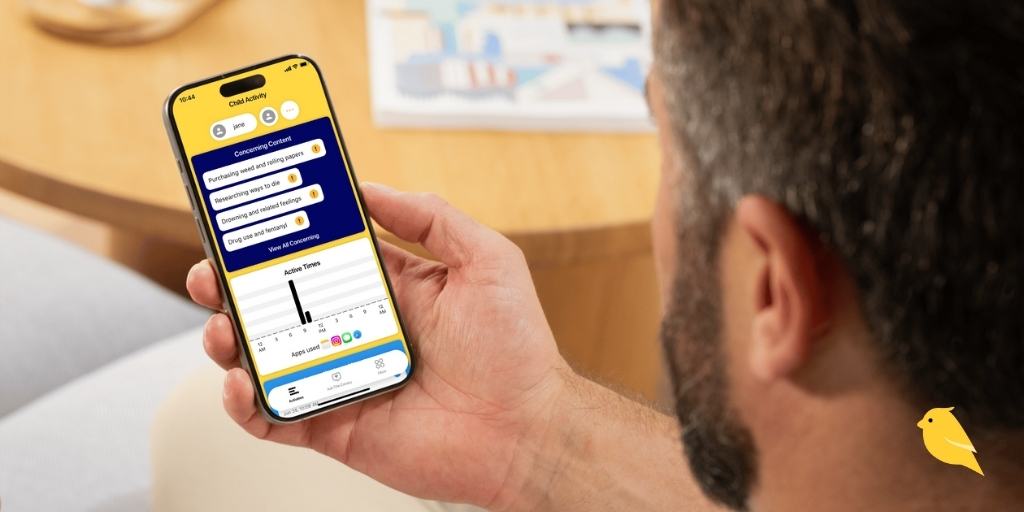
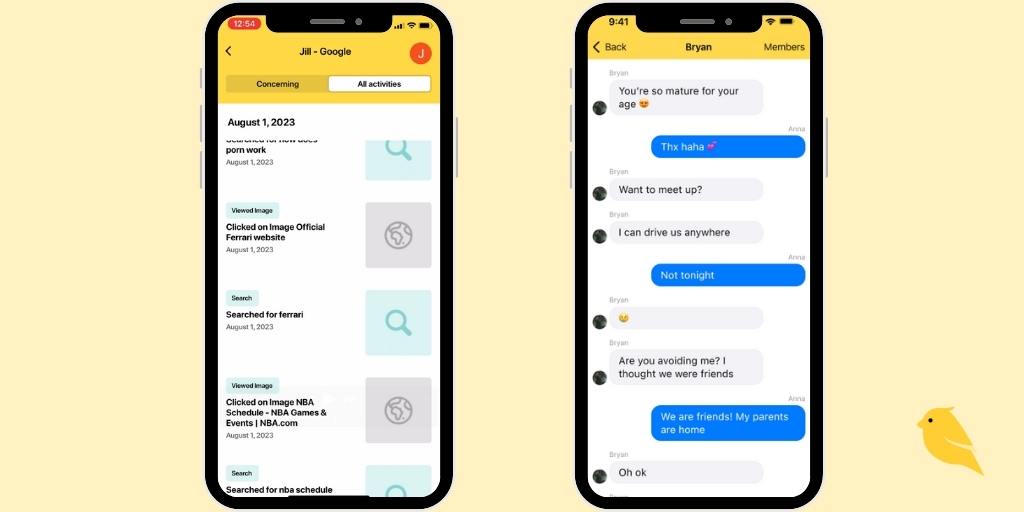
BrightCanary is one of the best parental monitoring apps for iPhone because it monitors what your child messages and sends across all their apps. Other apps only alert you when your child encounters something concerning, but BrightCanary gives you the option to view your child's latest keystrokes, as well as their emotional well-being, interests, and more.
The app works via a smart and secure keyboard, which you install on your child's device. BrightCanary's advanced AI monitors your child's activity, and updates in real-time with any concerning content alerts. For parents who want to monitor both sides of text conversations, images, and deleted texts, they can sync the app to their child's iCloud for two-way text monitoring.
The app includes a chatbot called Ask the Canary, which gives you helpful parenting guidance and conversation-starters 24/7. With a high rating in the App Store, parents have called BrightCanary the “best monitoring app I’ve found for iPhone.”
BrightCanary does not offer features like screen time limits or location sharing because those are freely available through Apple Screen Time. BrightCanary is ideal for parents who want to monitor the content of their child’s online activities, including text messaging.
OurPact can manage or block any iOS app, including messaging and social media apps, and set screen time limits based on the schedules you set. The app also offers geofencing alerts, so you’ll know when your kids arrive or leave locations like home or school. The Premium plan allows you to view automated screenshots of your child’s online activity, including texts, although you won’t receive alerts based on content monitoring.
Many of the app’s features are already freely available with Apple Screen Time, but OurPact’s well-designed interface may make these features more accessible for stressed-out parents.
Preference and accessibility are two big factors to consider when you’re weighing parental monitoring apps for iPhone. Some apps are on the higher end of the price range because you get access other features, like identity theft protection and location monitoring. Others have philosophical differences.
For example, BrightCanary is designed to encourage communication and independence; rather than blocking apps, BrightCanary gives parents visibility into what their kids are doing online, so they can talk about any red flags together. That insight, plus helpful summaries and AI-powered conversation starters, means that your child is learning how to use the internet safely with your support — rather than blocking everything until they graduate high school.
One key factor to consider is which apps you’ll be able to monitor on iOS. For example, Snapchat is a major concern for many parents, but most parental monitoring apps don’t include Snapchat on iOS. (You can monitor sent messages on every app, including Snapchat, with BrightCanary.) If you have a specific concern in mind, double-check that the monitoring app covers it.
Apple has strict limitations on what third-party apps can access, so many parental monitoring apps are limited on what they can monitor in iOS. Some companies get around that by requiring that you install an extra app on your child’s device, but that can actually slow down your child’s phone and drain their battery over time. Weigh the pros and cons, have a frank conversation with your child about online safety, and go with the parental monitoring app for iPhone that works best for your family. You’ve got this, parent.
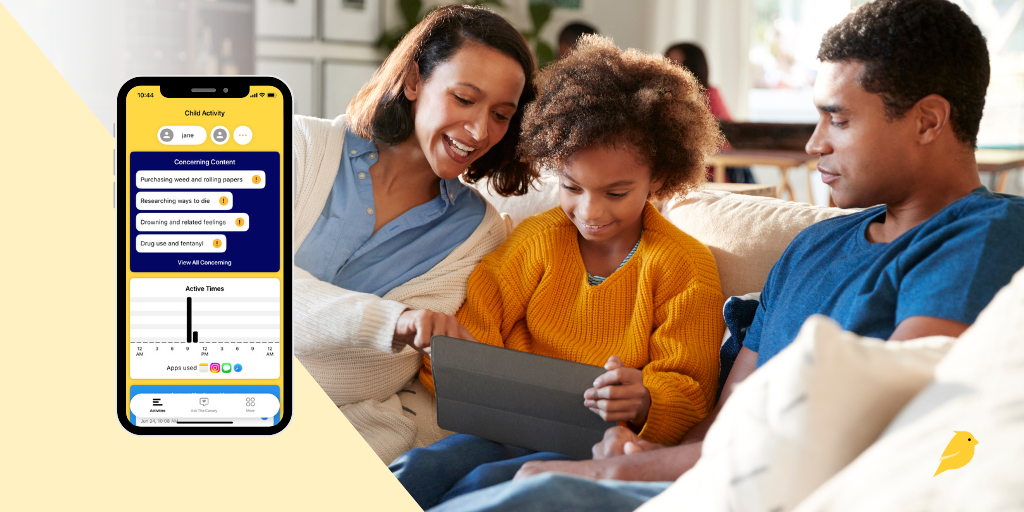
Giving your child their first phone is a big step, and staying connected to their digital world is just as important. That’s why we built BrightCanary: a smarter, safer way to help parents guide, protect, and connect with their child across every app they use.
But how does BrightCanary actually work? In this guide, we’ll cover how to set up BrightCanary and what makes it the best parental monitoring app for iPhone users. Let’s dive in.
BrightCanary uses a secure keyboard on your child’s iPhone or iPad to monitor what they type across apps like:
You can also add your child’s Google account to monitor their activity across Google search and YouTube. If they encounter anything concerning, we’ll let you know.
Unlike other apps, BrightCanary doesn’t require you to guess which apps your child uses. If they type in it, we help you monitor it.
BrightCanary uses a secure iOS keyboard to capture what your child types — no passwords required for most apps. This allows us to monitor content across multiple platforms, while also taking steps to preserve your child’s privacy.
Here’s why parents love BrightCanary:
Did you know? BrightCanary's keyboard never captures passwords or sensitive login data. And unlike other monitoring solutions, you don’t have to plug your child’s phone into your computer or sync with your home WiFi network.
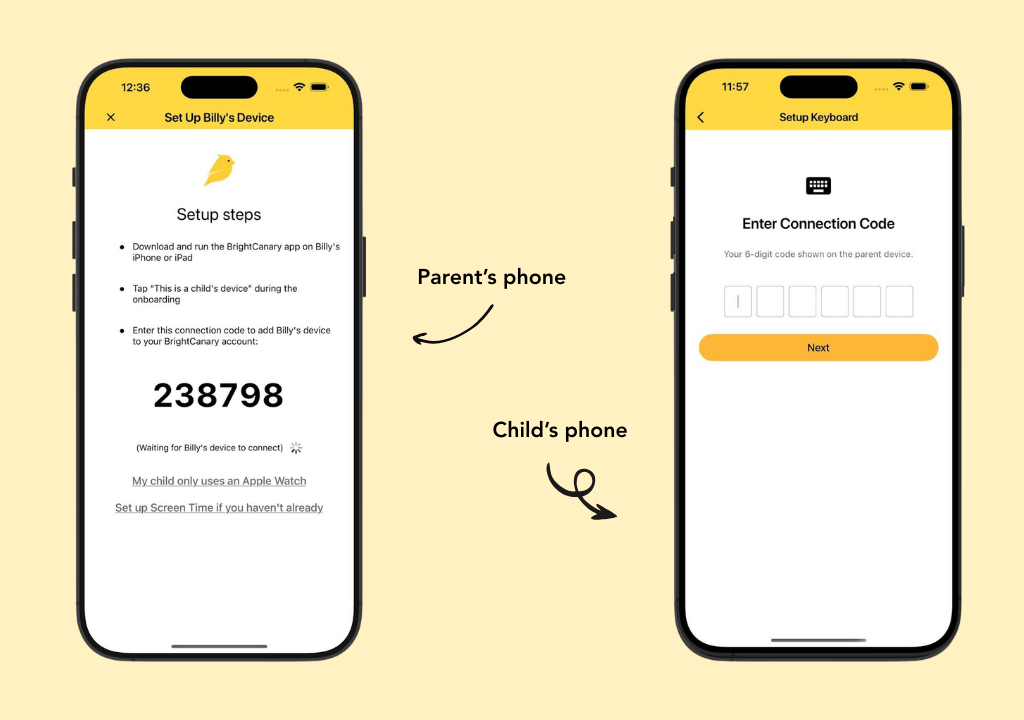
You’ll need your phone and your child’s iPhone or iPad for this one-time setup.
For best results, make BrightCanary the default keyboard and delete all other keyboards (except Emoji). This helps ensure consistent monitoring across all apps.
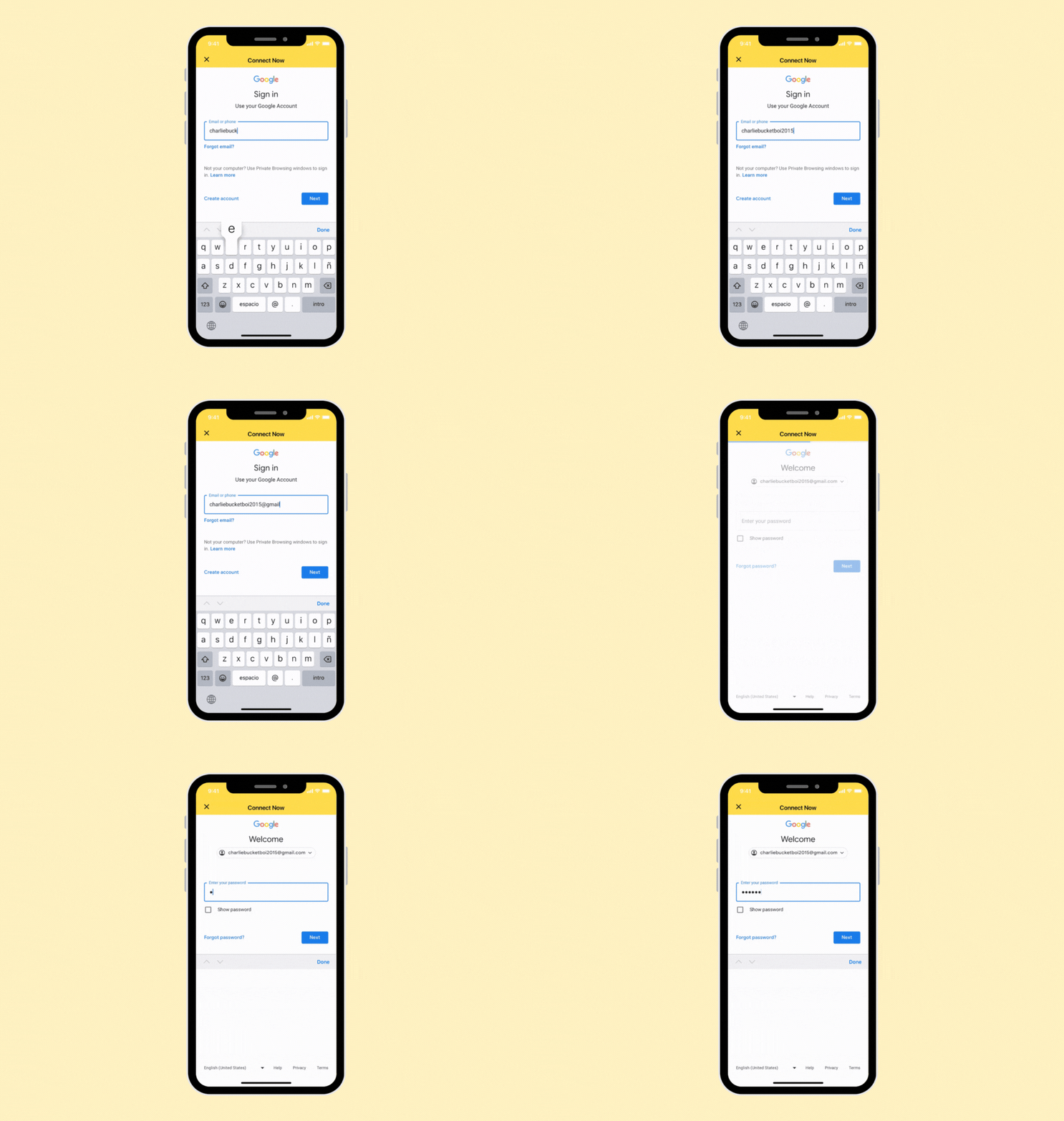
This feature tracks search history, video views, and concerning content. Here’s how to set it up.
If they already have a Google account:
If you don’t know your child’s logins, here’s how to ask for their passwords.
If you need to set up a Google account:
That’s it! Once you’ve created their Google account, make sure your child uses this information to log into Google and YouTube on their devices. Sometimes, Google's Additional Verification feature prevents BrightCanary from syncing data. Here's how to disable it.
It’s easier to monitor your child’s activity when they have their own Google account. For example, if they use your account to watch YouTube and you sync it with BrightCanary, our app might flag your activity.
If you haven’t already, this is a great opportunity to talk to them about how and why you’re using BrightCanary to keep them safe online. A digital device contract can help lay out rules and expectations for both of you.
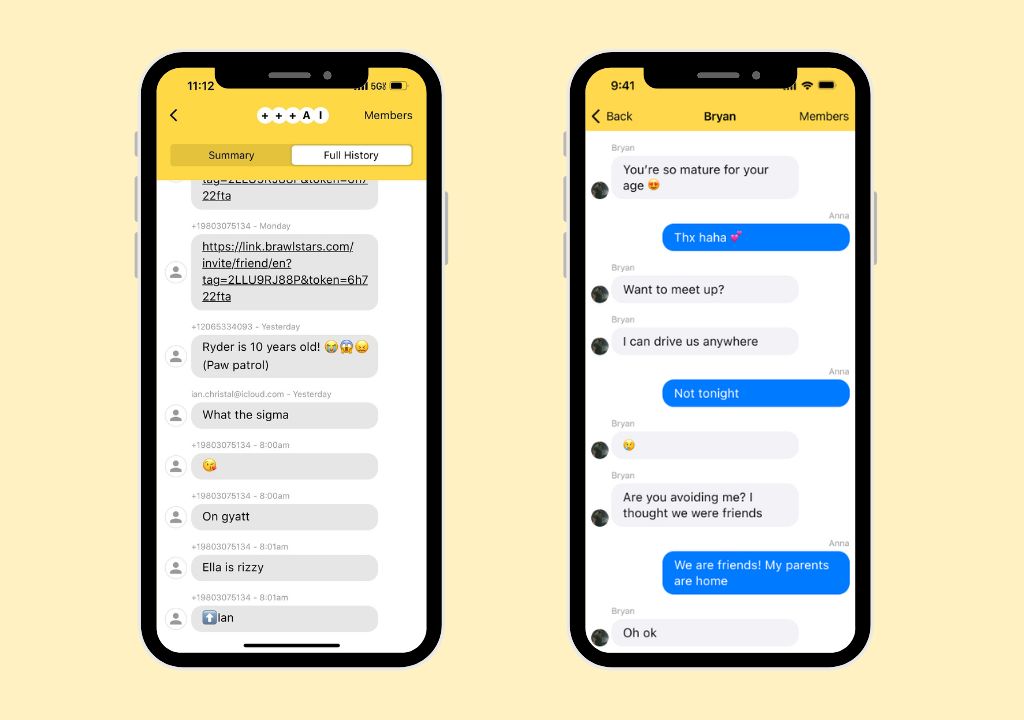
BrightCanary monitors everything your child types with the Keyboard. You can also monitor received messages, images, videos, group chats, and deleted texts. To set up full two-way text message monitoring, you need your device and your child’s device.
That’s it! New text messages may take a few hours to appear at first, and then you’ll start monitoring in real time.
Note: If your child only uses an Apple Watch, you won’t be able to install the Keyboard, but you can still monitor their text messages by syncing with iCloud using the steps above.
We designed the BrightCanary app to give parents detailed insights about their child’s activity. Here are some things you can do, all from your phone.
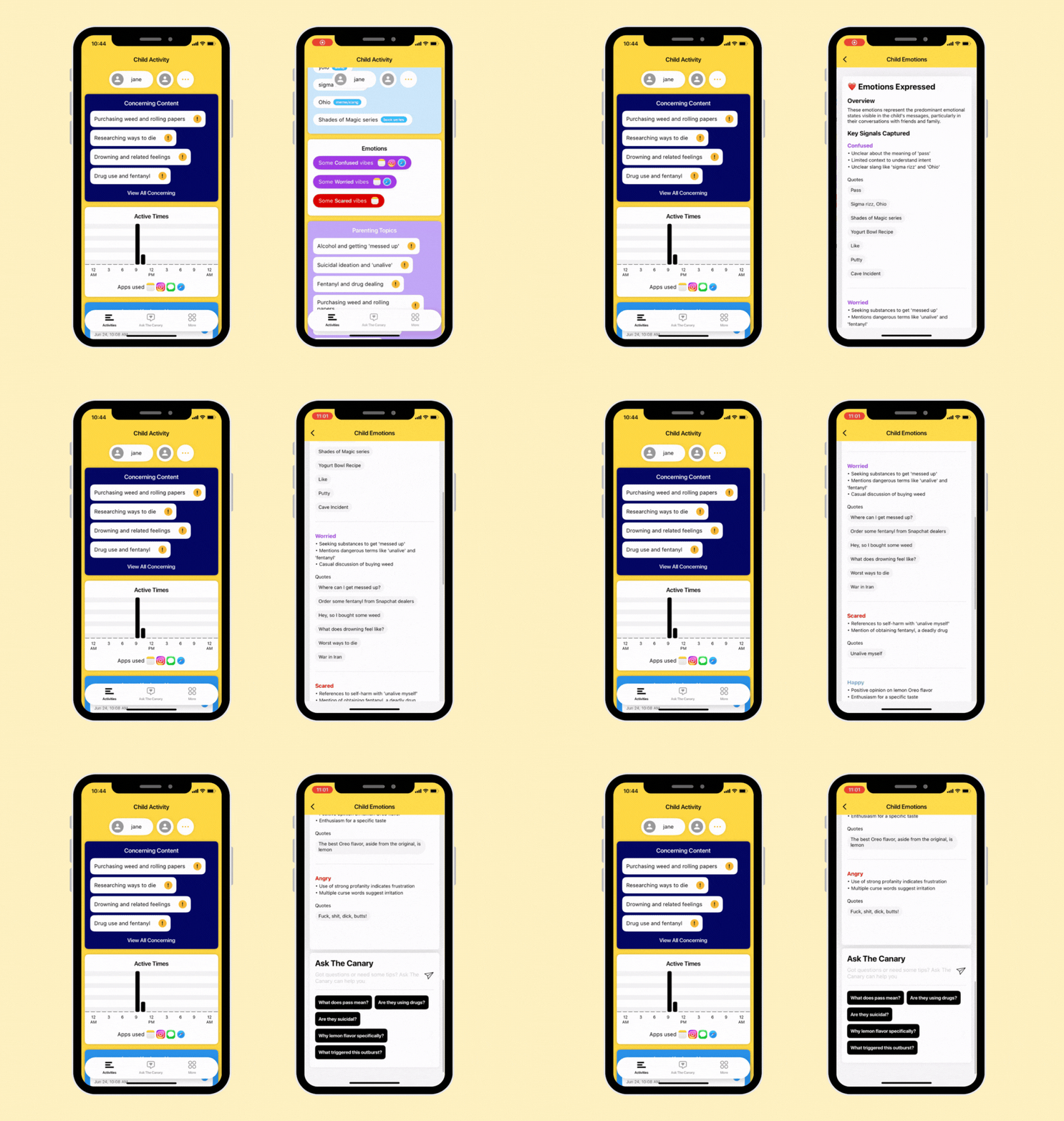
Get an overview of what your child is typing and searching, all in one place. Any concerning content is flagged at the top of the dashboard. You’ll also see recent activity, interests, emotional insights, and topics you might want to discuss with your child.
We use AI to detect red flags, such as suicidal comments, drug content, and explicit messages. You'll be able to view anything we detect. You can also customize which categories trigger alerts and set your sensitivity level — light, standard, or strict — in More → Settings → Manage Family → Content Settings.
View a transcript of your child’s latest keystrokes.
Whether your child is talking about a new TV series or using slang they picked up online, you’ll get a summary of their interests and pop culture chats in this section.
Get detailed summaries of your child’s emotional state based on their activity. You can even tap the quotes to see more context.
Not sure how to bring something up? Our built-in AI parenting coach gives you instant, age-appropriate advice on tricky topics like sexting, bullying, and more.
Monitoring should be a partnership, not a punishment. Here’s how to introduce BrightCanary to your child:
You can also use our free Digital Device Contract to help set expectations together
Ready to try BrightCanary? Download BrightCanary from the App Store and start your free trial today. Setup takes just a few minutes — and you’ll gain real peace of mind for years to come.
Unlike other parental monitoring apps, BrightCanary was designed for iOS devices. That means we show features that other apps don’t, like full text message conversations and the messages your child sends on all the apps they use. Here’s how BrightCanary compares on Apple devices.
You need your child’s device during setup, but unlike other child safety apps, we don’t slow down your child’s phone performance. However, we recommend that parents use BrightCanary in collaboration with their kids.
Explain why you’re using BrightCanary, how you’ll use it, and why it’s important to help keep them safe. Some of our parents make BrightCanary monitoring a requirement if a child wants their own phone and add it to their family’s digital device contract.
Yup. We’re real people with families behind this app! BrightCanary was founded in 2022. Based in Seattle, we’re a small team of parents who want to help parents guide, protect, and connect with their kids as they learn how to navigate the digital world. Learn more about our story.
Check out more questions at our FAQ.
Parenting in the digital age can feel like an uphill battle. Fortunately, parental monitoring apps like BrightCanary are tools you can add to your parenting toolbox. And a growing number of experts recommend monitoring your child’s online accounts, from the American Psychological Association to the U.S. Surgeon General.
Remember, parental monitoring is just one piece of the puzzle — it’s just as important to have regular conversations with your child about their online activity and how to handle what they see online.
Download the BrightCanary app from the App Store today and start your free trial!
For more parenting tips, here’s how to help your child use social media responsibly. Subscribe to our newsletter for parenting news, advice, and resources twice a month.
Welcome to Parent Pixels, a parenting newsletter filled with practical advice, news, and resources to support you and your kids in the digital age. This week:
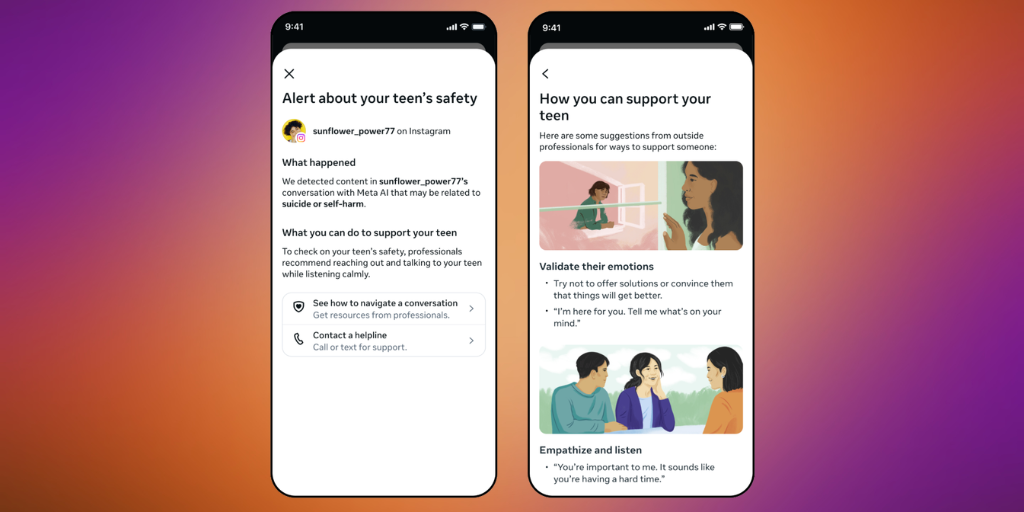
👀 Meta and OpenAI roll out new AI safety features for teens: If your teen uses any Meta platforms (Instagram, WhatsApp, and Facebook), make sure they’re using Teen Accounts. The company announced that parents will be notified if teens talk to Meta AI about suicide, along with expert researchers to help parents approach the conversation. Meta AI is a standalone AI chatbot that is accessible across Meta platforms, and we’ve covered it before (spoiler: not big fans). The company also announced an expansion of its Limited Content setting to the AI chatbot: when parents opt their teen into Limited Content on Instagram, that stricter filter will now also apply to their chatbot conversations, limiting the range of topics the AI will engage with.
The catch is that these features only work if your child is using a Teen Account, which automatically gives users between the ages of 13–17 stricter privacy settings. There’s nothing stopping a teen from creating a secondary account without parental supervision, which is why it’s important to continue supervising your child’s social media activity if you allow them to use it.
OpenAI also announced that parents with linked teen accounts will now receive a notification if their child is kicked off ChatGPT. Teen accounts can be deactivated for violating policies on violent threats or acts of violence. The notification includes a brief explanation of what happened and encourages parents to have a conversation with their teen offline — but, again, all of this relies on setting up ChatGPT parental controls.
It’s good to see that major companies are rolling out common-sense safety settings, but they’re guardrails on a road that many child safety experts think kids shouldn’t be on yet. Common Sense Media rates most AI chatbot use by children as an unacceptable risk, particularly for companionship. Robbie Torney, senior director of AI programs at Common Sense Media, said in a press release: "While companies have focused on necessary safety improvements in suicide prevention, our testing revealed systematic failures across a range of conditions including anxiety, depression, ADHD, eating disorders, mania, and psychosis—conditions that collectively affect approximately 20% of young people. This is about how AI chatbots interface with the everyday mental health of millions of teens."
These safety settings aren’t a set-it-and-forget-it situation. If you let your child use social media and AI, stay involved with what they’re doing. There’s no guarantee that those safety settings work the way they should (and, as we shared in our last issue, more than half of social media safety features aren’t working), and it’s an unfortunate truth that things will always slip through the cracks.
If your child is using AI — which, based on Common Sense Media's research, 86% of kids ages 9–17 are — BrightCanary monitors everything they type across all AI apps, including Meta AI and ChatGPT, and sends you real-time alerts if anything concerning comes up. This works regardless of whether your child is using a teen account, because BrightCanary monitors at the device level, not the account level.
It feels like there’s a new app to worry about every few weeks, right? And with each one comes the same question: “Is this okay for my kid?” Before you say yes (or no), here are five questions worth asking together:
🧵 Threads is rolling out new parental supervision tools through Meta Family Center. Parents will be able to set limits around how much time their kids spend on Threads, manage who can tag their teen in posts, and manage privacy settings and sensitive content filters.
🔑 Free guide: How to talk to your child about passwords. Most parents know they should have access to their child's accounts — actually having that conversation is where things stall. Our free guide walks you through which passwords matter, how to ask for them, and what to say if your child pushes back.
🤖 Is your child asking AI for diet advice? We shared a carousel on Instagram this week about why AI diet advice is dangerous for kids. It includes research showing AI diet plans average nearly 700 fewer daily calories than a dietitian would recommend, and our own writer's testing. Check it out.

Welcome to Parent Pixels, a parenting newsletter filled with practical advice, news, and resources to support you and your kids in the digital age. This week:
🔒 More than half of social media safety features aren’t working: Researchers at the Cybersafety Research Center tested 86 child safety features across TikTok, Instagram, Snapchat, and YouTube (aka, the apps your child is likely to use) and evaluated whether children could realistically find and use them. Only 35 of those features passed both tests. That’s just over 40%, which, if we’re taking things back to grade school, isn’t exactly passing. The features failed because they were buried in settings and hard to find and/or didn’t actually work the way they claimed. A few couldn’t be triggered at all, even when researchers actively tried.
Speaking of Snapchat: Two new reports led by Brooke Istook, President of the Heat Initiative, specifically examined the risks Snapchat can pose to children and adolescents. The reports — which included a survey of 1,000 adolescents ages 10–17 and the findings from two Snapchat accounts registered as 13-year-olds — found the following:
On the test accounts, across 12 combined hours of use, Snapchat recommended a combined 256 drug and alcohol-related videos, 244 sexual videos, 53 self-harm and suicide videos. To put that in perspective, that’s roughly one drug and alcohol-related video every three minutes of use.
What the platforms are saying: In response to the Heat Initiative reports, Snap published a detailed rebuttal, stating that the test accounts didn’t represent the typical teen experience. Platforms also pushed back on the Cybersafety Research Center’s report, stating that the findings were based on “intentionally taking actions to bypass protections that are not representative of the typical user experience.” (Our counterpoint to that: kids will intentionally try to bypass those protections, so why aren’t they working?)
Meanwhile, Meta is appealing the landmark social media ruling that found the company guilty of contributing to a woman’s mental health struggles and social media addiction. We’ve said it before, and we’ll say it again: Big Tech companies say their features work, but independent researchers keep finding they don’t. And for parents, the gap between what’s advertised and what’s real is exactly the space where harm happens.
That’s why it’s essential to stay involved. Check in with your child about not only what they see, but also how they feel and what they’ll do if they encounter a bully, or content that makes them uncomfortable, or a stranger in their messages. It’s why thousands of parents believe in BrightCanary, which monitors content across every app your child uses and sends you an alert if it detects anything concerning. It’s one of the most effective ways to stay informed about what your child is saying online, even on platforms designed to make that difficult.
Parent Pixels is a biweekly newsletter filled with practical advice, news, and resources to support you and your kids in the digital age. Want this newsletter delivered to your inbox a day early? Subscribe here.
Believe it or not, we’re rapidly approaching back-to-school season. That means new schedules, new pressures, and more time balancing screen time with school. Before the school year gets away from you, here are five conversations worth having now.
🆕 New in BrightCanary: custom concerning content alerts! You can now set your own custom alert categories. To check it out in the app today, go to More > Settings > Manage Family, and then tap “Content Settings.”
📋 The KIDS Act passed the House. The bipartisan Kids Internet and Digital Safety Act cleared the House with broad support. The legislation would require new safety features and parental controls, restrict minors' data for targeted advertising, mandate age verification for adult content sites, and establish new rules for AI chatbots and online games. It now faces an uncertain path in the Senate, where a similar bill has previously stalled.
📬 Back to school is coming fast. What digital parenting topic is on your mind as the new year approaches? Reply and let us know — we may cover it in a future issue.

Welcome to Parent Pixels, a parenting newsletter filled with practical advice, news, and resources to support you and your kids in the digital age. This week:
🇬🇧 The UK banned social media for kids. Is the US next? Prime Minister of the United Kingdom Keir Starmer recently announced that kids under age 16 will be banned from major social media platforms. The ban, which will take effect early next year, will include services with recommendation algorithms or where users can post content themselves — so messaging services like WhatsApp won’t be part of the ban, but TikTok, Snapchat, and Instagram definitely are. The UK’s ban also includes gaming: kids won’t be able to livestream, and there will be a block on functions that allow strangers to communicate with children. (Some platforms already have features like this, but it’s radically inconsistent.)
Do social media bans actually work? This policy is modeled after Australia, the first country to ban social media for teens — but results have been mixed there. The New York Times reports that six months into the ban, many teens are already back on Snapchat and Instagram due to inconsistent rollouts and the inherent difficulty of verifying ages online. Teens described easy workarounds, like drawing a mustache on their face for an age estimation scan or creating a new account with a fake birth date. Some Australian parents say the incoming generation of kids who aren’t yet on social media may benefit the most — and may stay off social media longer because parents feel more empowered to say no.
That’s the key here. Social media alone does not cause mental health issues, but it does increase the risk of exposure to dangers like bullying, drug use, predators, and explicit content. We’re past the age when parents can be hands-off about what their kids encounter online. Banning is like blocking: it helps prevent some dangers, but it doesn’t teach kids how to navigate the internet safely or what to do if someone harasses them online. Plus, social media bans are a false safety net: kids can still encounter concerning content in “safe” places, like text messages and WhatsApp.
Will the US ban social media? Recently, a US court ruled that Ohio can implement a law requiring social media companies to obtain parental consent before allowing children under 16 to use their platforms, a decision that will certainly be appealed. A national-level ban isn’t going to happen any time soon, though. In response to the UK social media ban, the US Embassy in London said it was concerned that regulations would place greater burdens on American technology companies. (We don’t think setting stricter rules for kids on social media is a burden, though.) Other proposed social media legislation, like the Kids Online Safety Act, is chronically stalled.
The best we can do right now is both: delay giving kids access to social media and smartphones, and teach them how to use their devices safely. That means setting boundaries around when devices can be used, monitoring their use with tools like BrightCanary, encouraging offline activities, and modeling healthy behaviors yourself. Easier said than done? Definitely. But we have to try.
Parent Pixels is a biweekly newsletter filled with practical advice, news, and resources to support you and your kids in the digital age. Want this newsletter delivered to your inbox a day early? Subscribe here.
Here are 5 conversations we’re having at home about social media, smartphones, and finding balance.
🗓️ Save the date for this Summer Digital Parenting Webinar series presented by our friends Digital Momming and OK to Delay! Get all the latest tips and tools for managing YouTube, iPad, Smart TV's, Routers and Video Game Gambling. The first webinar is on July 15.
🎮 Roblox has introduced new kids accounts, with chat disabled for kids younger than 9, age-checks required to chat, and stricter parental controls.
📧 Help someone else be the most informed parent in the room. Tell a parent to subscribe to Parent Pixels.





