

Most parents know they should have access to their child's accounts and devices, but actually asking for the passwords is where things stall out. What if they push back? What if it feels like a breach of trust?
Here's how to think about it and exactly which passwords to prioritize. Download the free printable guide, or read the highlights here.
Most parents wouldn't allow a lock on their child's bedroom door for safety reasons. What happens on their phone carries even more risk. Parenting in today's world means making account and device passwords a condition of having a device in the first place.
Your child should also understand that this comes from a place of responsibility, not suspicion. With a tool like BrightCanary, you're not reading every message — you get a summary of their activity, and only go deeper if something concerning comes up. That kind of transparency builds trust, and trust is what earns kids more independence over time.
This is the most basic layer of access, and the easiest to overlook. If you don't already have it, just ask.
A household rule tends to land better than a one-time demand: "Anyone under 18 in this house doesn't have a private passcode."
You'll need your child's Google login to monitor their search and YouTube activity with BrightCanary. If you set up a family Google account, check your password manager or recovery email first — you may already have it.
This is the one that trips up the most parents. Many of us set up our child's Apple ID years ago and haven't logged in since. Once you connect your child's iCloud account with BrightCanary, you'll have visibility into their text messages, too. Here are three ways to do it:
Want more guidance on having tough conversations with your kid about life online? Explore our free conversation guide, Raising Kids in the Age of Screens, developed in partnership with parent coach Lisa Smith.

Learning your child has been targeted by an online predator is every parent's worst fear. In the panic of the moment, it's easy to make mistakes that hurt your case. The steps you take in the first hour can determine whether law enforcement is able to act.
We worked with Detective Rich Wistocki, child crime expert and founder of BeSure Consulting, to put together a clear, step-by-step guide for exactly what to do. Download the free printable PDF, or read the steps here.
Before you do anything else (including reporting the account) capture every message, image, profile, and interaction. Social media platforms often delete accounts once content is reported, which means your evidence disappears with it.
If you use BrightCanary child monitoring, full message transcripts are already available, so screenshot those, too.
Record everything you know about the other party: username, gamer tag, phone number, email address, platform, and the dates and duration of contact. The more specific your documentation, the better the odds that law enforcement can act on it.
Document what happened in chronological order, including how the situation made your child feel. If there were any threats, state explicitly that you feared for your child's safety (that specific language matters for the official police report).
Make physical copies of your statement and all evidence, and save everything to two flash drives — one for law enforcement, one to keep. Once you hand over evidence, you may not get the original back.
Report to your local police department. Most patrol officers have little to no training in cybercrime, so if you encounter pushback, ask for a supervisor or specifically request an ICAC-trained detective.
One more thing: If your child has inappropriate images circulating online, visit takeitdown.ncmec.org. The National Center for Missing and Exploited Children will work with platforms to locate and remove them.
"No one is allowed to make them feel bad about themselves online. No one is allowed to make them do something they should not be doing, such as extortion. If a predator is doing it to them, they are doing it to 10 other people as well, and they need to be stopped." — Detective Rich Wistocki, cybercrime expert
This guide is based on expert guidance from Detective Rich Wistocki, founder of BeSure Consulting and a leading child crime investigator. For the full interview, including how to talk to your child afterward, read our expert insights piece. Stay informed about your child’s online activity with BrightCanary child monitoring, the only child safety app recommended by Detective Rich.
Welcome to Parent Pixels, a parenting newsletter filled with practical advice, news, and resources to support you and your kids in the digital age. This week:
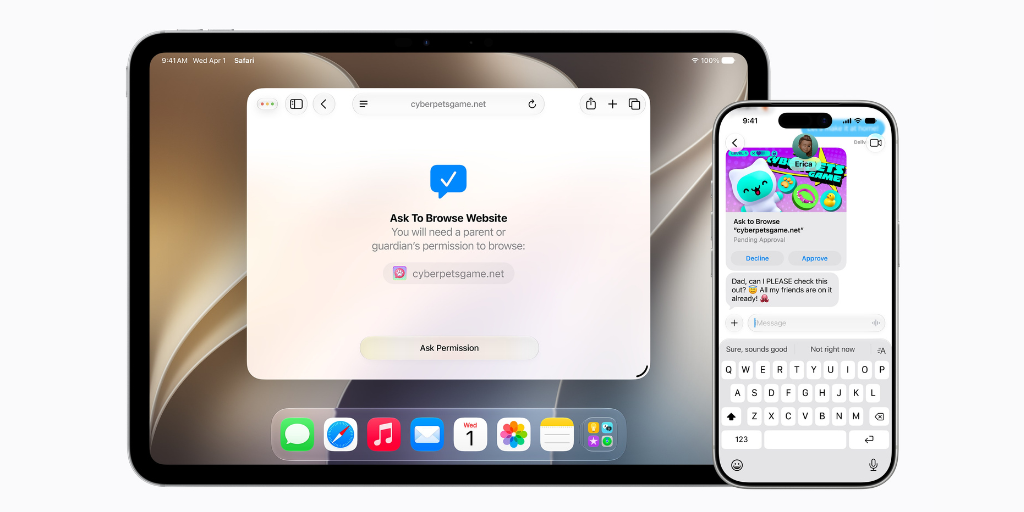
🍎 Apple previews new child safety features: Apple announced a slew of child safety updates coming this fall. Here’s what’s new with Child Accounts:
Our take: These are welcome improvements, but they’re largely an upgrade to existing tools. Notably absent is a way for parents to be alerted when something concerning comes up in their child’s activity — which is still the gap BrightCanary was built to fill. Learn more about BrightCanary’s real-time content alerts.
🇬🇧 The UK just told Apple and Google to block nude images on kids' devices: The UK government has asked tech companies, including Apple and Google, to block access to sexually explicit images on smartphones and devices for under-18s — and they have three months to comply. Prime Minister Keir Starmer has told companies to either activate built-in features or update their software, and Technology Secretary Liz Kendall said: “Companies should switch these protections on by default, for every child, on every device. We are giving them three months to show us that they will do the right thing."
The move has drawn some criticism because it requires companies to also verify the age of users, which raises privacy concerns. There is a precedent for it, though: Apple recently began asking UK iPhone users to verify their age to make sure only adults access apps and sites for people intended for users over 18. Do you think tech companies should automatically block explicit content on kids’ devices?
The UK has also announced a full social media ban for all users under 16, following in the steps of Australia, the first country to ban kids from platforms like Snapchat and TikTok. We’ll dig into this ban, and the implications, in our next issue.
🤖 New data: 86% of kids are using AI: A new report from Common Sense Media finds that most kids (ages 9–17) are now using AI, and they’re using it for more than just homework help. A significant majority (86%) of kids have used or interacted with AI, most commonly for “entertainment or just for fun” (89%) followed by “help with schoolwork or homework” (85%).
But here’s where it gets interesting: 57% of AI users are using it to get information or advice about their health or bodies. Among AI users:
The data on lonely kids is especially striking. Among kids who report feeling lonely at least some of the time, 54% use AI daily, 46% use it to practice social skills, and 45% use it to discuss their feelings and personal problems — significantly higher rates than their non-lonely peers. Kids who find it hard to make friends are also more than twice as likely to say AI understands them better than most people.
AI companionship isn't fringe behavior. It's already widespread, and it's filling an emotional gap for a meaningful number of kids. Not sure how to start a conversation about AI with your child? Our free conversation guide has a starter for exactly this.
Parent Pixels is a biweekly newsletter filled with practical advice, news, and resources to support you and your kids in the digital age. Want this newsletter delivered to your inbox a day early? Subscribe here.
Here are a few topics to bring up around the dinner table this week:
📹 YouTube now has DMs. YouTube just launched in-app direct messaging, which means your child can now send and receive private messages without leaving the app. If your child uses YouTube, it's worth knowing this exists — and having a conversation about it.
👨👩👧 Did you know you can share BrightCanary with your co-parent for free? If your partner isn't set up on BrightCanary yet, open the app, go to the bottom menu and tap “Add a Parent.”
📱 We're on Instagram! If you're not already following us, we share digital parenting tips, conversation starters, and news you can actually use. Follow us @bright_canary.

Welcome to Parent Pixels, a parenting newsletter filled with practical advice, news, and resources to support you and your kids in the digital age. This week:
📱The Pope and the US Surgeon General agree that screens are harmful: A new health advisory from the US Surgeon General highlights the harms of screen use and suggests stricter limits on screen time than most adults probably follow. Health advisories use the best available science to shed light on major public health challenges and suggest possible solutions, such as the Advisory on Social Media and Youth Mental Health (2025). This latest publication supports what you might already suspect:
Of note, the Advisory suggests screen time limits should be: none for children under 18 months old, less than 1 hour per day for children under 6, and 2 hours per day for 6–18-year-olds. If you looked at your screen time numbers after reading that recommendation, we also feel your pain.
The US Surgeon General also calls on tech companies to “provide effective parental controls that are accessible and understandable. The defaults for minors should be set for high privacy, low-data-collection, and age-appropriate content settings that don’t require parental opt-in,” as well as allowing users to opt out of addictive design elements like infinite scroll and auto-play, and giving parents a way to monitor screen use. Big agree. (If you need help setting up screen time limits on your child’s iPhone, save this guide.)
And if your child pushes back on screen time restrictions, maybe this will add extra weight to parental controls: the Pope said so. Pope Leo XIV’s first encyclical letter (an official pastoral letter written by the Pope, which is intended to provide moral guidance or offer reflections on major issues) warns about artificial intelligence and the risks of the digital age, but also addresses mobile devices:
Having a personal mobile device at too early an age and using it without adult supervision can exacerbate young people’s vulnerabilities, foster addiction and expose them to isolation, bullying and cyberbullying, as well as to pressures to share intimate images or sensitive information.
If you aren’t sure where to start with screen time limits, we recommend setting intentional screen time: being mindful of our device use and making deliberate choices about it. Learn more and find out how to model it yourself.
School's out soon, which means more unstructured time — and more time on devices by default. Summer is actually one of the best opportunities to reset your family's relationship with screens. Here are five conversations to get you started:
🏕️ 60% of 6-year-olds have access to internet-connected tablets, but 58% of kids that age aren’t allowed to play in their own yards unsupervised, according to a new survey from the Institute for Family Studies. At age 11, one in four kids aren’t allowed outside without adult supervision.
🍿 Looking for your next movie night pick? We’re biased, but the ‘90s featured some of the best movies for kids — Common Sense Media compiled this list that doubles as a trip down memory lane.
☀️ What is your favorite summer break memory? Email us at hello@brightcanary.io — we might feature it in our next newsletter.
Welcome to Parent Pixels, a parenting newsletter filled with practical advice, news, and resources to support you and your kids in the digital age. This week:
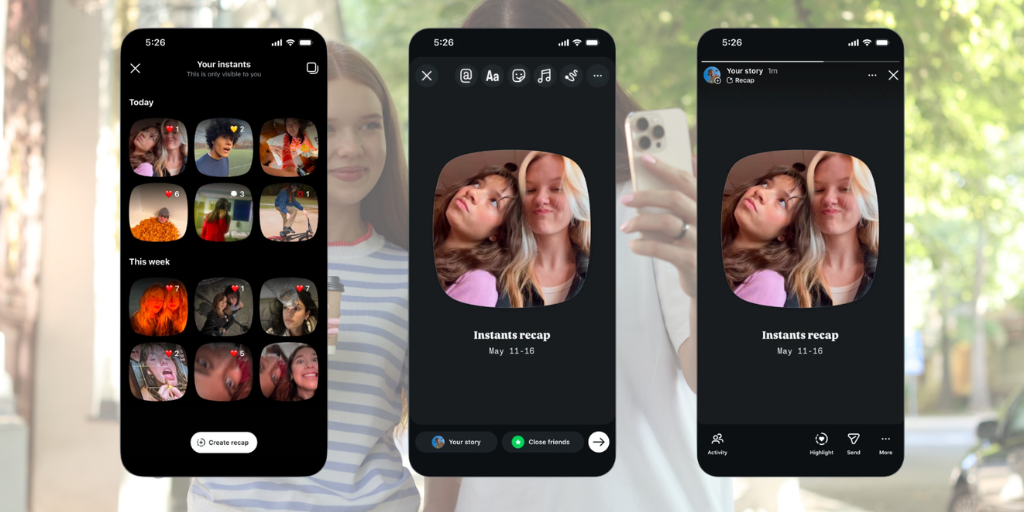
📸 Everything parents need to know about Instagram's new Instants feature: Instagram recently launched Instants, a new way for people to share spontaneous, unfiltered photos with friends — and we now have details on parental controls. Instants is kinda like Snap because photos disappear after someone views them, and friends can react and reply. If your child has a supervised Teen Account on Meta, they already have the following protections in place:
Here’s the catch: Instants is going to ruin someone’s day with an accidental share. The moment your teen taps the shutter button, the photo is automatically sent to everyone on their Friends list (accounts that mutually follow each other), unless they manually switch to Close friends beforehand. Every time. By default. It’s worth having a conversation about what’s okay and not okay to share, like personal information, location, and anything they wouldn’t normally share online. If you’d rather skip the feature altogether, here’s how to turn Instants off: go to your teen's profile → three-line menu → Settings → Content Preferences → toggle off "Hide Instants in Inbox."
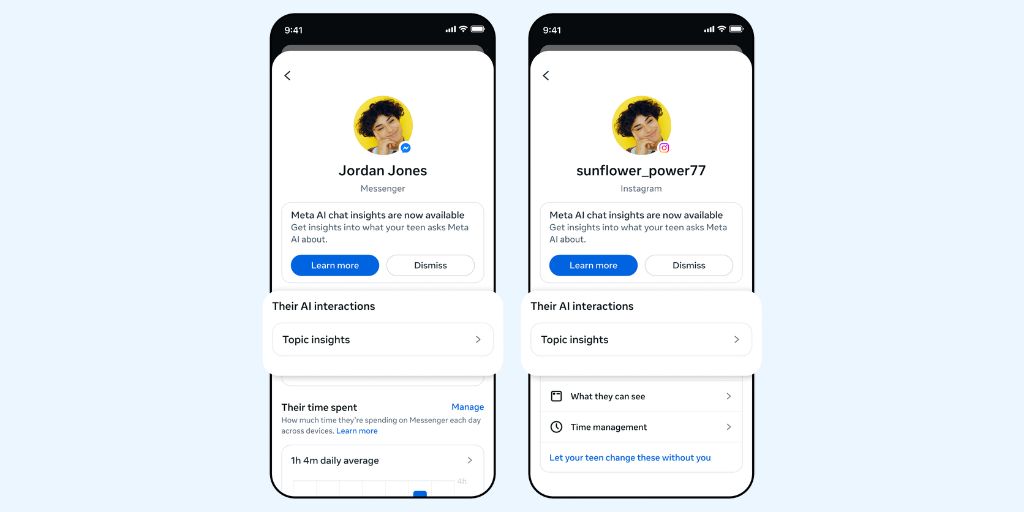
In more Meta news: the platform has introduced new parental supervision tools that let parents view the general topics their teen engages with across Instagram, Facebook, Messenger, and Meta Horizon. Those topics might include things like fashion, sports, humor, and other content. To set it up, visit familycenter.meta.com/supervision.
🥸 Kids are getting around age checks, and parents are helping: A new report from UK online safety group Internet Matters surveyed over 1,000 children and their parents about the UK’s Online Safety Act — and found that age verification isn’t exactly working. Nearly half of kids (46%) think age checks are easy to get around, and a third (32%) have bypassed them by using methods like entering a fake birthday or, yes, drawing on a fake mustache. Perhaps most surprising: a quarter of parents (26%) have allowed their kids to bypass age checks in order to use certain apps. Despite the new Online Safety Act protections, 49% of children say they’ve experienced some form of harm online in the past month.
This is the issue with age verification and bans: they don’t cover everything, nor do they actually teach kids what to do if they deal with something dangerous or alarming, like harassment or violent content. The best protection is talking to your child often about online safety, using available child monitoring tools and parental controls, and understanding what content they consume online. Want to know if your child is faking their age to access restricted content? Here’s how to check — and how to talk to them about it.
📱 New data: American kids are getting devices young — with few guardrails: A new report from the Institute for Family Studies paints a pretty striking picture of how early American kids are getting connected … and how little oversight most of them have. By age 11, smartphones are the primary way American kids access the internet, and over 60% have one. Nearly 50% of 3-year-olds use a tablet, iPad, or Kindle. But the restrictions on these devices are minimal. The use of content filters peak at age 4 and decline steadily from there. By age 5, fewer than 10% of kids are using internet-disabled smartphones. By 17, the most common parental control is location tracking. More parents require passwords to make purchases than implement content filters.
There is no set age for screen time or the amount of time kids should spend on devices. The American Academy of Child and Adolescent Psychiatry recommends teaching healthy habits, rather than sticking to certain numbers of screen time hours, for kids 6 and older. But quantity and quality matter. Parenting today is different now, and kids have access to concerning content and interactions within just a few swipes and taps. This is why we advocate for parents to keep tabs on not only how long their kids are using devices, but also what they encounter online. Here’s what to do if you find something alarming on your child’s phone.
Parent Pixels is a biweekly newsletter filled with practical advice, news, and resources to support you and your kids in the digital age. Want this newsletter delivered to your inbox a day early? Subscribe here.
Experts recommend banning devices from the dinner table — partially because it’s prime conversation time, and partially because nobody wants marinara on their iPhone 17. Add these conversation-starters to your rotation this week:
🚫 Minnesota bans AI nudification apps. Starting August 1, apps and websites that digitally alter clothed photos into intimate images without consent will be illegal to operate in Minnesota — the first state in the U.S. to do so. Developers face up to $500,000 per violation, and companies must geoblock Minnesota users. Learn more about the problems with deepfake nudes.
🎵 You can now turn off videos on Spotify. Did you know? Spotify shows music videos with certain songs. Did you also know? Some of those videos contain explicit content. The good news is that you can turn off video content by going to Settings > Content and Display > toggle off Canvas or videos for music or podcasts. This applies across mobile, desktop, TV, and web.
🍎 Health influencers make young people anxious: New Pew data finds that 40% of US adults get health and wellness information from people who record videos talking in front of grocery store aisles, aka social media influencers or podcasts. Among 18–29-year-olds who consume their content, 36% say it makes them feel more worried about their health — not less. Worth a conversation with your teen about how to evaluate health information they find online. Here’s more about how to talk to your teen about social media content and disordered eating.
Welcome to Parent Pixels, a parenting newsletter filled with practical advice, news, and resources to support you and your kids in the digital age. This week:
🤖 Meta gives parents a window into what their teens are asking AI: If your teen chats with Meta’s AI chatbot on Facebook, Instagram, and WhatsApp, this one’s for you. Meta’s new feature, called AI Insights, shows parents a weekly summary of the topics their teen has explored with AI — like school, entertainment, and health. To use it, you need to set up a Teen Account (which is genuinely useful and gives you access to Meta’s suite of parental controls).
We’ve written before about the risks of AI chatbots for teens. While AI can be useful for teens who need a sounding board, AI can also expose kids to dangerous content, unhealthy emotional attachment, and explicit deepfakes. Meta’s AI Insights is a step in the right direction, but it’s not a cure-all: parents still need to 1) actually set up parental supervision with Teen Accounts and 2) continue to talk to their children about online safety and what they encounter online.
It’s also worth noting what AI Insights doesn’t do. It will alert parents if kids search for suicide or self-harm content on the platform, but it only shows you topic categories, not actual conversations. For parents who want a deeper level of supervision, BrightCanary monitors everything your child types across all apps — including Meta AI conversations on Instagram and WhatsApp. You’ll get a real-time alert when something concerning appears.
According to Donna Rice Hughes, CEO of the online child safety organization Enough is Enough, parents should use whatever online parental controls are available, but also have frequent conversations with their kids about online safety. And even though Meta has parental controls for its AI chatbots, it’s a shame that other platforms don’t offer the same level of oversight. “Parents simply can’t continue to shoulder this burden alone,” Hughes told CNET.
🏅 BrightCanary earns the APA Labs Digital Badge: Big news from the BrightCanary team! We’ve earned the APA Labs Digital Badge from the American Psychological Association. We’re also part of the inaugural cohort of the APA Labs Digital Solutions Library — a new collection of trusted digital health tools. Earning this badge involved a series of hands-on assessments by experts. For parents, this means one thing: BrightCanary has been independently reviewed and found to meet a rigorous standard. We’ve always believed that parents deserve a monitoring tool they can actually trust, and we’re glad that belief has been validated by one of the most respected psychological organizations in the world. Read the full announcement here.
📱Instagram launched its own Snapchat, and Netflix goes short-form: Parents, these platform updates are worth having on your radar. Instagram is testing Instants, an app that works like Snapchat with disappearing content. It’s currently only available in Europe, but if it expands, we can expect that Instagram will promote it to teens — which means another avenue for content that disappears before parents can see it. The same monitoring principle applies here as it does to Snapchat: stay informed and involved, and set your rules around apps with disappearing images and messages. (Heads up: BrightCanary monitors what your child types across all apps, so even if the content disappears, the keystrokes don’t.)
Meanwhile, Netflix has launched Clips: a vertical, short-form video feed built into the Netflix app, showing highlights from original programming to help viewers find new shows to binge. This one is lower-stakes from a safety perspective since it’s Netflix’s own programming, but it is tailored to your child’s preferences — so, if they’re watching a lot of true crime, they’ll likely get more of the same on Clips. This is a good opportunity to make sure you know what type of content your child is watching and if it’s age-appropriate; there’s a big difference between watching One Piece and Hazbin Hotel. And did you know that Netflix has parental controls?
Parent Pixels is a biweekly newsletter filled with practical advice, news, and resources to support you and your kids in the digital age. Want this newsletter delivered to your inbox a day early? Subscribe here.
The group chat takes a dark turn. A friend sends something that crosses a line. Kids pressure each other into things they know they shouldn’t do. Something is going to come up eventually, and these conversation starters open the door to chat with your kid before something bad happens. The goal isn’t to get a perfect answer; instead, you want to let your kid know that they can bring these situations to you without judgment.
💬 In case you missed it — download our free conversation guide: Bullying. Self-image. Online strangers. AI. Most parents wait until something goes wrong before having these conversations — but by then, it’s already harder to talk. Our free guide, developed in partnership with Lisa Smith, the Peaceful Parent, gives you the exact words to proactively start these conversations.
📱 How do you actually delay giving your kids a smartphone? This piece from the BBC gives you step-by-step tips on how to manage the moment when your child starts pushing for their first phone — from what to talk to them about to how to get other parents on your side. And here in the US, parent groups are successfully pushing back against the digital tools schools give children — and getting results.
🌍 A little something fun: NASA has a tool that lets you spell your name using real satellite images of Earth (in a font aptly called “Landsat”). Genuinely worth five minutes — and a nice reminder that the internet occasionally produces something worth stopping for.
The APA Labs Digital Badge reflects alignment with APA Labs criteria for scientific principles, safety, ethical use, and usability. It is not an endorsement nor guarantee of effectiveness. APA Labs does not independently test products.

We have some news we're proud to share: BrightCanary has earned the APA Labs Digital Badge, recognizing our commitment to clinical evidence, ethical standards, data privacy, and child safety.
We're also part of the inaugural cohort of the APA Labs Digital Badge Solutions Library. This new, searchable collection of independently reviewed digital health tools was launched by the American Psychological Association.
The APA Labs Digital Badge program was created to help people — parents, mental health professionals, health systems, and others — identify digital tools they can trust.
Earning the badge is a big deal because products are measured across several categories, including clinical alignment, regulatory compliance, and data privacy standards. BrightCanary was evaluated with a hands-on assessment by independent digital health evaluators working with licensed psychologists, data privacy experts, and health technology engineers. APA experts in psychological science complete the final reviews.
If you're a mental health professional who works with families navigating digital parenting challenges, you can find us in the APA’s Digital Badge Solution Library. At launch, only six tools received the badge — and BrightCanary is one of them.
We built BrightCanary because we believe parents deserve a monitoring tool that's trustworthy, transparent, and grounded in how kids actually communicate online.
Earning this badge is evidence of what we've always aimed to deliver: a product that takes your family's data seriously, operates ethically, and is designed to support your child's well-being, not just monitor their activity.
“As parents ourselves, we know how much it matters to trust the tools you put in your home,” said Karl Stillner, CEO of BrightCanary. “Earning the APA Labs Digital Badge is a meaningful recognition that we're building something that meets a real, rigorous standard.”
Ready to try BrightCanary for yourself? Download now on the App Store to start your free trial, or learn more about how BrightCanary works. Keep up with all of our latest news by subscribing to our newsletter.
This APA Labs Digital Badge reflects alignment with APA Labs criteria for scientific principles, safety, ethical use, and usability. It is not an endorsement, or guarantee, of effectiveness, nor is it an evaluation of financial condition, business prospects, investment merit, or legal compliance.

Welcome to Parent Pixels, a parenting newsletter filled with practical advice, news, and resources to support you and your kids in the digital age. This week:
📊 How teens actually use Instagram, Snapchat, and TikTok: A new Pew Research Center report puts some useful numbers to something parents have sensed but couldn’t quite quantify: teens use different platforms for fundamentally different purposes, and it might not be what you’d expect. Most teens use Instagram (84%) and Snapchat (86%) primarily to stay connected with family and friends. They go to TikTok for news (45%), compared to 39% on Instagram and 26% on Snapchat.
Speaking of: Snapchat is the most active direct messaging platform among teens. A majority (57%) of teen Snapchat users message people directly every day, compared to just 34% on Instagram and 24% on TikTok. And despite the perception that teens are constantly broadcasting their lives online, very few actually post regularly: 28% post daily on Snapchat, and only 16% and 19% do so on Instagram and TikTok, respectively.
The most striking finding is about mental health. Very few teens report that any single platform has hurt their mental health — only 11% say this of Instagram, and 9% say it of TikTok and Snapchat. In fact, Gen Z’s feelings about technology in general have shifted, according to a separate Gallup survey: Gen Zers have become angrier and less excited and hopeful about tech in the past year. Whatever teens are telling us about individual platforms, their broader relationship with technology might finally be changing.
🎙️ New! A free conversation guide for raising kids in the digital age: We’ve been working on something we’re super excited about, and it’s finally here! In partnership with Lisa Smith, the Peaceful Parent, we’ve created a free downloadable guide: Raising Kids in the Age of Screens— the conversations that keep kids safe online and make your relationship stronger.
This guide was built around one slightly uncomfortable insight: most parents are waiting for a crisis before they have conversations about bullying, self-image, predators, and more. In this free PDF, you’ll find the five essential conversations every parent needs to have (social media, AI, strangers, drugs and scams, and monitoring), age-specific conversation starters for tweens through teens, a script for the trust talk about parental monitoring, and a family digital agreement you can fill in together. (There’s also a 20% discount on our most popular BrightCanary plan!)
It’s designed to help you feel prepared, not overwhelmed. Download the free guide.
And don’t miss our CEO Karl Stillner in conversation with Lisa Smith on her podcast! Listen here.
🎮 Roblox just made its biggest safety update yet — here’s what changed: A few months after rolling out facial age verification, Roblox is back with another safety update: account types that automatically restrict content and communication settings based on a child’s age. Beginning in June, Roblox will feature two new account types for younger users:
Roblox also announced expanded parental controls: parents can now block specific individual games through age 15, manage direct chat settings through age 15, and use a new approval feature to grant access to specific games that fall outside a child’s default account type. While announcements like these always make us think “what took so long?”, it’s good to see common-sense protections rolled out on the platforms we know our kids use. The caveat is that parental controls only work if parents set them up, and this isn’t a set-it-and-forget-it feature: no platform update eliminates the need for ongoing monitoring and conversations with your child about what they’re doing online.
If your child uses Roblox, now is a good time to review their account settings and set up parental controls. Save this guide on how to monitor Roblox (and how BrightCanary makes monitoring easier).
Parent Pixels is a biweekly newsletter filled with practical advice, news, and resources to support you and your kids in the digital age. Want this newsletter delivered to your inbox a day early? Subscribe here.
From our new free guide, here are the five conversations every parent needs to have — with a starter for each:
Download the full guide with age-specific starters and scripts.
💬 A piece in The Guardian makes a solid argument in favor of the much-aligned parenting group chat. In a world where the village has largely moved online, these chaotic, occasionally unhinged group chats are doing real community work for a lot of families.
📣 We want to hear from you: If we launched BrightCanary on Android, would you use it? Do you know a parent who's been waiting for it? Email us at hello@brightcanary.io and let us know — it genuinely informs what we build next.

Bullying. Self-image. Online strangers. AI. Most parents wait until something goes wrong before having a conversation. After all, these topics can feel overwhelming or premature, especially if your child seems fine. But by the time there’s a problem, it’s already harder to talk.
The truth is simple: the earlier you start these conversations, the safer and more prepared your child will be.
There’s often a gap between what kids say and what’s actually happening on their devices. Not because they’re being dishonest, but because they don’t always connect their online behavior to real-world risks.
That’s where this guide comes in. Developed in partnership with Lisa Smith, the Peaceful Parent, it gives you the exact words to start meaningful, low-pressure conversations — before something goes wrong.
“The conversations that feel too early are almost never too early. In peaceful parenting, we talk about connection before correction — and the same is true for the digital world.” - Lisa Smith, The Peaceful Parent
Inside, you’ll find:
This guide is designed to help you feel calm, confident, and prepared — not overwhelmed.
Bonus: Get 20% off BrightCanary’s annual plan. Use code PARENTS20 at checkout.
Kids today are growing up in a completely different world than we did.
Algorithms shape how they see themselves. AI chatbots are becoming companions. And online interactions blur the line between real and risky. Most of this is happening quietly, on devices we rarely see.
Kids won’t always come to you when something feels off. But if you’ve already opened the door to conversation, they’re far more likely to. This guide helps you open that door early, and keep it open.
BrightCanary helps you stay informed about your child’s digital world, without reading every message or invading their privacy.
It’s the easiest way to stay involved while still respecting your child’s independence.
Yes. You can download and share it with caregivers, schools, or anyone raising kids.
The guide includes conversation starters for ages 10 through teens.
No. The guide stands on its own. BrightCanary adds real-time monitoring and alerts if you want extra support.
This guide focuses on what to say, giving you real language you can use immediately, grounded in connection-first parenting.
Your child’s digital world is already here. The best thing you can do isn’t to wait — it’s to start talking.
Download the Free Conversation Guide (PDF) and open the door today.

Welcome to Parent Pixels, a parenting newsletter filled with practical advice, news, and resources to support you and your kids in the digital age. This week:
⚖️ After two major jury verdicts against Meta, what happens next? In a landmark ruling, Meta, the parent company of Instagram and Facebook, and YouTube were ordered to pay $3 million in damages to a woman who said their platforms were designed to addict her and caused negative impacts to her mental health. The decision comes right after a New Mexico jury ruled that Meta violated state law by not protecting kids from sexual predators.
Parents and Meta’s crisis PR team alike are concerned, albeit for different reasons (Meta plans to appeal both verdicts). What does this mean for parents, many of whom have kids that are already on social media? The verdicts give parents a nonconfrontational opening to revisit how their family uses social media — not as a punishment, but as a reasonable response to new information. It’s more evidence that we need to be more mindful about how we scroll.
A recent study published in the Journal of Research on Adolescence followed 102 parents of adolescents (ages 12–15) and found that nearly two-thirds used at least four of five core parenting strategies to actively manage social media use: communication, limit-setting, co-use, technical monitoring, and “nontechnical monitoring” (being generally aware and present). Nearly every parent had at least one conversation with their teen about social media during the study period. The parents who reported the most success shared some common habits:
Parents in the study were candid about what makes this challenging: kids find workarounds, different households have different rules, and conversations become harder as kids get older. But staying involved, in whatever capacity works for you, is better than nothing at all.
Here’s how BrightCanary can help without turning it into a daily battle over your child’s phone.
📺 AI slop is flooding YouTube Kids and making millions: More than 200 child advocacy groups and experts — including Jonathan Haidt, author of The Anxious Generation — have signed an open letter demanding that YouTube take out the AI-generated slop flooding YouTube Kids. AI slop refers to mass-produced, AI-generated videos that are often bizarre, nonsensical, and designed to grab and hold viewers’ attention.
The letter’s authors say YouTube is not only failing to stop AI slop from reaching children but is also actively profiting from it. Advocacy group Fairplay found that the top AI slop channels targeting children have earned over $4.25 million in annual revenue. A YouTube spokesperson responded that the platform has “high standards” for YouTube Kids content and that parents have the option to block individual channels. The practical takeaway here is that YouTube Kids is not a safe platform for kids to use without supervision. Despite those “high standards,” AI-generated content that’s engineered to maximize watch time — rather than to educate, entertain, or spark imagination — is worth limiting.
BrightCanary monitors what your child searches and watches on YouTube, including YouTube Kids, so you have visibility into what they’re actually spending their time watching. For more tips, learn how to set parental controls on YouTube.
🤖 What teens are actually doing with AI chatbots: Kashmir Hill of the New York Times spent time with teens who use social AI chatbots — apps like Character.ai and PolyBuzz that let users chat with AI-generated characters. The picture that emerged is more nuanced than either “teens are being corrupted by AI” or “it’s just entertainment.” Kids described using chatbots to process feelings they didn’t know how to articulate to a real person, to talk about social scenarios like breakups, or simply to fill the loneliness gap.
Teens used words like “play” to describe their interactions, treating more like a creative exercise than personal connection. It’s also a little bit absurd: one popular chatbot is a sentient piece of cheese with dreams of world domination, and it has been chatted with over five million times.
However, as information science professor Yang Wang put it, “I would caution parents. We found that if kids are addicted to interacting with these bots, the potential negative impact can be dire.” If chatbot interaction becomes a substitute for real-world connection, the skills that require actual human interaction stop developing. And then there’s the concern about how safe these chatbots are for younger users: several teens mentioned feeling frustrated when their chatbots became flirty or sexual, even when they weren’t initially seeking those interactions.
The capacity for a chatbot to help a kid articulate feelings or work through something uncomfortable has real value, but this is still a developing space that requires careful attention to who is constructing the chatbot and what protections they have for younger users. As with most things in digital parenting, the big questions are: how much, how often, and whether your kid knows they can come to you with what they’re actually experiencing online.
Want a free guide on this topic? Download our AI safety toolkit.
Parent Pixels is a biweekly newsletter filled with practical advice, news, and resources to support you and your kids in the digital age. Want this newsletter delivered to your inbox a day early? Subscribe here.
Given this week’s stories, it’s a good time to check in on how your teen feels about their own social media use — not what you think about it, but what they think. A few questions to try:
🐦 We revamped our FAQ, and we’re kinda obsessed with it. Everything you wanted to know about BrightCanary, organized by category, with a full troubleshooting guide for common issues. If you’ve ever had a question about how the app works, this is a good place to start.
📚 The best way to destroy your child’s love of reading: If you want your child to benefit from being a bookworm, this piece from ScreenStrong lays out what you shouldn’t do: make reading feel like a chore, never read yourself, show no interest in what they’re reading, skip the library, and more.
🌕 To the moon: The Artemis II crew is en route to the moon and back, and the images they’ve sent home — including never-before-seen views of the lunar surface and stunning photos of Earth — are genuinely breathtaking. It’s a good reminder that the internet can still occasionally produce something worth stopping for.





