Welcome to Parent Pixels, a parenting newsletter filled with practical advice, news, and resources to support you and your kids in the digital age. This week:
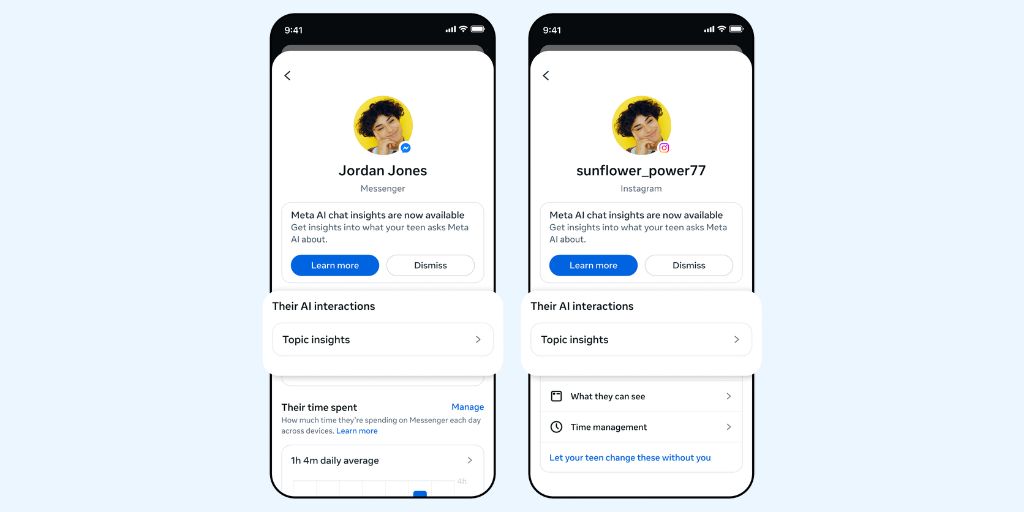
🤖 Meta gives parents a window into what their teens are asking AI: If your teen chats with Meta’s AI chatbot on Facebook, Instagram, and WhatsApp, this one’s for you. Meta’s new feature, called AI Insights, shows parents a weekly summary of the topics their teen has explored with AI — like school, entertainment, and health. To use it, you need to set up a Teen Account (which is genuinely useful and gives you access to Meta’s suite of parental controls).
We’ve written before about the risks of AI chatbots for teens. While AI can be useful for teens who need a sounding board, AI can also expose kids to dangerous content, unhealthy emotional attachment, and explicit deepfakes. Meta’s AI Insights is a step in the right direction, but it’s not a cure-all: parents still need to 1) actually set up parental supervision with Teen Accounts and 2) continue to talk to their children about online safety and what they encounter online.
It’s also worth noting what AI Insights doesn’t do. It will alert parents if kids search for suicide or self-harm content on the platform, but it only shows you topic categories, not actual conversations. For parents who want a deeper level of supervision, BrightCanary monitors everything your child types across all apps — including Meta AI conversations on Instagram and WhatsApp. You’ll get a real-time alert when something concerning appears.
According to Donna Rice Hughes, CEO of the online child safety organization Enough is Enough, parents should use whatever online parental controls are available, but also have frequent conversations with their kids about online safety. And even though Meta has parental controls for its AI chatbots, it’s a shame that other platforms don’t offer the same level of oversight. “Parents simply can’t continue to shoulder this burden alone,” Hughes told CNET.
🏅 BrightCanary earns the APA Labs Digital Badge: Big news from the BrightCanary team! We’ve earned the APA Labs Digital Badge from the American Psychological Association. We’re also part of the inaugural cohort of the APA Labs Digital Solutions Library — a new collection of trusted digital health tools. Earning this badge involved a series of hands-on assessments by experts. For parents, this means one thing: BrightCanary has been independently reviewed and found to meet a rigorous standard. We’ve always believed that parents deserve a monitoring tool they can actually trust, and we’re glad that belief has been validated by one of the most respected psychological organizations in the world. Read the full announcement here.
📱Instagram launched its own Snapchat, and Netflix goes short-form: Parents, these platform updates are worth having on your radar. Instagram is testing Instants, an app that works like Snapchat with disappearing content. It’s currently only available in Europe, but if it expands, we can expect that Instagram will promote it to teens — which means another avenue for content that disappears before parents can see it. The same monitoring principle applies here as it does to Snapchat: stay informed and involved, and set your rules around apps with disappearing images and messages. (Heads up: BrightCanary monitors what your child types across all apps, so even if the content disappears, the keystrokes don’t.)
Meanwhile, Netflix has launched Clips: a vertical, short-form video feed built into the Netflix app, showing highlights from original programming to help viewers find new shows to binge. This one is lower-stakes from a safety perspective since it’s Netflix’s own programming, but it is tailored to your child’s preferences — so, if they’re watching a lot of true crime, they’ll likely get more of the same on Clips. This is a good opportunity to make sure you know what type of content your child is watching and if it’s age-appropriate; there’s a big difference between watching One Piece and Hazbin Hotel. And did you know that Netflix has parental controls?
Parent Pixels is a biweekly newsletter filled with practical advice, news, and resources to support you and your kids in the digital age. Want this newsletter delivered to your inbox a day early? Subscribe here.
The group chat takes a dark turn. A friend sends something that crosses a line. Kids pressure each other into things they know they shouldn’t do. Something is going to come up eventually, and these conversation starters open the door to chat with your kid before something bad happens. The goal isn’t to get a perfect answer; instead, you want to let your kid know that they can bring these situations to you without judgment.
💬 In case you missed it — download our free conversation guide: Bullying. Self-image. Online strangers. AI. Most parents wait until something goes wrong before having these conversations — but by then, it’s already harder to talk. Our free guide, developed in partnership with Lisa Smith, the Peaceful Parent, gives you the exact words to proactively start these conversations.
📱 How do you actually delay giving your kids a smartphone? This piece from the BBC gives you step-by-step tips on how to manage the moment when your child starts pushing for their first phone — from what to talk to them about to how to get other parents on your side. And here in the US, parent groups are successfully pushing back against the digital tools schools give children — and getting results.
🌍 A little something fun: NASA has a tool that lets you spell your name using real satellite images of Earth (in a font aptly called “Landsat”). Genuinely worth five minutes — and a nice reminder that the internet occasionally produces something worth stopping for.
The APA Labs Digital Badge reflects alignment with APA Labs criteria for scientific principles, safety, ethical use, and usability. It is not an endorsement nor guarantee of effectiveness. APA Labs does not independently test products.