I’ve reviewed many apps for BrightCanary to find out if they’re safe for kids. Never have I been so shocked during the testing process as I was with Polybuzz. (I literally kept throwing my phone across my desk in disgust!)
In this review, I’ll break down exactly why Polybuzz isn’t safe for kids, including wildly inappropriate content, weak age verification, and no parental controls.
Polybuzz is a chatbot that uses anime-inspired imagery and AI voices to let users create personalized role-plays. Users can generate their own AI chatbot through prompts and reference images or interact with bots created by others. The app was originally known as Poly.ai, but in January of this year, it was rebranded to Polybuzz.
The options on Polybuzz are open-ended, allowing users to create an AI chatbot for many purposes, but it skews heavily toward relationship bots, romantic scenarios, and sexualized encounters.
Here’s how I tested Polybuzz:
The age rating for Polybuzz varies depending on a user’s device.
This inconsistency allows underage users to easily create accounts through the website, even if they’re blocked on their phone.
In short, no — not an effective one.
While age verification is imperfect, it’s an important part of the puzzle for keeping kids safe online. That’s why at BrightCanary, we always look for strong age verification when reviewing an app's safety.
Polybuzz falls far short on this measure. Here’s what I found:
In answering this question, I discovered a huge discrepancy between what the company says and what they actually do.
This is what Polybuzz’s website tells users:
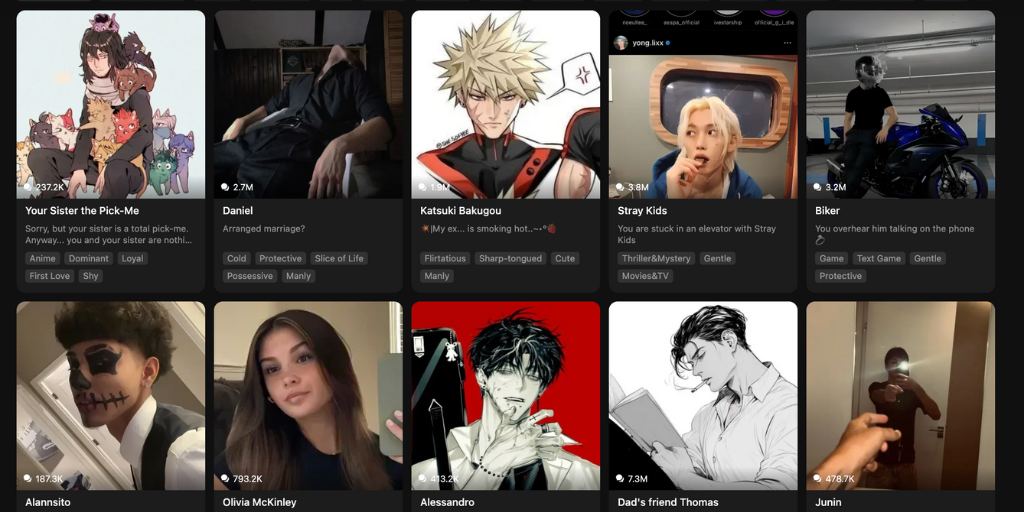
Here’s just a sampling of what I found on the front page of my Explore tab the very first time I opened the app. Keep in mind, this was using my test account set to 14 years old with Pure Mode activated.
Polybuzz has zero parental controls. In fact, there are no user controls either, except for Pure Mode, which, as found in my testing, appears to do very little.
Here’s a summary of the risks we uncovered during testing:
| Risk | Description |
| Explicit sexual and violent content | Found on the Explore page even in “Teen Mode.” |
| Weak or nonexistent age verification | Kids can easily create accounts, even under 13. |
| No parental controls | Parents can’t monitor or restrict content. |
| Psychological impact | Disturbing or sexualized scenarios can harm young users’ emotional well-being. |
If you’re worried about your child using Polybuzz or other chatbots, here are some steps you can take today:
Chatbots can seem like innocent fun to kids. Explain the risks and your concerns.
Make sure you have parental controls set on your child’s device through either Apple Family Sharing or Google Family Link, including setting their age and maturity level and requiring permission before they download new apps.
This will minimize the chances they’ll be able to use chatbots on their mobile devices without you knowing.
BrightCanary shows you which apps your child uses and monitors what they type on their device. Our advanced AI alerts you if they type anything concerning, like a worrisome interaction with a chatbot.
In case it isn’t crystal clear from my review, let me unequivocally state it here: Polybuzz is not safe for kids.
All chatbots present measurable risks for kids, but with weak age verification, no parental controls, and filters that are so flimsy it’s unclear if they even exist, Polybuzz stands out as exceptionally unsafe. Parents should monitor their children’s online activity to make sure they aren’t using Polybuzz.
BrightCanary helps you monitor your child’s activity online, including if they use chatbots like Polybuzz. Download today to get started for free.