
Welcome to Parent Pixels, a parenting newsletter filled with practical advice, news, and resources to support you and your kids in the digital age. This week:
🛡️ Attorneys general push Congress for child online safety bills: A bipartisan group of 32 state AGs are urging Congress to pass the Kids Online Safety Act (KOSA) this year. KOSA is intended to boost online privacy and safety for children, creating regulations that reduce the addictive nature and mental health of social media platforms. Last summer, KOSA overwhelmingly passed the Senate in a 91-3 vote, but it’s struggling to clear the House because lawmakers on both sides of the aisle are divided over its language — and there are only weeks left in the current session. In a letter to House and Senate leaders, the AGs cited recent investigations and lawsuits against Meta and TikTok for allegedly harming minors to bolster their case that children need better safeguards online.
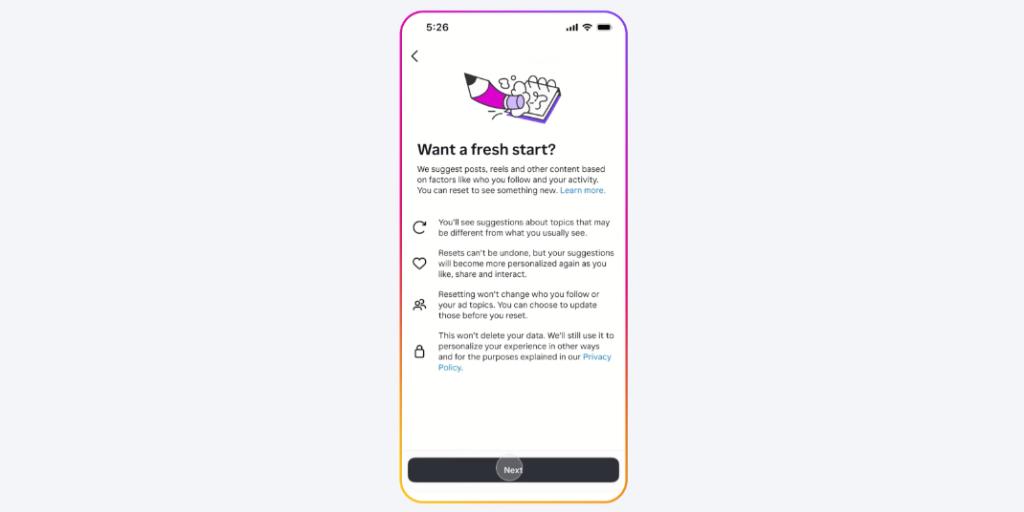
🔃 Instagram makes it easier to “refresh” your teen’s recommendations: Instagram is testing the ability for everyone on Instagram — including teens — to reset recommended content. In the app, recommended content appears on Explore, Reels, and Feed. Over time, the algorithm gets a sense of your child’s interests and starts showing them more of what they like. But that can get problematic if your child is consuming a lot of negative content — the app will deliver more of the same. When resetting, users have the option to review the accounts they’re following and unfollow any that share content they don’t want to see. It’s a great addition and something we recommend sitting down with your teen to do together. If the feature isn’t available for your teen’s profile yet or they want to start fresh on other platforms, check out our guide to reset your child’s social media algorithms.
🍎 Social media interactions predict health years later: A recent study found that, at age 21, receiving positive social media posts from peers — such as inside jokes and messages about shared experiences — predicted better physical health seven years later, including lower inflammation, better sleep quality, and healthier BMI. Conversely, receiving posts that deviate from peer norms — like those featuring profanity, drug references, or skipping class — was associated with worse health outcomes. Social media plays a big role in your teen’s peer connections, but quality matters. Parents can play a critical role in their child’s long-term health by encouraging positive online connections, talking about healthy friendships, and staying aware of any red flags (that’s where monitoring comes in handy).
Winter break is just around the corner, and it’s a perfect opportunity to help your teen strike a healthy balance between chill time and productivity. Open communication can help you get a sense of what they want from their break — and guide them toward meaningful activities that recharge and inspire them. Use these conversation starters to chat with your teen about their plans and how they can make the most of their time off.
If you’re thinking about giving your child a phone, you might be debating between a flip phone or smartphone. But are they mature enough for a smartphone? Will the flip phone have all the features they need? Here are the pros and cons of both.
Text message monitoring can help you stay informed and involved when your child starts messaging friends independently. Here are the three main ways to view your child’s iPhone texts, plus tips to make this a team effort.
📱 About one in five Americans get their news from social media, Pew Research Center reports. Seventy percent of the survey respondents believe the news they get from influencers is somewhat different than what they hear elsewhere. Does your child get their news from social media?
🙈 Most social media users don’t read an article past the headline, according to a new study from Penn State. Researchers found that 75% of links were shared without posters clicking the link first. Now’s a good time to digital literacy with your child and remind kids how to check their sources online.
👋 Good news: We always check our sources. Follow BrightCanary on Instagram, TikTok, Facebook, Pinterest, and YouTube.

Over 60% of kids aged 7 to 12 have been exposed to explicit content online, according to Parents Together. Exposure can come from friends sharing links and videos, salacious ads and recommendations popping up on their social feeds, and, of course, curious kids who are Google adult material. If you’re a parent wondering how to block porn on iPhone, Apple offers free tools to help reduce these risks. Here’s how to set them up effectively, plus extra tips to keep your child safe online.
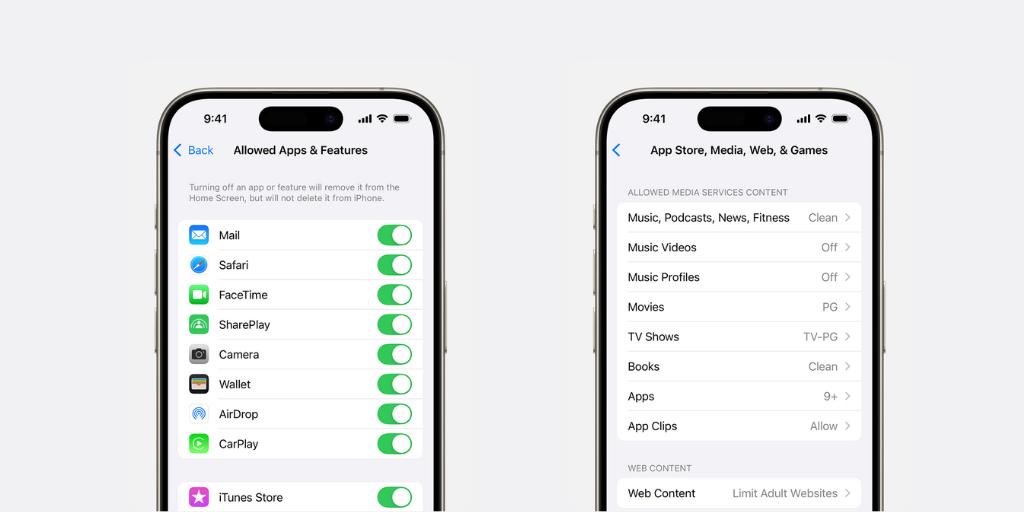
Do you know about Apple Screen Time? This free feature lets parents set up content and privacy restrictions to block explicit content and manage app usage (among other features). To set it up, you’ll need to enable Family Sharing and create a profile for your child.
There are a few different ways to use Apple Screen Time to block porn on iPhone:
Use this setting if you only want to allow your child to access a limited number of apps and features. For example, you might restrict all web browsers, the iTunes Store, and any downloaded social media apps to limit exposure to explicit content.
You can block explicit music, movies, and apps with adult content and ratings. Popular music platforms like Spotify and YouTube music can easily expose your child to pornographic content, ranging from explicit images and audio content to podcasts. Here’s how to prevent it:
You can also filter website content to limit explicit material in Safari and block specific websites. Here’s how to block porn sites on iPhone:
We recommend blocking pornography websites like Pornhub, adult chat sites, and forums with no age limits.
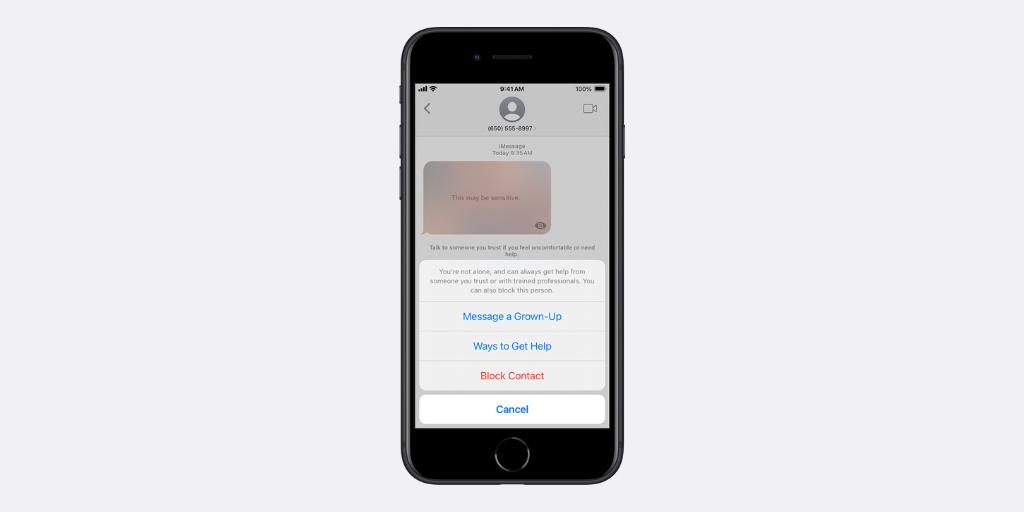
Apple’s Communication Safety feature helps protect kids from viewing or sending photos containing nudity. Here’s how to set it up:
When nudity is detected in messages or shared content, the image is blurred, and your child is warned about the risks. They also have the option to message an adult they trust about the photo or video.
Even with these built-in tools, some explicit content may still slip through. This is why it’s crucial to maintain open communication with your child. Remind them that it’s okay to talk to you or another trusted adult about anything that makes them feel uncomfortable online.
For additional peace of mind, tools like BrightCanary help you stay informed about what your child types and searches for online, including explicit content, so you’ll know if they run into something they can’t handle on their own. Unlike Apple’s built-in tools, BrightCanary offers:
You might not always know how to talk to your child about problematic content, but BrightCanary’s features help get the dialogue started — without constantly checking your child’s phone.
There are ways to block porn on iPhone, but nothing replaces the importance of having regular check-ins with your child. Staying informed with a monitoring tool like BrightCanary is the best way to make sure your child isn’t consuming anything they can’t handle on their own.
Are you worried about your child’s porn viewing habits? Find out what to do if your child was caught looking at porn, and save these signs of porn addiction in teens.

Welcome to Parent Pixels, a parenting newsletter filled with practical advice, news, and resources to support you and your kids in the digital age. This week:
🚫 TikTok banned from operating in Canada, may remain in US: The controversial social media app was politely yet firmly asked to shutter its offices in Canada, although Canadians can still use and access TikTok at their own risk. CBC reports that the decision to shutter TikTok’s Canadian offices was based on national security concerns and the advice of Canada’s security and intelligence community — pretty similar to the reasons TikTok was heading toward getting banned in the US. President-elect Trump has signaled that he will try to halt the ban, which would likely face formidable political challenges and legal hurdles. Either way, odds are high that your child will still be able to record TikToks for the foreseeable future. Stay informed with our guide to TikTok parental controls.
👤 NYT profile uncovers the dark side of minors on social media: The New York Times recently profiled Jacky Dejo, a child influencer turned social media entrepreneur who grew up in the creator economy — and in close proximity to men who are sexually interested in minors. Jacky’s parents started social media accounts for her when she was 6, intending to chronicle her snowboarding prowess. But as Jacky grew older, she captured the attention of adult fans, ultimately leaning in to their interest and charging for exclusive access to salacious posts and images. The profile is as enlightening as it is disturbing, but one of its more harrowing illustrations is the way that social media algorithms play a distinct role in surfacing children’s images to men who have a sexual interest in them — and failing to remove underage content that violates terms of service. Parents, talk to your kids about the risks of online predators, grooming, and why they should keep their social profiles private.
🔐How schools implement “away for the day” phone policies: More schools across the country are asking students to put away their phones, but are these policies really helping kids? A recent feature in the Seattle Times says yes. Robert Eagle Staff Middle School is one of 4,000 schools worldwide that use Yondr pouches, neoprene bags that lock away the child’s phone for the day. Staff at these schools say that students are more focused during class, spend less time dealing with conflicts from group chats or social media, and even have fewer disciplinary incidents (like vaping and alcohol use) because kids can’t use their phones to coordinate meetup locations. “The last two years, 70% of my job has been dealing with cellphones. It felt like whack-a-mole,” Principal Zachary Stowell said. “And now that’s removed. Now I’m talking to teachers about their teaching, which is cool.” Does your child’s school have a phone-free policy?
Parent Pixels is a biweekly newsletter filled with practical advice, news, and resources to support you and your kids in the digital age. Want this newsletter delivered to your inbox a day early? Subscribe here.
Is social media influencing your child’s eating habits and relationship to food? We spoke with Maiken Wiese, RD, about eating disorder warning signs. Here are some important conversation-starters based on her insights.
Is your child consuming an endless loop of bad news? This habit can expose your child to an endless stream of negative content and fuel their anxiety. Find out what to do about it.
Text message monitoring is a great way to keep your child safe. But if your child is deleting texts, your alarm bells might be going off. Is it harmless, or are they hiding something?
🤬 What’s the best way to stay cool, calm, and collected with your children? Check out these tips to improve self-regulation — your ability to keep your emotions in check — via Parenting Translator.
📵 Australia has proposed a ban on social media for kids under age 16, but it isn’t clear how the ban would be implemented. If the legislation becomes law, the platforms would have a year to figure out the details.
🧩 Looking for some screen-free activities you can do with your children this winter? Save this list from Techno Sapiens.
🎧 We were featured on the Calm Parenting Podcast in an episode about practical strategies for screen time and parental controls — give it a listen!
Welcome to Parent Pixels, a parenting newsletter filled with practical advice, news, and resources to support you and your kids in the digital age. This week:
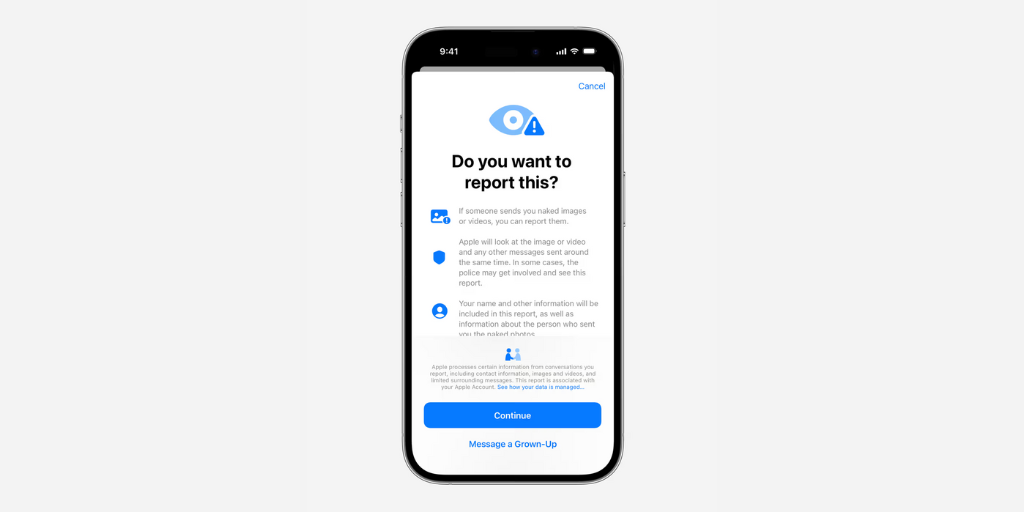
❗New iMessage feature prompts children to report explicit images: Apple is rolling out a new feature that allows children to report nude images and videos directly to Apple, which can then be escalated to law enforcement. The feature is being piloted in Australia with plans for a global release, The Guardian reports. It builds on existing communication safety measures for users under 13: currently, Apple identifies and flags nudity in messages, AirDrop, and Photos, but the new update will allow users to report the content to Apple. Apple hasn’t stated when the feature will debut to users outside of Australia. In the meantime, talk to your child about how to respond to explicit content. Here’s our guide.
🙈 Google introduces Sensitive Content Warning on Android: In related news, Google recently announced new protections for Google Messages on Android, including an optional Sensitive Content Warning that blurs images containing nudity. When enabled, this feature automatically blurs potentially explicit images and prompts users with a screen that lists resources and options, including the choice to view the content. If a user attempts to send or forward a nude image, the feature provides a reminder about the risks of sharing sensitive imagery to help prevent accidental shares. This feature will be enabled by default for users under 18 once it rolls out.
Parent Pixels is a biweekly newsletter filled with practical advice, news, and resources to support you and your kids in the digital age. Want this newsletter delivered to your inbox a day early? Subscribe here.
Is your child wrapped up in a toxic friendship? We spoke with Anna Marcolin, LCSW, about what to do if unhealthy relationships are bringing your child down. Save these conversation-starters and read the full list of tips at our blog.
This messaging app is popular among teens and tweens. But between location sharing and stranger danger, it can also be cause for concern. Here’s what parents should know.
Social media can negatively impact your child’s mental health. But how does social media influence eating disorders? We spoke with Maiken Wiese, RD, about red flags to watch for.
📵 Why are churches encouraging their congregations to take a month-long digital detox?
💬 Norway plans to increase the minimum age for social media use from 13 to 15 and older.
⭐ How exactly should you praise your child? Research suggests that there are better ways to say “I’m so proud of you.”

Welcome to Parent Pixels, a parenting newsletter filled with practical advice, news, and resources to support you and your kids in the digital age. This week:
📵 Predators are using TikTok to exploit minors. Minors are using TikTok’s live feature to perform sexually suggestive acts on camera in exchange for money and gifts, according to a report by Forbes and documentation from TikTok’s own internal investigation. NPR and Kentucky Public Radio also found that TikTok tweaked its algorithm to more prominently show attractive people, and the platform quantified how much time it takes for viewers to become addicted to the platform: 260 videos, or under 35 minutes. Even though minors aren’t allowed to livestream or receive gifts, it’s relatively easy for children to fib about their age when they sign up. Performing suggestive acts on camera in exchange for gifts is just one way predators can groom targets for sexual abuse and sextortion. TikTok says it has a zero tolerance policy for child sexual abuse material, and the platform does have parental controls — but they only work if your child sets their correct birthdate.
🤖 Social media companies aren’t doing enough to stop AI bots. That’s according to new research from the University of Notre Dame, which analyzed the AI bot policies and mechanisms of eight social media platforms, including Reddit, TikTok, X, and Instagram. Harmful artificial intelligence bots can be used to spread misinformation, hate speech, and enact fraud or scams. Although the platforms say they have policy enforcement mechanisms in place to limit the prevalence of bots, the researchers were able to get bots up and working on all the platforms studied. If you haven’t talked to your child about the risks of bots, misinformation, and online scams, now’s the time — if your child has used any social platform, odds are high that they’ve encountered a bot already.
😩 Teens are stressed about their future, appearance, and relationships. A team of researchers surveyed US teens about what stressors today’s teens are feeling. A majority (56%) of teens are stressed about the pressure to have their future figured out, 51% felt pressure to look a certain way, and 44% felt like they needed to have an active social life. While adults drove teen’s pressures to have their futures planned out and achieve the most, the pressure to have an active social life and keep up with appearances were driven by social media, the teens themselves, and peers. Teens are struggling to reduce those stressors, too — time constraints, difficulty putting tech away, and feeling like rest isn’t “productive” enough were all blockages to practicing more self-care. Techno Sapiens breaks down things parents can do to help their stressed-out teen.
Parent Pixels is a biweekly newsletter filled with practical advice, news, and resources to support you and your kids in the digital age. Want this newsletter delivered to your inbox a day early? Subscribe here.
Helping your teen manage stress starts with open and honest conversations. Here are five conversation-starters designed to prompt meaningful chats about self-care, stress management, and healthy ways to navigate the pressures they face:
It’s spooky season! A Good Girl’s Guide to Murder is a popular young adult mystery thriller (and Netflix series) — but is it safe for kids? If your child is interested in this series, read this guide first.
Are your child’s group chats causing major drama in their friend group? Here’s what parents need to watch for when their child starts texting independently — and how to help your child handle it.
🤳 Instagram remains the most used social app among teens, followed by TikTok, according to a new report by Piper Sandler.
🎃 Halloween is next week! In Washington, where BrightCanary is based, the most popular Halloween candy is Reese’s Peanut Butter Cups. What’s the most popular treat in your state?
📍 We’re on Pinterest! Follow BrightCanary to keep up with our latest parenting tips, infographics, and resources.

Welcome to Parent Pixels, a parenting newsletter filled with practical advice, news, and resources to support you and your kids in the digital age. This week:
🚫 More kids are contending with AI-generated explicit photos: The Center for Democracy and Technology (CDT), a nonprofit focused on digital rights and privacy, recently reported a concerning rise in intimate images being shared without consent in American schools. During the past school year, 15% of high school students heard about a sexually explicit deepfake (an AI-generated image) of someone associated with their school, and 11% of kids ages 9–17 knew a peer who used AI to generate nude images of others.
This alarming trend can ruin a child’s self esteem, social life, and well-being. It’s fueled by the widespread availability of generative AI apps, which some students may use without fully understanding the risks and consequences. According to CDT’s survey, less than 20% of high school students said their school had explained what a deepfake nude is, and a majority of parents reported that their child’s school provided no guidance about authentic or AI-generated NCII. For more information and tips on how parents can reduce the risk for their kids, check out our blog.
👀 California Governor Gavin Newsom signed SB 976, also known as the Protecting Our Kids from Social Media Addiction Act. The bill prohibits online platforms from knowingly providing an “addictive feed” to a minor without parental consent. The bill also prohibits social media platforms from sending minors notifications during school hours and late night hours. The regulations won’t go into effect until January 1, 2027, to make time for the very likely court challenges from opposition groups, such as tech lobbyists and the Meta legal team.
Parent Pixels is a biweekly newsletter filled with practical advice, news, and resources to support you and your kids in the digital age. Want this newsletter delivered to your inbox a day early? Subscribe here.
There’s an alarming trend on the rise: AI-generated explicit images circulated among high schoolers. What are deepfake nudes, and how can parents prevent it?
Looking for a new read to help you navigate parenting in the age of social media and smartphones? We’ve got you covered with this list.
When was the last time you had a really meaningful conversation with your child? Maybe you tried, but they clammed up or just repeated a series of “I don’t know”s and noncommittal grunts. Here are some conversation-starters to have better chats with your child, based on advice from psychotherapist Anna Marcolin, LCSW. Remember, approach the conversation with curiosity — not judgment.
🦄 Fortnite now allows parents to set time limits for their kids. If you’re curious about other Fortnite parental controls, we’ve got you covered on the BrightCanary blog.
😮💨 Women tend to do more of the day-to-day online work for the family, such as ordering essentials online, managing digital communications with schools and doctors, and planning events with other parents — all of which contribute to digital overload and even burnout, BBC reports.
🫶 How do you raise a well-adjusted adult? That’s the million-dollar question. Dr. Cara Goodwin of Parenting Translator breaks down the factors supported by research: a warm and loving parent-child relationship, and encouraging kids to take control of their thoughts and feelings.
💁 Preventing online addiction in kids requires a multi-pronged approach: teach kids about digital literacy, set rules and limits on devices, promote offline activities, and use digital monitoring tools alongside regular communication. Read more tips over at Psychology Today.
Welcome to Parent Pixels, a parenting newsletter filled with practical advice, news, and resources to support you and your kids in the digital age. This week:
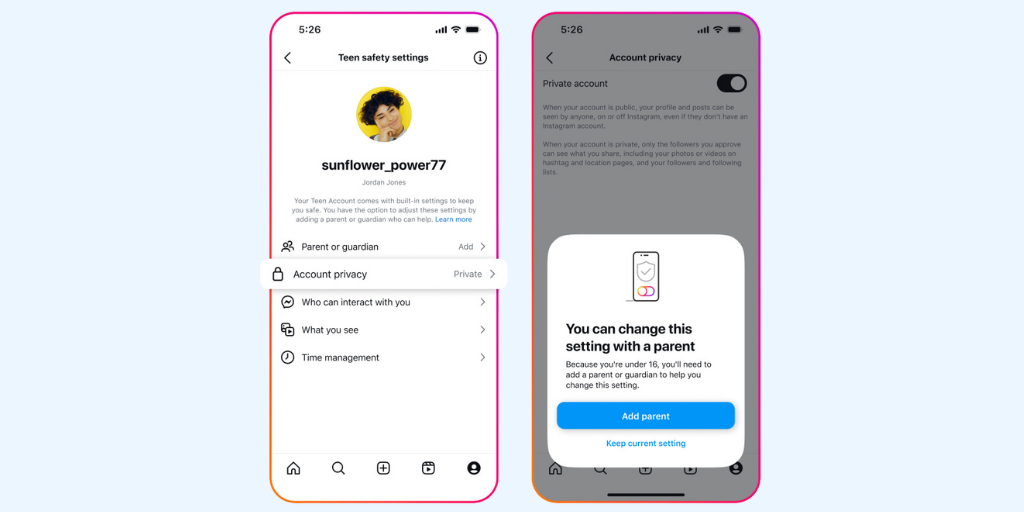
🛡️ Meta announces Teen Accounts: If your teen uses Instagram, their account will automatically convert to a Teen Account with added safety protections over the next few months. The update, which affects all new and existing accounts for teens ages 13–17, comes as social media companies face mounting pressure to do better for their youngest users. Many of the features have existed since 2021, but required users to opt in. Now, these protections will be automatically applied, along with improved age verification measures.
Some of the key features for teen accounts include:
Parents can also use updated supervision tools to see the topics their teen engages with and who they’re messaging, although you won’t be able to view the content of the messages. (To monitor those Instagram DMs, you’ll need BrightCanary.)
Our take: It’s about time. Instagram’s existing parental controls were confusing and difficult to find. This update applies common-sense safety measures to teen accounts, but parents still need to stay involved — and make sure their teen isn’t fibbing about their age online.
⚖️ KOSA and COPPA 2.0 advance in the House: Two major child online safety bills have moved out of the House Committee on Energy and Commerce: the Kids Online Safety Act (KOSA) and the Children and Teens’ Online Privacy Protection Act (COPPA 2.0). KOSA would hold social media accountable for harm caused to underage users, while COPPA 2.0 expands and updates the outdated 1998 COPPA law. KOSA had previously passed the Senate but faced some last-minute amendments in theHouse committee, including the removal of a provision that would have held platforms responsible for mitigating anxiety, depression, and eating disorders. While both bills are now set for a full vote in the House, it’s not clear whether they’ll gain enough support to pass.
😬 FTC finds that social media companies don’t adequately protect kids: A new FTC report found that large social media and video streaming companies surveilled their consumers in order to monetize their personal information, and they failed to protect young users online. The companies cited in the report include Amazon (which owns the gaming platform Twitch), Meta, Snap, Discord, and ByteDance, which owns TikTok. The companies’ data collection, minimization, and retention practices were designed as “woefully inadequate,” which is as harsh a burn from the FTC as you can get, and urged companies to provide greater safety measures for children. The FTC also urged Congress to pass stricter federal privacy legislation.
Parent Pixels is a biweekly newsletter filled with practical advice, news, and resources to support you and your kids in the digital age. Want this newsletter delivered to your inbox a day early? Subscribe here.
If your child uses Snapchat, you’ve probably heard of the social clout Snapstreaks can have. But what is a Snap streak, how do they work, and should parents be worried?
Monitoring your child's texts can reveal warning signs of risky behavior or distress, but what should parents look for? We spoke with psychoanalyst and life coach Anna Marcolin for tips.
From the moment your child gets home, they’re thinking about what’s happening on Instagram or what their friends are sharing on Snapchat. If your child is hyper-focused on social media and dealing with FOMO (fear of missing out), it’s time to help them refocus their energy on real-life hobbies, interests, and activities. Here’s how to start the conversation.
😤 What is the worst argument social media companies use to defend themselves? “Instead of acknowledging the damage their products have done to teens, tech giants insist that they are blameless and that their products are mostly harmless,” write Zach Rausch, Jon Haidt, and Lennon Torres for The Atlantic.
👎 Nearly half of Gen Zers wish social media was never invented, according to a new survey by The Harris Poll. Eight in 10 Gen Zers have taken steps to limit social media usage at some point, such as unfollowing or muting an account (42%) or deleting a social media app (40%).
📰 Around half of TikTok users (52%) now say they regularly get their news on the platform, up from 43% last year and just 22% in 2020.
📅 The Australian government is considering a minimum age limit for teens to use social media, citing mental health concerns.

Welcome to Parent Pixels, a parenting newsletter filled with practical advice, news, and resources to support you and your kids in the digital age. This week:
😩 Surgeon General says parental stress is a public health issue: In a new public health advisory, US Surgeon General Murthy called for policy changes that better support parents and caregivers. The advisory noted that 48% of parents report that their stress is completely overwhelming, compared to 26% of other adults. And even though the amount of time parents spend working has increased (+28% for moms, +4% for dads), the amount of time they spend engaged in primary child care has also increased (+40% among moms, +154% among dads). Murthy called for safe, affordable child safe programs, predictable workplaces and understanding workspace leadership, and community centers (such as playgrounds and libraries) that can give children space to play while fostering social connection among parents.
👎Snap and TikTok sued for failures with child safety: The attorney general of New Mexico filed a lawsuit against Snap, the parent company of Snapchat, alleging that the company’s design features (namely, disappearing messages and images) facilitates sexual abuse and fails to protect minors from predation. Additionally, a U.S. appeals court has ruled that TikTok must face a lawsuit over a 10-year-old girl’s death. The girl’s mother, Nylah Anderson, is pursuing claims that TikTok’s algorithm recommended a viral “blackout challenge” to her daughter.
📹YouTube introduces content rules and new supervisory tools for teens: YouTube is limiting content that could be problematic for teens if viewed repeatedly. This includes content that promotes weight loss, idealized physical appearance, and social aggression. The platform also introduced new parental controls for teen users, allowing parents to link their account to their teen’s in order to view their YouTube activity. Parents will be able to view their child’s uploads, subscriptions, and comments — but not their content. (For that, you’ll need a child safety app like BrightCanary.)
Parent Pixels is a biweekly newsletter filled with practical advice, news, and resources to support you and your kids in the digital age. Want this newsletter delivered to your inbox a day early? Subscribe here.
Snapchat can be risky for kids because of how easily strangers can contact them and messages can disappear. Here’s what parents need to know about the platform.
Many apps promise to help you monitor your child’s texts, but finding one that actually works well is an uphill battle. We’ve done the research to find the best of the best.
Even when your child’s social media feed doesn’t explicitly promote eating disorders, content can still encourage unhealthy behaviors or unrealistic body standards in subtle ways. Here are some conversation-starters to help you talk to your kids about content that promotes disordered eating behaviors and body negativity.
📵 “Just like it is impossible to train your child to drive a car without supervising from the passenger seat, you cannot train your child to be smart online if you are not privy to what he is doing in that world,” writes Melanie Hemp of Be ScreenStrong. Read more about your teen “earning” smartphone privacy.
📱 If your kid keeps getting around Apple Screen Time limits, what are your options? On the BrightCanary blog, we explain common workarounds and how parents can prevent kids from sneaking past their screen time boundaries.
👻 We’re adding a new, much-requested platform to the BrightCanary app in the coming weeks — stay tuned!

Welcome to Parent Pixels, a parenting newsletter filled with practical advice, news, and resources to support you and your kids in the digital age. This week:
As back-to-school season kicks off, the debate over cell phone bans in schools is heating up. From Los Angeles Unified to the entire state of Florida, more schools are telling kids to keep their devices locked up from bell to bell. So, why are schools banning phones — and should your local district ban them, too?
Why are schools banning phones? Cell phone restrictions are becoming more common as educators grapple with the impact of smartphones on learning. Over 70% of high school teachers say that student phone use is a major problem. According to the National Center for Education Statistics, 77% of U.S. public schools now prohibit non-academic use of cell phones during school hours.
The goal of these bans is to create an environment where students can focus on school, without the constant pull of devices. Some schools require students to put their phones in backpacks or special lockers that can only be opened at the end of the school day. Others force the teachers to fend for themselves, leading to an inconsistent mishmash of cell phone rules between classrooms.
Should schools ban phones? Cell phones are disruptive, especially for kids. Students can take up to 20 minutes to refocus on what they were learning after being distracted (which is literally what phones were designed to do). Studies show that removing phones from classrooms can lead to better academic performance, test scores, and self-regulation skills.
Not everyone is on board. One major source of pushback is parents who are used to being in constant contact with their children throughout the school day. Some parents rely on texting or calling their kids during school hours (often for non-emergencies), which can disrupt the learning environment. Others will even FaceTime their kids to talk about assignments or quiz grades … in the middle of class.
But as Mercer Island School District in Washington demonstrates, there are ways to navigate this challenge.
MISD recently introduced a comprehensive phone-free policy in partnership with Yondr, a company that provides lockable phone pouches for students. With few exceptions, all students must have their own Yondr pouch and place their devices in it at the beginning of the day, and they can unlock it at the end of the day.
For emergencies, parents can call the school to deliver a message, or kids can come to the front office to use a phone … just like the days before iMessage. On an impressively detailed page on MI’s website, the district is clear: some people are very used to communicating schedule changes and practice/game/event schedules via cell phones. Those people (students, parents, and staff) will have to adjust.
With the right communication and planning, a phone-free school environment is achievable.
Parents, encourage your child to use their phone responsibly, and set an example by giving them space during the school day. After all, the goal is to help them develop healthy habits that will serve them well beyond their school years.
If your child’s school is considering a phone ban, advocate for policies that are logistically possible and enforceable. Away for the Day maintains an impressive list of policy examples across the country.
Parent Pixels is a biweekly newsletter filled with practical advice, news, and resources to support you and your kids in the digital age. Want this newsletter delivered to your inbox a day early? Subscribe here.
Did you know that BrightCanary's new AI feature summarizes text messages, detects concerning content, and even coaches you through parent-child talks? Hear from co-founder Steve Dossick about how the new feature works.
A Court of Thorns and Roses is the first volume in an ongoing and highly popular romantacy series by Sarah J. Maas. But is ACOTAR for kids? We break down what parents should know about this series.
Is your child struggling to stay off their phone during school hours? It’s time to talk to them about boundaries and possible solutions. Here are a few conversation-starters to talk to your child about swiping and scrolling during class and how to take more responsibility for their habits.
😮💨 About a quarter of young people use social media almost constantly throughout the day, mostly for entertainment and communicating with friends, according to a new survey. More than three quarters are aware that’s a problem and try to control their use: 67% curate their feeds to get rid of what they don’t want to see, and 63% take a break from their social media accounts.
🤗 How do you raise empathetic children? It comes down to empathetic parents: pay attention to what they’re feeling, try to understand their problems rather than minimizing them, and offer emotional support.
📺 Just dropped: A major systematic review of current research on screens for young kids (0 to 6). Some key takeaways, via Techno Sapiens: avoid using screens while interacting with kids, choose age-appropriate content, and avoid having TV on in the background — there’s evidence that it makes it more difficult for kids to focus their attention on whatever else they’re doing.

It’s harder than ever for teens to make friends in the digital age. Having strong friendships in adolescence is associated with better mental and emotional health as adults, but between the constant pressures of social media and the normal growing pains of being a teenager, your teen might feel isolated, lonely, and unsure what to do about it. If you’re wondering how to help your teenager make friends, here’s what you should know.
Kids are lonelier today than ever. Compared to those over 70, people aged between 16–29 are twice as likely to say they feel lonely “often or always.” What’s more, over 30% of young people say they don’t know how to make new friends.
Loneliness isn’t just a fleeting feeling — it can increase the risk of depression and anxiety among adolescents. That’s a problem, considering we’re already in the midst of a youth mental health crisis.
Positive relationships can help improve everything from school attendance to your child’s likelihood of graduating college. But the way teens make friends has changed over time. The rate of teens meeting up with their friends “almost every day” has decreased from 50% in the ‘90s to 25% today.
What changed? Although the percentage of teens meeting up with friends has been declining over the last few decades, there’s a steep dropoff in 2010 — when smartphones went mainstream. Text messages, social media, and Snapstreaks became the digital currency of social clout. It became easier for teens to feel connected online, even though offline friendships are more meaningful and intimate.
Being a teenager is radically different today than it was a few short years ago. That means making friends and maintaining strong friendships is radically different, too.
If you want to know how to help your teenager make friends, the biggest step is encouraging your teen to try new things. It’s hard to meet new people without going into new spaces, so you’ll want to work with them to discuss their interests and brainstorm ways they can use those interests to spark new connections. Here are some places to start:
You might feel super motivated to help your teen make friends, but keep in mind that you don’t always know the finer social dynamics of their world. Your teen might not even realize that they feel lonely. They might even feel overwhelmed if you throw a bunch of ideas at them at once.
Instead, get them talking. Here are some ways to spark a dialogue:
Be open, not judgmental. If you’ve noticed that your teen is spending more time alone than normal, ask them about it in a non-confrontational way, like, “I noticed you’re not hanging out with Sammy as often. Is everything okay?”
Show interest in their interests. Teens can easily pursue their passions and find niche communities online, but you wouldn’t know it unless you get involved. If your child mentions something they enjoy, ask them what they like about it. It might lend itself to an in-person activity. For example, if they’re really into a certain series, you might suggest inviting a friend and hosting a movie night.
Validate their feelings. If your teen says they feel like they don’t have any friends, you might be tempted to give them a million and one solutions to the problem. Instead, give them space to talk about their experiences. Questions like “That’s rough. Can you tell me more about how you feel?” or “What makes you think that?” can encourage your child to keep talking and give you space to examine what might be holding them back from making friends.
It can be difficult for parents to recognize when their teens are struggling, especially if they tend to isolate themselves behind screens. Monitoring your child’s online activity can help identify any red flags, like signs of depression or conflicts that might hinder their ability to make friends.
BrightCanary monitors what your child types across their text messages, social media, Google, YouTube activity, and more. The app uses the American Psychological Association’s emotional communication guidelines to categorize conversations, so you can identify anything concerning at a glance.
Plus, our AI-generated summaries make it easy to understand online messages, identify any potential issues early on, and have more informed check-ins with your child.
Look for signs of withdrawal, increased screen time, or reluctance to engage in social activities. Ask your child how they spend their free time—do they check in with friends during passing periods and participate in after-school activities, or do they spend most of their time alone?
Encourage open communication, help them explore new social groups, and monitor for any signs of bullying or depression. Recognize that you may not be able to solve their unique social dynamics, but you can give them space to work through their feelings and find different spaces for connection.
Yes, it's becoming more common, but it's important to ensure these online friendships are healthy and positive.
Focus on quality over quantity. Encourage them to pursue hobbies or activities where they can meet people with similar interests in smaller, more comfortable settings. Introverted teens may not want to attend large sporting events, but they may be interested in a book club or cooking class.
It's important to find a balance—be supportive and present, but allow them the independence to navigate social situations on their own. Remember that their social life includes the digital world, and you’ll want to find a way to stay involved that works for your family. We recommend starting with regular online safety check-ins.
While making friends can be challenging, it’s a crucial part of teenage development. As a parent, you can help your teen brainstorm different ways to expand their social circle online and offline based on their interests. Sometimes, the most important thing you can do is give them space to talk and find solutions on their own (with your encouragement and guidance, of course).





