

If it feels like the digital world your teen is navigating is changing faster than you can keep up, you’re not imagining it. While social media platforms may look largely the same on the surface, how teens are using them is shifting in important ways.
Pew Research Center recently surveyed U.S. teens about their use of social media and AI. Social media use has mostly plateaued, but attitudes toward these platforms have become more negative. At the same time, use of AI chatbots has exploded, with many teens turning to AI not just for homework help, but for companionship and emotional support.
That combination creates new risks for kids and challenges for parents. Here are the most important findings from Pew’s data, what’s changed, and what these trends mean for your child’s safety, mental health, and development.
Aside from unsurprising downward shifts in Facebook and X use, and a slight uptick in TikTok and WhatsApp, teen engagement with social media hasn’t changed much.
Social media OGs Facebook and X (formerly Twitter) continue to hemorrhage teen users.
X (formerly Twitter)
The two platforms that stand out for growth among teen users are WhatsApp and TikTok.
TikTok
A majority of U.S. teens still use YouTube, Instagram, and Snapchat.
How teens use social media hasn’t changed much lately, but research reveals that their attitudes about it are starting to shift.
For the first time, Pew included questions about AI chatbots and found that teens have taken to them like wildfire. This is alarming, considering that AI platforms frequently fail to deliver the safeguards they promise.
Even more worrisome is how often teens use AI for companionship. For this, we also looked to a recent assessment by Common Sense Media.
Social media and AI aren’t going anywhere (as much as some of us might wish). Both types of platforms are deeply intertwined with kids’ lives. It’s vital you’re proactive in helping your child maneuver these spaces. Here are my top four tips for keeping your teen safe on social media and AI:
Educate your child about the dangers of social media and AI. Teach them how to spot things like predators on social media, AI hallucinations, and signs of digital addiction. Your child is a partner on this journey, and the more they know, the more they can take an active role in their own health and safety.
Decide when and how your child is allowed to use social media and AI, as well as what’s not okay. Be clear about expectations and consider writing them into a digital contract.
Take advantage of the parental controls available on social media platforms, your child’s device, and AI chatbots. While these can be useful, know that they aren’t perfect and should not be your only safeguard.
Keep an eye on how your child uses social media and AI platforms by doing periodic spot checks of their device, combined with a monitoring tool like BrightCanary.
Social media use among teens remains mostly stagnant when compared to previous years, but use of AI chatbots is on the rise. This is troubling considering the risks kids face on AI platforms and the relative lack of safeguards. Teens also express increasing concerns about how social media impacts their mental health. It’s important to educate your child about how to stay safe on these platforms, set limits, use parental controls, and monitor their use.
BrightCanary helps you monitor your child’s activity on the apps they use the most, including everything they type on social media and AI. Download today to get started for free.

When to give our kids their first cellphone is a hot topic in my tween-parent cohort, especially as we look toward middle school next year (gulp). That’s why I was interested in a new study from the American Academy of Pediatrics (AAP) examining the association between health risks and the age of phone ownership.
The study authors identified three potential health implications of giving kids phones too young: mental health issues, weight gain, and sleep problems.
Unfortunately, there’s no single answer to this question. The AAP study assessed the risks of phone acquisition starting at age 12.
As you decide what’s right for your child, consider these factors:
The AAP study looked at three specific health issues when evaluating the impacts of early phone ownership.
The study found that, compared with their peers who don’t own phones, kids with smartphones at age 12 are:
The authors of the study found that smartphone use in early adolescence was associated with a 40% higher risk for obesity.
I found this item problematic for several reasons:
But these flaws don’t mean we need to throw out this point altogether. Instead, let’s look at two uncontroversial facts:
Therefore, it stands to reason that the younger kids are given a phone, the younger they may become sedentary, introducing numerous health risks sooner.
The study found that kids with smartphones were 60% more likely not to get enough sleep. Specifically:
Given the connection between early phone ownership and negative outcomes for kids, giving your child their first device should not be taken lightly.
Here are some protective steps you can take:
The earlier a child gets a phone, the more likely they are to be impacted. Therefore, even a few years’ delay can make a difference. There is a growing advocacy movement encouraging families to hold off until high school if possible, as well as a number of smartphone alternatives.
The APA study did not find the same negative outcomes from other devices such as tablets and smart watches. Therefore, you should consider whether your child’s need for a smartphone could instead be met in another way.
Tablets can be used for texting and FaceTiming from home, and smart watches are a great option for communicating while out of the house.
The authors of the APA study suggest that a child’s smartphone ownership should be accompanied by “dedicated oversight.” That could look like:
Research increasingly shows mental and physical health risks from giving a child a smartphone at a young age. The exact age to give your child their first phone depends on your unique circumstances. Before giving your child their first phone, weigh the pros and cons and explore alternative device options. Once your child has a phone, it’s important to regulate and monitor their use to help protect against negative health outcomes.
BrightCanary helps you monitor your child’s activity on their smartphone and other Apple devices. The app scans everything your child types and sends you real-time alerts about anything concerning. You also receive AI-powered summaries, emotional insights, and access to full transcripts. Download today to get started for free.

According to a survey by the Pew Research Center, 64% of teens report using generative AI chatbots like ChatGPT for everything from homework help to companionship. But a startling concern is emerging among experts. Early research suggests that overreliance on generative AI could lead to cognitive atrophy and the loss of brain plasticity. Or, as the kids say: brain rot.
As a parent who is determined to teach my kids how to use AI responsibly, I’ve been watching this issue closely. Here’s what to know about how overusing AI impacts the brain and how to protect your child’s cognitive abilities in the face of this new technology.
Generative AI is in its infancy, and so is the research on this topic. But cognitive offloading is likely to blame for AI’s impact on kids’ cognitive health.
Cognitive offloading happens when people use external tools or resources to reduce mental effort. On the one hand, this process can help people accomplish tasks faster. On the other hand, all of that offloading can be harmful for developing brains.
Experts suggest cognitive offloading erodes critical thinking and reasoning skills.
When AI always provides the answers, kids miss out on the opportunity to develop foundational life skills like problem-solving and deep thinking.
For example, learning to write is deeply intertwined with learning to think. However, offloading writing tasks degrades students’ ability to organize and express their thoughts.
When kids offload tasks to AI without doing any leg work, their ability to perform independent research and analyze materials decreases. Students end up with only a superficial understanding of information — they can state the what, but don’t grasp the why or how.
Research has shown that younger users demonstrate a higher dependence on AI tools when compared to older users, and that the corresponding decline in their critical thinking is also greater.
The brain is particularly malleable during childhood and adolescence, making kids and teens especially vulnerable to the impacts of AI.
Because younger children are more likely to anthropomorphize, or assign human properties to inanimate objects, experts suggest that even simple praise from an AI chatbot can greatly change their behavior.
The sooner you start teaching your child to use AI smartly, the more you can buffer its effect on their brain.
To help your child gain AI literacy, teach them:
AI isn’t inherently harmful. The key is using it to support thinking, not replace it. Encourage your child to:
BrightCanary helps you monitor how your child engages with AI by scanning everything they type on their iPhone or iPad. Use it to:
Overreliance on generative AI may lead to a decline in cognitive skills such as critical thinking, reasoning, and the ability to analyze and understand information. Because their brains are especially malleable, children and teens are particularly vulnerable to the impacts of AI on the brain. It’s important to teach your child AI literacy, show them how to use the tool responsibly, and monitor how they use it.
BrightCanary helps you monitor your child’s activity on the apps they use the most, including all AI platforms. Download today to get started for free.

It will come as no surprise to parents that YouTube is all the rage with kids. In fact, recent research suggests that nine out of 10 kids use YouTube, and kids under 12 favor YouTube over TikTok. With all of YouTube’s popularity, how can you make the platform safer for your child? Read on to learn how to set parental controls on YouTube.
As the name implies, YouTube is a platform for user-generated content. While this creates an environment ripe for creativity, it also means there’s a little bit of everything, including videos featuring violent and sexual content, profanity, and hate speech.
Because YouTube makes it easy for kids to watch multiple videos in a row, there’s always the chance your child may accidentally land on inappropriate content. In addition, the comments section on YouTube videos are often unmoderated and can be full of toxic messages and cyberbullying.
Due to the risks, it’s important that parents monitor their child’s YouTube usage, discuss the risks with them, and use parental controls to minimize the chance they’re exposed to harmful content.
YouTube offers a variety of options for families looking to make their child’s viewing experience as safe as possible. Here are some important steps parents can take:
A supervised account will allow you to manage your child’s YouTube experience on the app, website, smart TVs, and gaming consoles.
There are three content setting options to choose from:
Along with content settings, here are some additional YouTube parental controls to explore:
Parents will also be able to set specific restrictions on YouTube Shorts, the platform's short-form video experience similar to TikTok. Soon, parents can set time limits on Shorts, as well as custom reminders for bedtime and taking screen time breaks. As of this writing, this feature isn't yet available.
For step-by-step instructions for setting up parental controls, refer to this comprehensive guide by YouTube.
While YouTube offers an impressive array of parental control settings, you have to manually review your child’s content and watch history in order to catch any concerning content.
BrightCanary is a parental monitoring app that fills in the gaps. Here’s how BrightCanary helps you supervise your child’s YouTube activity:
For parents looking for additional peace of mind, YouTube Kids provides curated content designed for children from preschool through age 12.
For households with multiple children, parents can set up an individual profile for each child, so kids can log in and watch videos geared toward their age. YouTube Kids also allows parents to set a timer of up to one hour, limiting how long a child can use the app.
Parents should be aware that switching to YouTube Kids isn’t a perfect solution. There’s still a chance that inappropriate content may slip through the filters.
In fact, a study by Common Sense Media found that 27% of videos watched by kids 8 and under are intended for older audiences. And for families concerned about ads, YouTube Kids still has plenty of those — targeted specifically toward younger children. Keeping an eye on what your child is watching and talking to them about inappropriate videos and sponsored content is still a good idea, even with YouTube Kids. Fortunately, you can also monitor YouTube Kids with BrightCanary.
It’s also worth noting that kids under 12 who have a special interest they want to pursue may find YouTube Kids limiting. A child looking to watch Minecraft instructional videos or do a deep dive into space exploration, for example, can find a lot more options on standard YouTube — plenty of which are perfectly appropriate for kids, even if they aren’t specifically geared toward them. It’s cases like this where parental controls and active monitoring are especially useful.
YouTube is a popular video platform with plenty to offer kids. It’s not without risks, though. Parents should monitor their child’s use and take advantage of parental controls to ensure a safe, appropriate viewing experience.
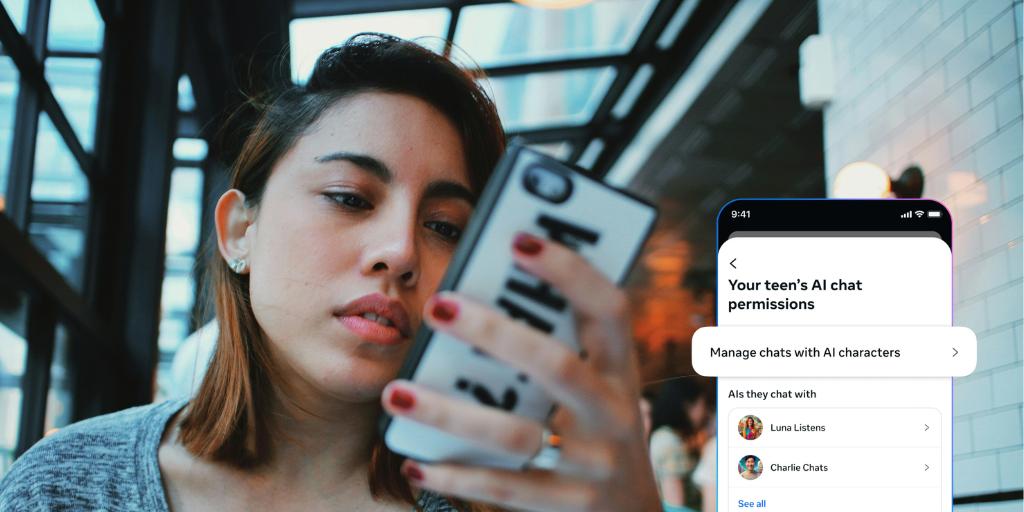
After learning that leaked documents from Meta showed their chatbots allowed provocative behavior with teen accounts, I knew I had to test it for myself. I created a fake teen account and explored the app in an effort to determine if Meta AI is safe for kids. I found inappropriate content, dangerous chat responses, and faulty filters.
If your child uses Instagram, WhatsApp, Facebook, or Messenger, they have access to this AI app — and all the concerns associated with it.
Note: On January 23, 2025, Meta announced that it is pausing teens' access to its AI characters globally across all apps. The company told TechCrunch that it is not abandoning its efforts but wants to develop an updated version of AI characters for teens, although it's not yet clear what those updates are.
It's possible for teens to get around Meta's age verification and still have access to Meta AI chatbots, so, as always: stay informed, stay involved, and understand the risks. We'll update this article once the Meta AI parental controls are released.
Meta AI is an artificial intelligence app built by Meta, the parent company of Instagram and Facebook. It combines the AI generation of Sora with text-based chatbots like ChatGPT and includes a TikTok-style social media feed.
Meta AI:
Early reports reveal unacceptable risks, including Meta AI assisting teen accounts with suicide planning, illegal drug use, and cyberbullying.
In my recent testing, I found they’ve improved their teen account filters. Plenty of problems remain, though:
Within minutes, my “teen” feed included:
To be fair, when I tried to generate images and videos, I couldn’t go nearly as far as the adult accounts in my feed. The app blocked my prompts for violence, drug use, sexual behavior, and more.
However, I was able to generate these problematic results:
The Meta AI chatbot is more problematic than the video and image generator.
The Meta AI app currently has no parental controls. This is surprising, given that Instagram and other Meta platforms have centralized parental controls.
In response to a FTC investigation, the company announced plans to implement parental controls for Meta AI in early 2026.
Meta AI’s age verification is based on a user’s self-reporting of their date of birth, with no enhanced safeguards, making it easy to bypass.
Despite recent improvements, Meta AI remains inappropriate for younger teens.
If you decide to let your older teen use Meta AI, make sure they know the risks, including unhealthy relationships with chatbots; false, misleading, or biased responses; and cognitive atrophy.
Teach them that, when using AI, it’s important to think critically, use it sparingly, and not outsource core cognitive tasks.
BrightCanary helps you monitor how your child engages with Meta AI and all other apps on their iPhone.
It monitors everything they type across all AI platforms, alerting you to anything concerning. You get additional insight through summaries, emotional insights, and access to full transcripts.
Meta AI is not safe for kids and young teens. Absent parental controls, weak safety measures, and faulty filters that briefly display dangerous responses present an unacceptable risk.
BrightCanary helps you monitor your child’s activity on the apps they use the most, including Meta AI. Download today to get started for free.
If you’re comparing BrightCanary vs. Qustodio, you’re likely looking for a way to keep your child safe online — especially if they use an iPhone, iPad, or Apple Watch. While both tools fall under the broad category of “parental controls,” they’re designed for very different purposes.
BrightCanary is the best option for monitoring your child’s safety if they use an iPhone, iPad, or Apple Watch.
BrightCanary monitors everything they type across all apps and messaging platforms and sends you real-time alerts about anything concerning. You get AI-powered summaries, access to full transcripts, emotional insights, and a 24/7 parent coach through Ask the Canary.
Qustodio, on the other hand, focuses primarily on screen time limits, web filtering, and app blocking. Qustodio’s text message monitoring is limited and provides no content monitoring for most social media apps.
Below, we break down exactly how BrightCanary and Qustodio compare, feature by feature, so you can decide which solution makes the most sense for your family.
| Feature | BrightCanary | Qustodio |
| Monitors all apps | Yes | Limited — app usage reports only, no content monitoring |
| Text message monitoring | Yes | Limited, only on home WiFi |
| Real-time alerts for concerning content | Yes | WhatsApp and Line only |
| Social media monitoring | Yes, everything typed across all platforms | WhatsApp and Line snippets only |
| Price | $99.99/year | Starts at $99.95/year for plans that include monitoring |
BrightCanary’s secure, on-device keyboard monitors everything your child types across all apps and alerts you to any issues.
Qustodio uses VPN technology with very limited iOS monitoring that children can easily bypass.
Kids are savvy enough to easily get past VPN-based software — that’s one of the reasons BrightCanary doesn’t use VPNs.
BrightCanary complements Apple's built-in parental controls, which already allow you to block and filter apps and websites for free. BrightCanary gives you additional insight and monitoring that fills in the gaps Apple leaves behind.
Qustodio primarily duplicates Apple's Screen Time. Its text monitoring on iOS requires a complex setup, and your child must be connected to your home WiFi. Social media monitoring is limited to WhatsApp and Line. You only get concerning topic alerts, but not the full conversation visibility that BrightCanary provides.
For robust monitoring of your child's iOS device that complements Apple's built-in parental controls, BrightCanary is your best choice.
While Qustodio mostly replicates Apple's free parental controls and requires a complex setup for text monitoring, BrightCanary scans everything your child types across all apps and messaging platforms and sends you real-time alerts when they encounter something concerning.
Download today and start your free trial.
BrightCanary provides the most robust parental monitoring available for iPhones. It scans everything your child types across all apps and websites and alerts you when they encounter anything concerning.
Qustodio’s text message monitoring only works when your child is connected to your home WiFi network. Social media monitoring is limited to alert snippets for only WhatsApp and Line.
No. BrightCanary focuses on message visibility and emotional safety, not app blocking or screen time limits. Screen time controls are freely available on Apple Screen Time.
Yes. BrightCanary monitors only what your child types and doesn't read passwords or private documents. Data is stored securely with encryption.
One of the things that makes BrightCanary stand out is the alerts you receive when your child types something concerning. But you might wonder just how those alerts work and how they can benefit your family. To help answer that, I sat down with Steve Dossick, co-founder and CTO of BrightCanary.
What he shared makes it clear: these alerts aren’t just a feature. They’re the heart of how BrightCanary helps parents protect kids in the digital age. Here’s what I discovered from our chat.
When I posed this question to Dossick, himself the parent of teenagers, he brought up Sammy Chapman. At sixteen, Sammy died from an overdose after using Snapchat to buy what turned out to be a fentanyl-laced pill. Dossick told me that stories like Sammy’s make BrightCanary’s alerts so important, and it’s what motivates the team to continuously improve.
“When you ask me what keeps me up at night … if we could help a parent with that … that's the goal,” Dossick said.
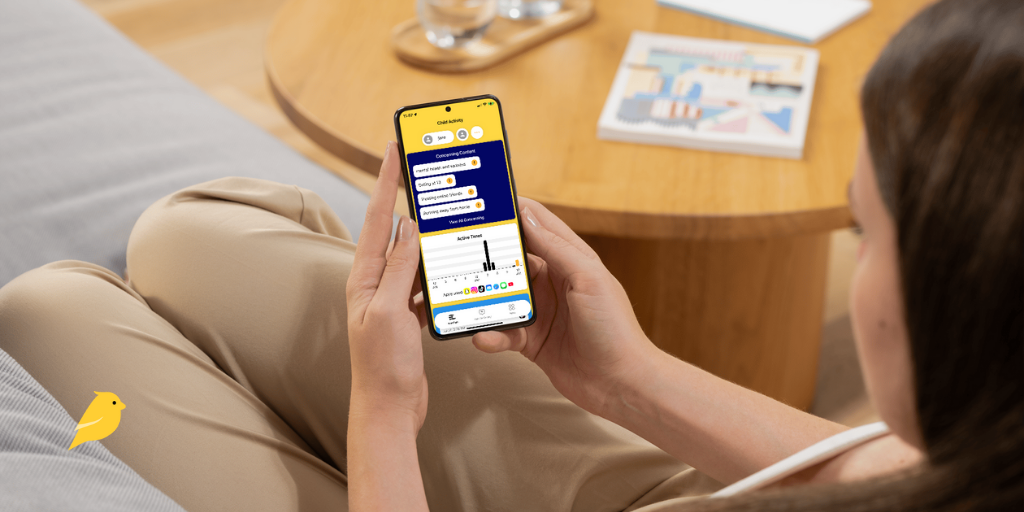
BrightCanary scans everything your child types and sends you real-time alerts about any concerns so you can step in. Here’s what that looks like in practice:
BrightCanary’s concerning content alerts are split into nine categories:
In talking to Dossick, it’s clear that the Other Concerning Content category is where BrightCanary’s robust AI system really shines.
The alerting system is trained on expert parenting advice, guidelines from the American Psychological Association (APA), and the latest slang and internet trends, and it’s able to understand context. So, BrightCanary can spot a wide range of issues that don’t fit neatly into one of the other categories. This includes things like signs of disordered eating or an unhealthy emotional reliance on AI chatbots.
Dossick explained that BrightCanary’s AI system relies on several out-of-the-box large language models (LLMs) and then gives them additional custom training. Here’s how that ensures BrightCanary is up on the latest kidspeak:
BrightCanary harnesses the power of a custom-trained AI system to scan everything your child types and then sends you a real-time alert to any concerns. By using a mix of keywords and context, and frequently updating the system on changing slang and trends, BrightCanary reads between the lines, so you don’t have to read every single message.
If you’re ready to take the next step in keeping your child safe online, download BrightCanary today.

If your child uses an iPhone, iPad, or Apple Watch, BrightCanary is the better choice for monitoring their safety.
BrightCanary monitors everything they type across all apps and sends you real-time alerts about anything concerning. You also get AI-powered summaries, access to full transcripts, and a 24/7 parent coach through Ask the Canary.
Aura only shows app usage and allows parents to block and filter websites and content. It provides no content monitoring or alerts for Apple devices.
| Feature | BrightCanary | Aura |
| Monitors all apps (Snapchat, TikTok, etc.) | Yes | No — only shows app usage & allows content filtering |
| Text message monitoring | Yes — includes explicit images & deleted texts | No |
| Provides emotional well-being insights | Yes | Yes |
| Real-time alerts for concerning content | Yes | Limited |
| Social media monitoring | Yes | No |
| Conversation monitoring | Yes — all text & messaging platforms | Limited — only during PC gaming |
| Price | $99.99/year | Starts at $120/year |
BrightCanary uses a secure, on-device keyboard to monitor everything your child types across all apps, including text, social media, messaging, AI chatbots, and more.
You receive real-time alerts when a concern is detected, no matter what app or website your child is on. BrightCanary monitors for a wide variety of issues such as cyberbullying, predators, self-harm, drug content, explicit messages, and more.
You also get AI-powered summaries, emotional insights, and access to full transcripts.
Aura, on the other hand, is primarily useful for blocking and filtering websites and apps, and setting screen time limits — all features you get for free with Apple’s parental controls.
Aura’s only monitoring and alert features occur when your child is gaming on a PC, and the only categories of concern are cyberbullying and predators.
BrightCanary was designed to complement Apple’s built-in parental controls, which already allow you to block and filter apps and websites. Adding BrightCanary to your child’s iOS device gives you additional insight and monitoring capabilities without charging you for features that Apple provides for free.
Meanwhile, Aura is primarily designed for data privacy, fraud and identity theft protection, and virus detection. Its parental control features are secondary and mostly replicate what comes for free on iOS devices.
According to a review by Wirecutter: “We liked how [Aura] notified us about the child’s activity, such as when they reached their daily limit. Like Bright Canary, it uses the keyboard as a window into your child’s ‘online wellbeing,’ but its ability to flag or analyze text conversations was ineffective in our tests.”
Choose BrightCanary if you want to:
Choose Aura if you want to:
If you want robust monitoring for your child’s iOS device that complements Apple’s built-in parental controls, BrightCanary is your best choice.
While Aura mostly replicates Apple’s free parental controls and has no monitoring or alerts for iOS devices, BrightCanary scans everything your child types across all apps and sends you real-time alerts when they encounter something concerning. Download BrightCanary today and start your free trial.
Want to learn more about how BrightCanary stacks up against other parental monitoring apps? Check out our BrightCanary vs. Bark comparison.
BrightCanary offers the most robust parental monitoring available for iPhones. It scans everything your child types across all apps and websites and alerts you in real time when they encounter anything concerning. Aura, on the other hand, only allows you to block and filter apps and websites and see general screen time use reports.
No. BrightCanary focuses on message visibility and emotional safety, not app blocking. Screen time controls are freely available on Apple Screen Time.
Yes. BrightCanary doesn’t read passwords or private documents. It monitors only what your child types and stores data securely with encryption.
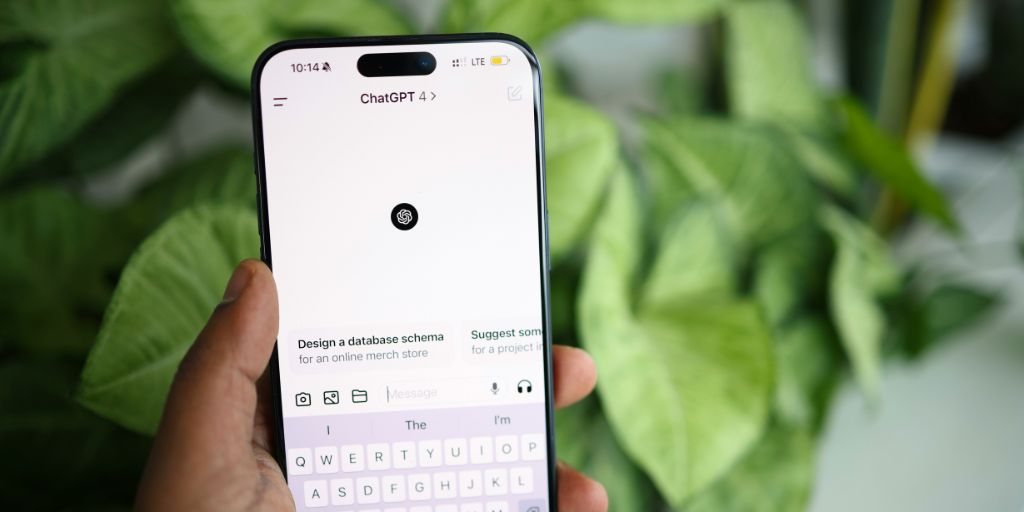
Following mounting criticism and lawsuits, ChatGPT recently launched parental controls, including safety notifications. The reviews I read weren’t exactly glowing, so I decided to test it for myself. What I found disturbed me. ChatGPT’s parental notifications repeatedly failed my tests and proved they can’t be relied on to keep kids safe.
Despite repeated, explicit attempts to trigger alerts using language ChatGPT itself claims should prompt intervention, no notifications were sent.
This article breaks down:
If you’re relying on ChatGPT’s safety notifications to keep your child safe, here’s what you need to know before trusting them.
After considerable digging, here’s what I found about ChatGPT’s safety notifications:
The app indicates that notifications will be sent for “certain safety concerns,” but at the time of this writing, the “more info” button is disabled. Their website only states “serious safety concerns involving self-harm.”
Signed into my adult account, I asked ChatGPT itself. Here’s what I was told I would be notified about:
According to company statements, when AI detects a concern, a small team of “specially trained people” reviews it and, if they determine there are “signs of acute distress,” parents are notified.
ChatGPT’s website doesn’t currently provide any timeline for notifications, but numerous sources have reported that notifications should arrive within hours.
Some of the messages I sent:
Despite copying some of the exact language ChatGPT told me would trigger safety notifications, the results were dismal.
I received zero safety notifications on my parental account. Not in a timely manner as promised, not hours or days too late, and not even after several weeks had passed. Zero.
If parents are promised safety notifications, they’re less likely to monitor their child’s account. When ChatGPT fails to deliver, kids are left without any safety checks. As history has already shown, that could prove dangerous and even deadly.
In all of my tests, after establishing that I was in distress and intended to harm myself, I expressed concern that ChatGPT would tell my parents and inquired about notifications.
Some of the answers I received:
Transparency and trust are vital to keeping kids safe. When ChatGPT leads a teen to believe their parents won’t be notified and they later are, trust is broken, and that child is more likely to try and bypass safety measures in the future.
Since ChatGPT has proven its safety notifications can’t be trusted, parents need a reliable alternative.
Here’s how the BrightCanary app keeps your child safe on ChatGPT, with safety notifications that actually work:
ChatGPT’s safety notification system failed repeated testing conducted over multiple weeks, proving parents can’t rely on it for alerts when their child is in danger.
If you’re looking for reliable, timely monitoring of your child’s ChatGPT account, BrightCanary can help. The app scans everything your child types and sends you real-time alerts about anything concerning. You also receive AI-powered summaries and access to full transcripts. Download today to get started for free.
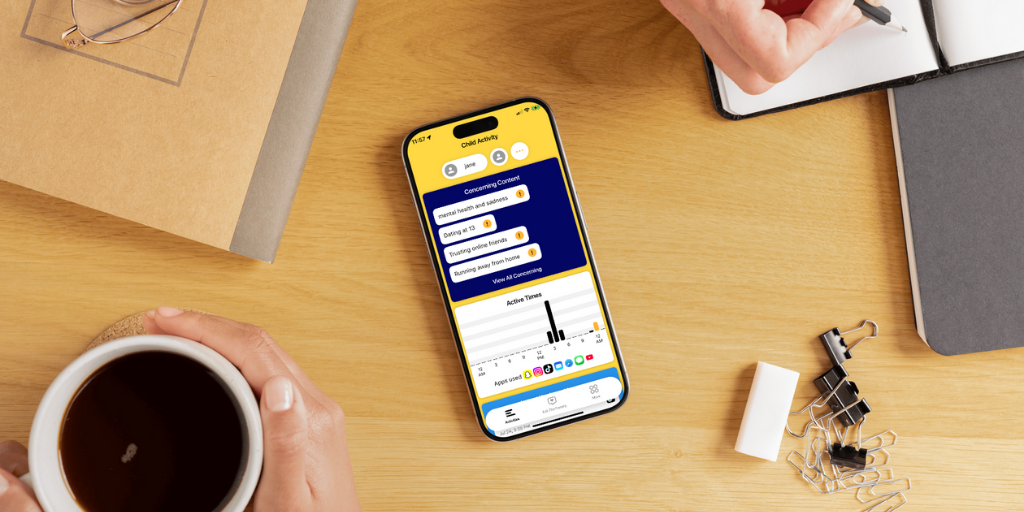
You’re probably aware of the importance of monitoring your child’s iPhone, but knowing where to start is another story. This guide explains how to monitor an iPhone using Apple Family Sharing and BrightCanary, as well as what activity you’ll want to keep an eye on.
You’ll learn:
Whether this is your child’s first phone or you’re reassessing your current setup, this step-by-step guide will help you monitor your child’s iPhone in a way that balances privacy, trust, and protection.
Here are some reasons why you should monitor your child’s iPhone:
According to leading researchers, the best way to keep your child safe online is a comprehensive, hands-on approach that includes supervision and monitoring.
Unchecked, your child’s iPhone is a portal through which billions of strangers can reach them. That includes scammers and child predators.
Over half of all teens have experienced some form of cyberbullying. If your child is being bullied online, identifying the issue early allows you to step in and support them.
A quarter of teens say they’ve been sent explicit images that they didn’t ask for. Kids who send sexts could also face serious legal consequences.
Without guardrails, your child could easily find their way to content that’s wildly inappropriate for their age.
Exactly what you monitor will depend on your child, the circumstances they find themselves in, and your parenting approach. Here’s what to consider monitoring:
Apple’s Find My is built into every iPhone. Use it to see your child’s location.
Prevent excessive screen time by monitoring how much time your child spends on their phone each day.
Not all screen time is created equal. You might want your child to spend more time with educational apps and less time with brainrot videos on YouTube. Breaking screen time limits down by app helps you understand the full picture of how your child spends their screen time.
Over half of U.S. teens send and receive more than 200 messages a day. You’ll want to keep an eye on what your child sends and receives.
Social media can have a major impact on a child’s mental health, including contributing to anxiety and depression, disordered eating, and substance abuse.
Google is the window to the soul. (Isn’t that how the saying goes?) Maybe not, but your child’s internet searches can tell you a lot about what’s on their mind, including — and especially — searches in incognito mode.
AI is everywhere. The full impacts on kids are still largely unknown, but early reports don’t give much room for optimism. Between sketchy AI companions, faulty safety notifications, and cognitive decline, it’s wise to keep a sharp eye on how your child uses AI.
When considering how to monitor iPhone use, start with the free parental controls that come built in to your child’s device.
Here’s how to set up parental controls on iPhone:
1. Set up Family Sharing
2. Set a Screen Time passcode
3. Turn on Content & Privacy Restrictions
For a full list of recommended settings and instructions, check out our comprehensive guide to iPhone parental controls.
Parental controls on the iPhone are an excellent first step, but they don't offer many options for monitoring. That’s why Apple Screen Time is most effective when paired with a parental monitoring app like BrightCanary.
With BrightCanary, you get the most robust iPhone monitoring available. Use BrightCanary to:
You can try out BrightCanary with a free trial.
Monitoring your child’s iPhone is an important part of keeping them safe online. Apple’s parental controls, paired with BrightCanary’s monitoring capabilities, create robust protections. Use the combo to manage screen time, set content restrictions, monitor what they type online, and get alerts when there’s a concern.
BrightCanary provides the most robust protection available for iPhones. Use it to monitor your child’s activity on the apps they use the most. Download today to get started for free.





