
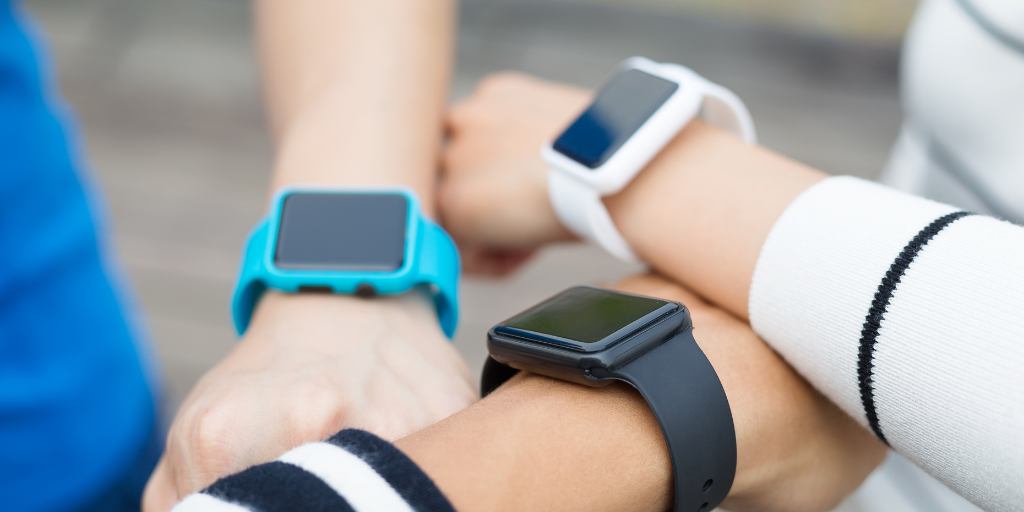
A big topic of conversation lately in my tween-parent cohort is how to delay smartphones as long as possible. Many parents turn to smart watches to fill important communication needs before their kids are ready for phones. But are smart watches safe for kids?
Let’s examine the safety risks of smart watches, which devices have the best parental controls, and the steps parents can take to make smart watches safer for their kids.
Smart watches can be a great first device for kids who aren’t ready for a smartphone. Here are a few reasons parents choose them:
While smart watches are generally safer than smartphones, they’re not risk-free. Here are safety considerations parents need to know:
If you give your child unrestricted access to text on their smart watch, they could easily find themselves talking to unapproved contacts, potentially exposing them to predators.
Batteries die, cell service gets patchy, and GPS isn’t always accurate. If you rely solely on your child’s watch to keep them safe, they’re at risk if the technology fails.
Texting in class is bad news, but texting while crossing the street? That could be deadly. Smart watches are much less distracting than phones, but that doesn’t mean kids can’t get lost in them.
Some smart watches marketed toward kids aren’t properly encrypted, leaving them open to digital attacks. Less reputable brands have had serious issues, like allowing hackers to send messages that appeared to come from a child’s parent, eavesdropping on kids, and intercepting parent-child communication.
The safety risks from a smart watch can largely be controlled with these safety measures:
1. Choose a reputable brand. Look for smart watches that have built-in parental controls and secure encryption. Avoid knockoffs or brands without clear privacy policies.
2. Turn on parental controls. Enable features that set communication limits, manage screen time, and block unknown messages.
3. Set non-digital safety boundaries. Establish rules for how far your child can go alone, who they can contact, and what to do if their watch stops working.
4. Create a digital device contract. Outline when and how your child can use their smart watch, like no texting at school or after bedtime.
5. Use a monitoring app like BrightCanary. If your child uses an Apple Watch, BrightCanary lets you monitor texts (including deleted ones) and get alerts for concerning content. You can also view full transcripts or use AI summaries to understand what’s happening at a glance.
When selecting a smart watch for your child, robust parental controls should be at the top of the list. Here are our top recommendations:
Apple Watches are a great option for kids. You don’t need an iPhone to use one, they have excellent built-in parental controls, and BrightCanary offers unparalleled monitoring on Apple devices.
It’s vital that you set up Apple Family Sharing to enable parental controls, though. If you don’t take this step, your child will have unrestricted cellular service, which means they can be contacted by anyone, including strangers.
The Gabb Watch offers a ton of parental controls, like the ability to manage all contacts. It also has reliable location tracking and is intuitive for users (and their parents).
The GPS tracking is accurate, and parents can set up “safe zones,” so they receive an alert whenever their child enters or exits those areas.
The parental controls on the Fitbit Google Ace LTE are managed through Google Family Link and offer strict options like required parental consent to add all contacts.
Contacts are limited to 20, though, and adding friends can be glitchy, so this watch may be better for younger kids who mostly need to reach parents and other caregivers.
Yes. When properly set up, smart watches can be a safe option for kids who need a device but aren’t ready for a smartphone just yet.
There are some risks to smart watches if they aren’t used properly, such as exposing kids to contact from strangers. That’s why it’s important to select a watch with strong encryption and robust parental controls and teach your child to use it safely and responsibly.
For families opting to give their child an Apple Watch, BrightCanary helps you monitor all the texts they send and receive on their smart watch (including deleted messages) and sends you alerts if they encounter anything alarming. Download the app and get started today.
Most experts recommend introducing a smart watch between ages 8 and 12, when kids start gaining independence but aren’t ready for a smartphone.
Generally, yes — smart watches limit exposure to the internet and social media, reducing risks like cyberbullying or online predators.
Many models allow limited texting or voice messaging, but parents can usually control who the child can contact.
Turn on parental controls, limit contacts, discuss safety rules, and use a monitoring app like BrightCanary for added visibility.
The Apple Watch and Gabb Watch 3e are top options for safety, reliability, and parental control features.
Although nearly half of all teens have experienced cyberbullying, the majority don’t report it. That’s why it’s especially important to watch for signs that your child is being cyberbullied. But it’s an issue that didn’t exist during our childhoods, meaning it can be difficult to recognize. This article will explain various types of cyberbullying, such as doxing and cyberstalking, so you can step in and support your child if you see a problem.
Cyberbullying is any harassing, threatening, abusive, or humiliating behavior that takes place in online spaces such as social media, texts, or gaming platforms.
Over the past decade, the lifetime rate of cyberbullying in the U.S. has steadily increased, from 33.6% in 2016 to 58.2% in 2025.
Parents should be aware of these seven types of cyberbullying.
According to the National Bullying Prevention Center, cyberbullying crosses the line into harassment when the behavior is based on the victim being a member of a protected class.
For example, if a person is cyberbullied because of their race, gender, sexual orientation, disability, or religion, that’s considered harassment.
Example: A teen repeatedly receives hate messages about their ethnicity or gender identity on social media.
The term fraping originated as a combination of the words Facebook and rape, but it has since expanded to apply to all social media platforms.
Fraping is an account takeover. It happens when a bully takes control of someone’s social media account and proceeds to post content intended to humiliate them. Not only is this behavior harmful, it could be illegal. Many states have laws against online impersonation.
Like fraping, masquerading is another form of online impersonation that involves posting harmful or humiliating content. Rather than taking control of the victim’s existing social media account, the cyberbully creates a new online profile impersonating their target.
In the case of one teen from Australia, a bully used the fake account to post mean comments about other kids, making it appear as though the victim was the one being a cyberbully.
Dissing is the act of using private messages or public posts to spread cruel information about a victim in order to ruin their reputation or their relationships with other people.
Cyberbullies who use this approach tend to have a personal relationship with their victim, which allows them to know what gossip will be most harmful.
Doxxing, also known as outing, is the act of revealing private information about a person without their consent in order to cause them harm or humiliation.
It could be anything from sharing sensitive photos of someone without their permission, to posting screenshots of private messages, to taking a video of the victim in a compromising situation and then sharing it on social media.
Take this real-life example of a teen who was filmed, without her knowledge, getting drunk for the first time.
Cyberstalking is using technology to cause another person to fear for their safety. This could include tracking their whereabouts (made easier by platforms like Snapchat which encourage users to broadcast their location), making threats via text, instant message, or social media, or posting threatening statements about them online.
Cyberstalking often happens to people with a large online platform, such as teenage TikTok star Ava Majury, but it can just as easily involve everyday teens, like the ones in this small New Hampshire town, where a man cyberstalked high school girls online for years before being caught.
Also known as roasting, flaming is similar to trolling, where the cyberbully attacks an individual in a group setting, such as a comment thread or chat forum, using profanity and insults with the goal of intimidating the victim or baiting them into reacting.
But while trolling is usually done anonymously or by a stranger, flaming is more personal and direct, often using the cyberbully’s knowledge of the victim to target their attacks.
If your child is being cyberbullied, here are some steps you can take:
Even the most vigilant parents can’t see every online conversation. That’s why BrightCanary was built — to help you fill those gaps.
BrightCanary uses advanced technology to scan everything your child types. You’ll receive an alert if any red flags are detected, such as signs your child is being cyberbullied. You can also access full transcripts which can be helpful as you document the bullying.
Download BrightCanary today to stay ahead of digital risks and support your child when they need it most.
Cyberbullying is on the rise, with nearly half of all teens reporting being victims of such behavior. There are various types of cyberbullying, such as doxing, flaming, and cyberstalking. But no matter what form of online bullying a child is victim of, the experience can be damaging.
That’s why parents should educate themselves on how to recognize cyberbullying, so they can step in and support their child if it happens to them.
BrightCanary can help you monitor your child for signs of cyberbullying by scanning what they type across all platforms and websites they frequent. Download the app today to get started.
The seven most common types include harassment, fraping, masquerading, dissing, doxing, cyberstalking, and flaming.
Trolling is usually anonymous and meant to provoke. Flaming is more personal, often directed at someone the bully knows.
Harassment and dissing are among the most frequent forms, especially on social media and group chats.
Teach digital empathy, monitor online activity with tools like BrightCanary, and maintain open communication with your child.
Certain forms, such as doxing, impersonation, and threats, can violate state or federal laws.
Cyberbullying is harassment that occurs through digital devices, including texts, emails, social media, forums, and gaming platforms. The problem has been on the rise over the past decade and can have a profoundly negative impact on kids’ mental health.
One of the best things parents can do to protect their children is to educate themselves on the risks of cyberbullying. Here are nine facts about cyberbullying in 2025 that every parent should know, plus what you can do to protect your child.
Among U.S teens ages 13–17, 46% report experiencing at least one instance of cyberbullying. If you take into consideration the fact that the majority of teens who experience cyberbullying don't report it, that number is likely to be even higher.
Girls, specifically older teen girls, are more likely to be the victims of cyberbullying, along with LGBTQIA+ students.
While these demographics experience online abuse at a higher rate overall, older teen girls are also more likely to report being targeted because of their appearance.
Regardless of gender, the risk of cyberbullying increases as kids get older. After the age of 10, the likelihood that a child will be cyberbullied increases by 2% every two years.
Has your child been the target of a cyberbully? Here are some tips for supporting them.
Research suggests that victims of cyberbullying are more likely to go on to victimize others.
The gender data on this question is mixed, with some studies suggesting that boys are more likely to cyberbully, and others finding that girls are more often both victims and perpetrators.
While cyberbullying ramps up in the teen years, indicators may be present much earlier. Signs of cyberbullying can appear as early as elementary school.
Children who are victims of traditional bullying are more likely to be victims of cyberbullying.
Here are some tips on what to do if you discover your child has been cyberbullying others.
Given the marked increase in how much time teens spend online, it should come as no surprise that cyberbullying has seen a dramatic uptick as well.
Over the past decade in the U.S., the lifetime rate of cyberbullying has steadily increased, from 33.6% in 2016 to a whopping 58.2% in 2025.
Cyberbullying can happen on any digital platform, including text messages and gaming sites, but it’s most likely to occur on social media.
The always-on nature of apps like Instagram and Snapchat, plus the ease with which bullies can create anonymous accounts to harass others, lends itself to cyberbullying, even when a child is home.
Only 8.9% of cyberbullying victims report it to a parent or guardian. Students are less likely to seek help for cyberbullying than they are if they’re victimized offline, potentially because they worry about social repercussions or losing access to their devices.
Perhaps the most sobering statistics come when we look at how cyberbullying impacts mental health. Cyberbullying has a profound negative effect on not just the mental health of victims, but also on perpetrators.
Communication and monitoring go hand-in-hand when it comes to keeping kids safe online.
Some steps parents can take today:
The prevalence of cyberbullying has increased by more than 20% in the past decade, although that number is likely underreported. Parents should be aware that cyberbullying can increase their child’s risk for mental health issues, including self-harm and suicidal thoughts and behaviors.
In addition to arming themselves with the facts, one of the best things parents can do to protect their child against the harms of cyberbullying is to monitor their online activity so they can step in at the first signs of trouble.
BrightCanary uses advanced technology to monitor everything your child types online and alerts you when there’s a problem, including if they’re experiencing cyberbullying. Download the app and get started today.
46% of U.S. teens have experienced cyberbullying — and experts say the real number may be higher because most cases go unreported.
Girls (especially older teens) and LGBTQ+ youth experience cyberbullying at the highest rates.
Social media is the most common platform, followed by texting and online gaming.
Most victims don’t report it because they fear social consequences, losing device privileges, or worsening the situation.
Parents can talk openly about online behavior, set boundaries, and use monitoring apps like BrightCanary to detect signs of bullying early.
Setting up parental controls on your child’s iPhone can be daunting. We see you, overwhelmed parents. Here’s a step-by-step guide, plus suggestions on how BrightCanary can help fill in the safety gaps.
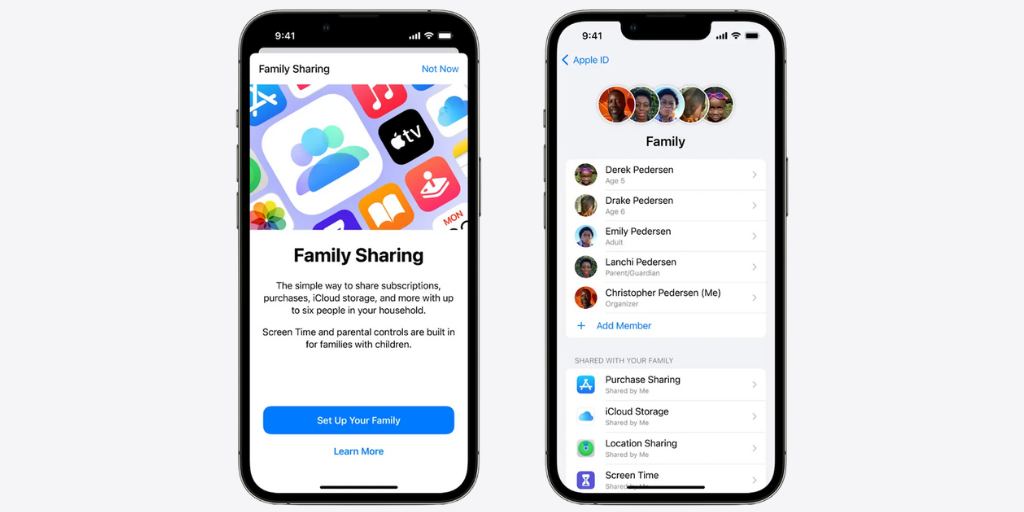
Go to Screen Time > Content & Privacy Restrictions > iTunes & App Store Purchases.
Select Don't Allow or Ask to Buy.
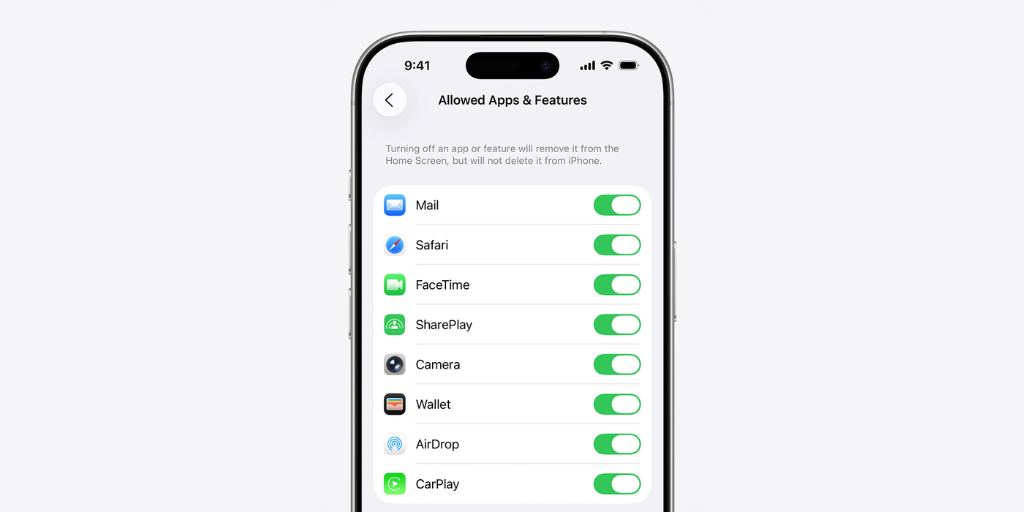
Go to Content & Privacy Restrictions > Allowed Apps & Features.
Select which preinstalled apps your child can use.
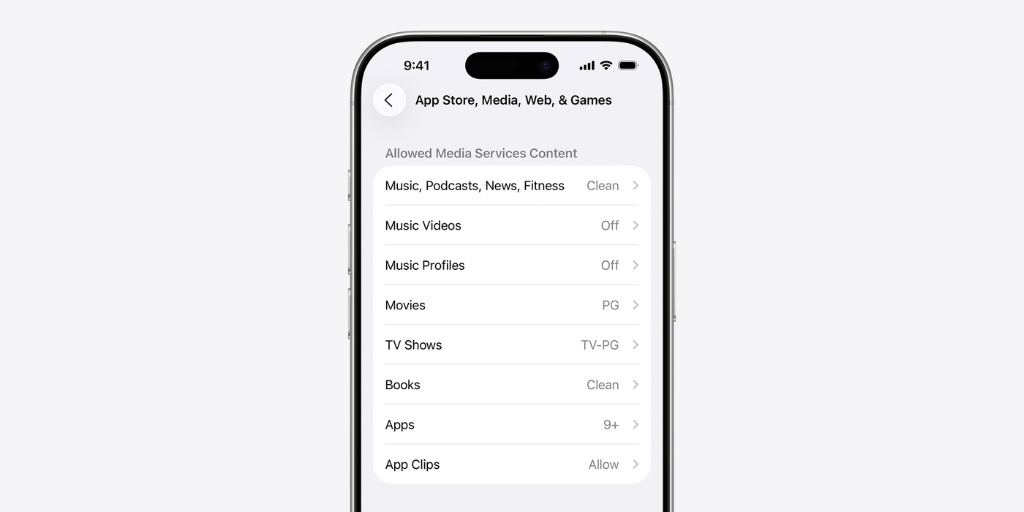
Go to Content & Privacy Restrictions > App Store, Media, Web, & Games. Set filters on these categories:
Go to Content & Privacy Restrictions > Intelligence & Siri.
Select Explicit Language and then choose Don’t Allow.
These settings build on the tween settings above.
Use this once your child starts spending extended time away from home, so you can verify their whereabouts.
Teens may need their downtime and app limits to accommodate schoolwork, so revisit this setting with them as needed.
Teens need increasing freedom as they mature. This will look different for every family, but here are some suggestions to consider:
Apple has excellent parental controls that will get you off to a great start. But it has gaps, especially when it comes to showing you what your child is actually encountering online. BrightCanary fills in the gaps with robust parental monitoring for iPhones, including:
Download BrightCanary and get started today.
The best settings include Screen Time, Content & Privacy Restrictions, and Communication Limits. Together, they allow you to manage screen use, filter explicit content, and control who your child can talk to.
Apple’s built-in tools don’t show message content or app activity. To view what your child types across apps like Snapchat or TikTok, use a monitoring tool like BrightCanary.
Go to Settings > Screen Time > Communication Limits. You can restrict contacts to known friends and family during both screen time and downtime.
Yes. BrightCanary offers full iPhone and iPad coverage, monitoring what your child types across all apps — including Snapchat, Discord, and AI chatbots.
Many parents wait until 8th grade or later. The key is to set up parental controls and monitoring before handing it over.
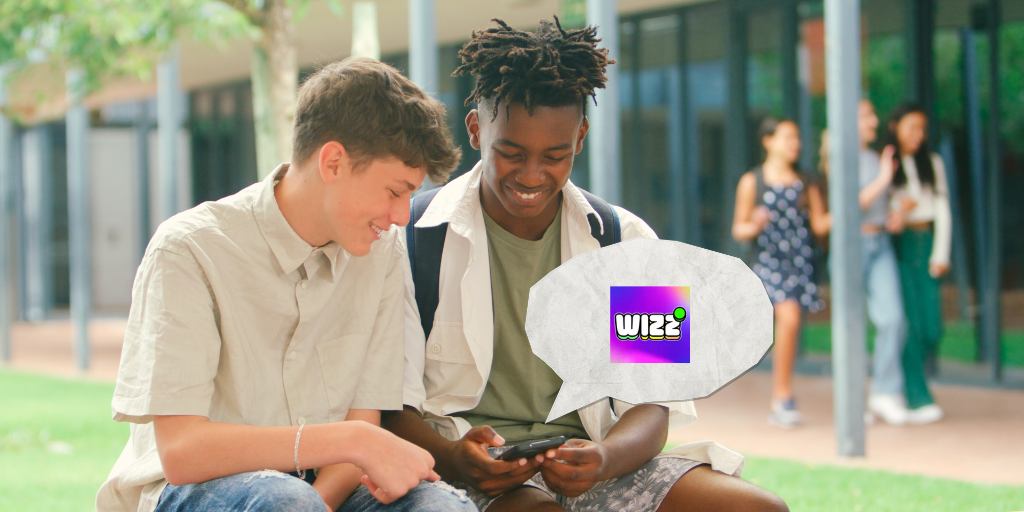
If you’ve overheard your child talk about swiping right on Wizz, it likely raised some questions about the safety and appropriateness of the app.
The Wizz app is not considered safe for kids. While it offers age verification and moderation, Wizz connects young users with strangers, has no parental controls, and has a history of safety concerns.
This guide will explain what Wizz is, explore whether Wizz is a dating app, and look into some major safety concerns for kids.
Wizz is a social networking app for 13-24 year olds that connects users with their peers around the world.
Unlike other social media platforms like Snapchat and Instagram, which emphasize connecting users with people they already know, Wizz is designed to link strangers. Here are the basics:
Although Wizz says it’s not a dating app, it’s been called “Tinder for teens." In many ways, it lives up to that label.
Here’s what we found:
Despite a few strong marks in the safety department, there are enough red flags to make the Wizz app unsafe for kids.
Parents: Is your child using these secret messaging apps to talk to strangers?
If you choose to let your child use the Wizz app, here are some steps you can take to help them stay safe:
The Wizz app is a social networking platform for ages 13–24. Unlike Instagram or Snapchat, the Wizz app connects strangers through swiping profiles and direct messaging.
Wizz says it’s not a dating app, but its swiping feature, romantic marketing, and teen usage patterns make it function like “Tinder for teens.” Many users use it to flirt and look for relationships.
The Wizz app is designed for users aged 13–24. However, it is not recommended for kids under 16 because it connects strangers.
No. Despite strong age verification and AI moderation, Wizz is unsafe for kids due to stranger contact, lack of parental controls, and its history of sextortion and explicit content.
If your child uses Wizz, educate them about online grooming, encourage positive digital behavior, and use a parental monitoring app like BrightCanary for alerts on risky activity.
Despite recent commendable efforts by Wizz to keep kids safe on the platform, major concerns remain. A lack of parental controls, exposure to strangers, and a poor safety track record make the app an unsafe choice for kids.
If parents choose to let their child use Wizz, they should take steps to help them stay safe, such as educating them about the risks and using a third-party monitoring app.
BrightCanary helps parents monitor their children’s activity on the apps they use the most, including what they type on Wizz. Download today and get started for free.

BeReal is a photo-sharing social media app that prompts users to share unfiltered photos once per day. takes a unique approach by prompting users to post at designated times. The goal is to break through the noise of heavily curated feeds. It’s an interesting idea, but is BeReal safe for kids?
While it may seem more authentic than TikTok or Instagram, BeReal has no parental controls, limited privacy features, and high exposure to explicit material. BeReal is not considered safe for kids under 16.
This article explains how BeReal works, what risks parents need to be aware of, and how to help kids use the app safely.
BeReal is a photo-sharing social media app that prioritizes authenticity.
Here’s how it works: Once a day, at a random time, users get an alert that it’s time to post. They have a two-minute window to snap a photo of what they’re doing.
The app takes a simultaneous photo with both the front and back cameras and then creates a collage. Users can retake a photo as many times as they want within the two-minute window, but the app notifies their friends how many times they retook it.
After time’s up, users who post can see their friends’ posts and react with comments and emojis. If a user makes a post within the time limit, they’re allowed to post up to five more times that day.
Users can still post if they miss the window, but their post will be marked as “late.”
Parents: Is your child using these secret messaging apps behind your back?
Parents need to be aware of the following dangers:
BeReal has no parental controls and very few privacy options for users.
Users must be at least 12 to open a BeReal account, but it’s self-reported and therefore easy to bypass.
Here are some steps you can take today to help your child stay safe on BeReal.
Here’s how BeReal stacks up against other popular social media apps.
| Feature | BeReal | Snapchat | |
| Age verification | Easy to bypass | Easy to bypass | Easy to bypass |
| Parental controls | Yes, through Instagram Teen Accounts | No | Private teen accounts, messaging and content restrictions |
| Direct messaging | Yes | Yes, friends only | Yes, with disappearing messages |
| Comments on posts | Yes | Yes | No (interaction is through Snaps, chats, and Stories) |
| Content moderation | Yes, but explicit content often slips through | Minimal, mostly relies on users’ reports | Limited; explicit content present in Snap Stories and Spotlight |
| Explicit material | Prohibited but common | Common. Nudity allowed as long as it’s consensual | Explicit content present in public Stories and Spotlight |
| Reporting tools | Yes | Yes | Yes |
| Private accounts | Yes | Yes | Yes |
No. BeReal has no built-in parental controls. Parents can only adjust privacy settings manually, such as limiting who can connect or turning off location sharing.
BeReal requires users to be at least 12 years old, but the age limit is self-reported and easy to bypass. Experts recommend waiting until at least age 16.
Not necessarily. While BeReal promotes authenticity, it has fewer safety features and less content moderation than Instagram or Snapchat. Teens are at high risk of seeing explicit content.
Turn off “friends of friends,” disable location sharing, teach your child how to block or report users, and use a parental monitoring app like BrightCanary for added protection.
BeReal is a photo-sharing social media app with a fun and unique concept. However, due to the inherent risks of the app and a lack of parental controls, it’s not safe for users under 16.
Parents should help their child use BeReal safely by limiting who can discover them and using a parental monitoring app like BrightCanary.
BrightCanary helps parents monitor what their children type and search on the apps they use the most, including BeReal. Download today to get started.

If you want to share favorite movies from decades past with your tween or teen, without them rolling their eyes or you frantically diving for the remote to hit pause during a scene you completely forgot was so not okay, we’ve got you covered.
These seven nostalgic picks include MPA ratings, content warnings, and why tweens and teens will love them — so you can enjoy family movie night without surprises.

MPA rating: PG
Who it’s good for: 8+
Where to watch: Disney+, Prime Video, Fandango, Apple TV, AMC+, Roku, Google Play
Why you’ll both love it: This outlandish satirical fairy tale will have the whole family laughing, swooning, and cheering. It features likeable characters, strong role models, and positive messages of courage, integrity, and teamwork.
Content warnings: Princess Buttercup is a powerless female, so younger kids might need help understanding the satire. Adults drink, occasionally swear, and there’s a reference to “perfect breasts.” Violence is frequent, but it’s mostly played for laughs, and the fairy tale tone dampens it a bit.

MPA rating: PG-13
Who it’s good for: 9+
Where to watch: Hulu, Prime Video, Sling, Fubo, Apple TV
Why you’ll both love it: This over-the-top intergalactic romp will have the whole family in stitches. Kids will love the gross-out aliens, while parents will appreciate the clever writing and positive role models.
Content warnings: More sensitive kids might find the aliens scary. There’s a ton of violence, but it’s very campy and cartoonish. Frequent swearing.

MPA rating: PG-13
Who it’s good for: 10+
Where to watch: Peacock, Sling, Apple TV, TNT, Paramount+, Roku, Google Play, Fandango
Why you’ll both love it: This comedy is a fun way to expose kids to classic rock and features positive messages about teamwork, following your passion, and believing in yourself.
Content warnings:
Occasional strong language (including “slut”). Adult characters smoke and drink at rock concerts, and there’s mention of “getting wasted.”

MPA rating: PG
Who it’s good for: 10+
Where to watch: Hulu, HBO Max, Roku, Google Play, Disney+, Prime Video, Fandango, Apple TV
Why you’ll both love it: Napoleon Dynamite and his quirky band of misfits celebrate nonconformity and embracing differences. The offbeat humor and deadpan jokes are great for laughs.
Content warnings: Characters insult each other, including multiple instances of the R-word. A Mexican teen faces prejudice. Napoleon’s uncle sells breast enhancement supplements.

MPA rating: PG-13
Who it’s good for: 13+
Where to watch: Hulu, Prime Video, Google Play, Fandango, Disney+, Apple TV
Why you’ll both love it: 10 Things I Hate About You is a fun, feminist retelling of Shakespeare’s The Taming of the Shrew, packaged in a classic teen romcom. It features strong female role models and positive messages about resisting peer pressure and staying true to yourself.
Content warnings: Quite a few sexual references and discussions of teenage sexual experiences, but nothing is shown. Underage drinking and smoking at a party, with a brief reference to teenage drug use.

MPA rating: PG-13
Who it’s good for: 13+
Where to watch: Pluto, HBO MAX, Apple TV, Roku, Prime Video, Google Play, Fandango, Netflix
Why you’ll both love it: Hoop Dreams is a powerful documentary that sheds light on race and class in urban America. It doesn’t shy away from tough subjects as the two young men it follows open up about poverty, violence, urban blight, and teenage pregnancy. This honest portrayal opens the door for families to have important discussions.
Content warnings: Drug use is discussed, and neighborhood drug dealers are shown, but substance use isn’t glorified. There’s some locker room profanity and music with strong lyrics.

MPA rating: PG-13
Who it’s good for: 15+
Where to watch: Prime Video, Fandango, Google Play, Apple TV
Why you’ll both love it: This sweet, funny coming-of-age movie shows a realistic depiction of teen life. While your kiddo might be baffled by the pagers and boomboxes, they’ll relate to the timeless themes of love, authenticity, and the struggle to stay true to yourself.
Content warnings: Teens make out and have sex; although the sex isn’t explicit, it’s discussed in detail afterward. Underage drinking is depicted, but avoiding drunk driving is emphasized. Some swearing.
Some of the best 90s family movies to rewatch with kids include The Princess Bride, Men in Black, and 10 Things I Hate About You. They combine humor, adventure, and positive role models.
Yes. Many 2000s family movies like School of Rock and Napoleon Dynamite are still great choices. Parents should check content warnings for language, mature themes, or outdated jokes. Use parental controls on streaming platforms, such as Netflix, to set guardrails around what your child watches.
Movies like School of Rock (ages 10+) and Napoleon Dynamite (ages 10+) are great for tweens because they feature relatable characters, positive themes, and humor kids enjoy.
Preview ratings and content warnings, set viewing guidelines, and use tools like BrightCanary to supervise what your child watches on their own.
The films on this list are great for family movie night, but it’s a good idea to keep an eye on what your tweens and teens watch on their own, too. BrightCanary helps supervise your child’s online activity, offering AI-powered alerts for inappropriate content on Apple devices, YouTube, Google, and social media. Download today to get started.

Have you overheard your teen talking about their spam Insta and their main and had no idea what they meant? Instagram spam accounts are on the rise, and they bring with them risks to teens. This article will explain what a spam account on Instagram is, the risks parents need to be aware of, and tips for keeping kids safe.
TL;DR: A spam account on Instagram is a second, private profile teens use to share more private posts with close friends, separate from their main account.
In teenspeak, “spam” accounts on Instagram refer to a secondary account with a smaller group of followers where users share more unpolished views of their life. In contrast, their real account (their “main”) portrays a more selectively curated view, like a highlight reel.
There’s functionally no difference between finstas (and their close cousin faketoks) and spam accounts; they’re just two different slang terms for the same activity.
There are numerous reasons your teen might use a spam account, and while some are harmless, others deserve your attention.
Spam accounts aren’t inherently unsafe, but they can be, depending on how your child uses them. Here are some potential risks:
If you discover your child has a spam account on Instagram, here are some actions you can take to ensure they’re safe:
A spam account is a secondary Instagram profile teens create to post casual or hidden content for a smaller, private group of followers.
Teens use spam accounts to share authentic posts with close friends, avoid pressure from their main account, or sometimes hide risky behavior from parents.
Yes. Spam accounts and Finstas are both slang terms for secondary Instagram accounts used to share unfiltered or private content.
Spam accounts can be safe if used for lighthearted sharing, but they carry risks if teens use them to hide inappropriate behavior, post risky content, or connect with strangers.
The safest approach is to talk with your child, set clear boundaries, and use a monitoring tool like BrightCanary to alert you to concerning content across all accounts.
It's not abnormal for kids to create spam accounts, but it can be risky if they use them to hide unsafe behavior or inappropriate content. Parents should talk to their children about the risks of spam accounts and why what they share online matters.
BrightCanary can monitor what your child types on every app they use, regardless of which account they use on Instagram. Download today to get started.

A major topic of conversation among my parent cohort is how to give our tweens increasing social independence in a communication landscape vastly different from the one we grew up in.
We’re beyond ready to stop texting other parents to help arrange hangouts, but most of us aren’t eager to hand our kids their own smartphones yet. And none of us have the landlines available that we picked up to call our friends at this age.
What’s a modern parent to do?
I scoured the advice of experts and conducted an informal poll of my parenting peers to bring you these tips on how to help your child connect with friends before they’re ready for their own phone.
Here are some tech solutions available to help kids connect without smartphones.
High-tech solutions are important to explore in this day and age, but they’re not the only option. Consider these non-digital ways to help kids connect.
Kids these days don’t get to see the adults around them make a lot of phone calls, and most parents aren’t sharing their text messages with their kids. Because they missed out on the passive learning we took for granted, our kids need more active practice to master skills like how to answer the phone and texting etiquette.
If you’re eager to delay getting your child a phone without risking their social isolation, try being an early adopter. If other parents see your child safely using a smart watch or biking to a friend’s house, they may be more likely to put off giving their child a smartphone, too.
If your child has a particular messenger app on a tablet, but none of their friends do, it defeats the purpose. Reach out to the parents of their besties and see if you can all get on the same page about how the kids can keep in touch.
Listen, I’m not saying the minute I loaded my nephew as a contact into the family iPad that my kid used the opportunity to text his cousin a picture of his butt, but I’m not saying it didn’t happen, either. Because we’ve closely regulated who our child can message and we’re keeping close tabs on what he sends, incidents like this can serve as low-risk teachable moments.
Communication independence doesn’t mean no supervision. It means meeting your child where they’re at, supervising them very closely at first, and then slowly loosening the reins as they prove capable.
Parents can give their child alternatives like smart watches, dumb phones (basic flip phones), or a shared family device. These options allow kids to call and text trusted contacts without the risks of social media or unrestricted internet access.
Most experts recommend waiting until around age 13 to give a child their first smartphone, though the right age depends on your child’s maturity and your family’s needs. Before then, consider supervised alternatives such as smart watches or family-shared devices.
Yes. Smart watches are generally safer because they allow limited texting and calling with preapproved contacts but don’t provide full internet or social media access. This makes them a good stepping stone before giving your child a smartphone.
Kids can connect without social media through in-person activities like sports or clubs, old-fashioned playdates, or using safer tools like smart watches or family tablets. Encouraging them to plan hangouts at school or ride bikes to friends’ houses also builds independence.
For kids using alternatives like iPads or Apple Watches, tools like BrightCanary help parents monitor what children type across apps and browsers (for iPads) and what they text (for Apple Watch). BrightCanary provides real-time alerts and summaries, ensuring parents can guide safe communication.
For parents eager to give their tweens and young teens more freedom to connect with their friends without the involvement of adults, but who aren’t ready to give them their own smartphone, there are plenty of options. From digital solutions like smart watches to old-school techniques like riding a bike to knock on a friend’s door, families can find something that works for them.
Regardless of the approach you take, it’s important to set kids up for success by teaching them the skills they need to be safe and monitoring their efforts as they learn their way.
For parents adopting digital solutions like tablets, BrightCanary is here to help. The app’s advanced technology monitors what your child types and alerts you to any red flags, allowing you to give kids the freedom they want with the supervision they need. And when you’re ready to transition your child to a smartphone (with guardrails), BrightCanary has you covered there, too. Download today to get started.
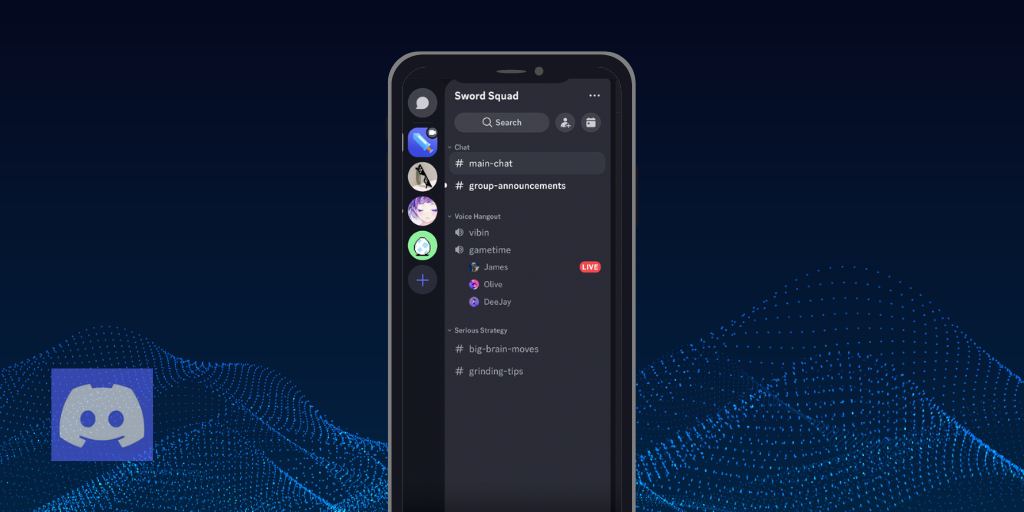
Discord is one of the most popular platforms for teens to hang out online. While it’s generally safe for users over 13, there’s always the possibility of cyberbullying or unwanted contact.
This guide explains how to block someone on Discord step by step, what happens when you block a user, and additional safety steps for parents.
Blocking someone on Discord is simple. Here’s how to do it on both desktop and mobile devices:
You can also block a user by right-clicking their name in the Friends List or within a DM, then selecting Block.
Did you know? You can monitor your child’s Discord activity with BrightCanary. You’ll also get alerts for concerning content, like bullying and harmful messages.
Your child might worry about the social fallout when they block someone, but blocking is a helpful way to prevent someone from continuing to harass your child. Here’s how to explain what happens when your child blocks someone:
In addition to helping them block the user who’s bullying them, here are some other steps you can take to keep your child safe:
Discord strictly prohibits bullying on its platform, and such action could potentially lead to a suspension. Here’s how to report it:
If the behavior continues, having these details will be helpful.
Don’t minimize the situation or make excuses for the aggressor. It’s important that your words and actions convey unconditional support and a desire to stop the bullying.
If the bullying is based on gender, race, or disability, contact the Office of Civil Rights.
If the bullying involves physical threats, contact law enforcement. If your local police department isn’t helpful, contact county or state officials, as they often have more expertise and resources for dealing with technology-related crimes.
Do you have additional questions about how blocking works on Discord? We’ve got answers!
No. A blocked user cannot DM you. In shared servers, their messages appear as “Blocked Message,” but you can click to reveal them.
Signs include being unable to DM them, invite them to servers, or react to their messages. They’ll disappear from your Friends list, and their status will always show as “Invisible.”
Yes. Go to your Blocked Users list or find them in a shared server, then select Unblock.
If the blocked user was previously on your Friend list, they’ll be automatically unfriended when you block them.
Yes. If you block someone on Discord, all DMs from before you blocked them will still be visible.
Discord is generally safe for teens, but bullying and harassment are real risks. If this happens, help your child block the person bullying them and report the issue to Discord. It’s also important to support your child emotionally by making it clear the situation is not their fault.
BrightCanary can help you monitor your child online, including on Discord. Our advanced technology scans what they type and alerts you if they encounter anything harmful, such as cyberbullying, so you can step in and support them. Download BrightCanary today to get started.





