Welcome to Parent Pixels, a parenting newsletter filled with practical advice, news, and resources to support you and your kids in the digital age. This week:
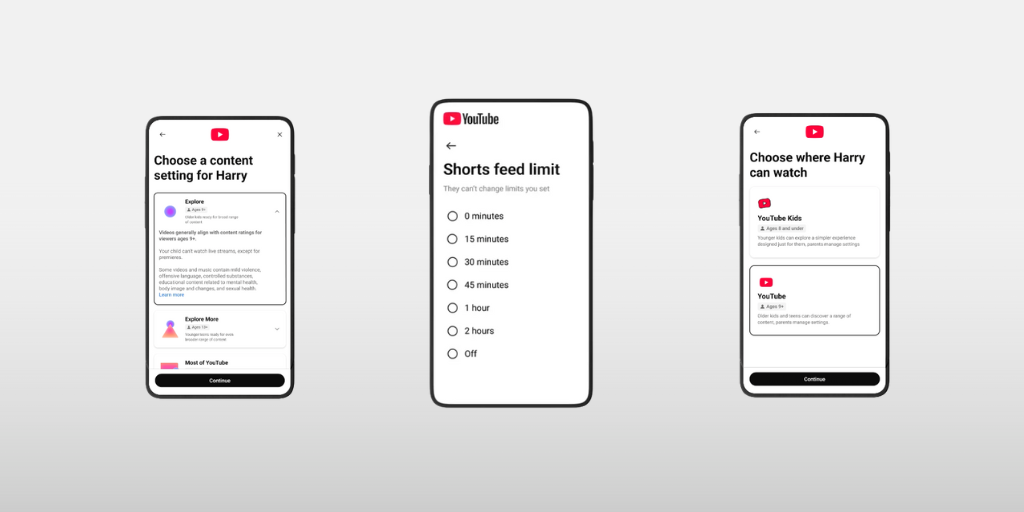
📵 Parental controls are coming to YouTube Shorts: If YouTube Shorts have quietly taken over your teen’s free time, this update’s for you. YouTube just announced new parental controls that let parents set limits on how much time teens spend scrolling short-form videos, calling it an “industry-first feature” that puts parents firmly in control. Parents of supervised teen accounts will soon be able to set daily Shorts limits (yes, even zero), customize limits by situation (homework vs. road trips), and add Bedtime or Take a Break reminders to help teens build healthier habits.
YouTube is also rolling out new quality standards for teen content, developed with child development experts. These standards aim to promote more age-appropriate, enriching videos (like Khan Academy, CrashCourse, and TED-Ed) while reducing brain rot content in teen feeds. Our take: Major companies like Google and Meta have shown that their parental control settings aren’t foolproof, and it’s still possible for teens to get around age verifications. Parents need to stay informed about not only when their kids are watching short-form videos, but also what they’re watching. Here’s how to set parental controls on YouTube.
👻 Snapchat announces expanded parental controls in Family Center: It’s so interesting that so many major platforms are releasing common-sense parental controls, all around the same time, while they’re under intense legal scrutiny and ongoing lawsuits. Anyway! Snapchat’s new parental controls allow parents to see how much time they’re spending on Snapchat, including how that time breaks down across different features (like sending Snaps, exploring the Snap Map, or watching content on Spotlight and Stories). Parents can also see how their teen might know new friends they add. However, you can’t view anything about what they’re sending (you need BrightCanary for that). If your teen uses Snapchat, here’s how to set up Family Center and make the most of those parental controls.
🎮 Can video games actually be good for kids’ brains? New research suggests that certain types of video games, especially action games, may help sharpen attention, learning, and cognitive flexibility, particularly when played in short, moderate sessions. Experts emphasize that most benefits showed up with 30–60 minute sessions, not marathon gaming. Gaming works best as one layer of a healthy life, alongside physical activity, creativity, sleep, and real-world socializing. So, no, this isn’t permission for your kid to play Minecraft overnight for their brain health. Video games aren’t necessarily the enemy, but it’s still a good idea to understand what your child is playing, how often they play, and what interactions they have online. Not sure where to start? Check out our guide to parental controls on Roblox.
🍽️ Screens are hurting kids’ conversation skills, but there’s an easy fix: Recent research shows that the use of phones negatively impacts our in-person interactions, and that’s a problem for kids. Constant phone use is directly eroding kids’ ability to hold face-to-face conversations. Kids in screen-saturated households struggle more with reading nonverbal cues, activate fewer mirror neurons (linked to empathy), and feel anxious about real, unedited conversations. The good news is that you don’t need a full digital detox to help. One of the simplest interventions: device-free family meals to model healthy conversations at home.
Parent Pixels is a biweekly newsletter filled with practical advice, news, and resources to support you and your kids in the digital age. Want this newsletter delivered to your inbox a day early? Subscribe here.
At some point, your child will come across something online that’s upsetting: a violent video, graphic news footage, or content they weren’t emotionally prepared to see. How you respond matters more than the content itself. These conversation-starters can help you keep the door open without making things scarier or shutting them down:
🏛️ It’s falling on states to regulate the platforms that put kids most at risk, and New York is stepping up to the challenge. Gov. Kathy Hochul announced a sweeping plan to expand online parental controls and age verification, encompassing online platforms like Roblox. The proposed protections include setting kids’ accounts to the highest privacy settings by default and disabling AI chatbot features for kids.
🔒 Google is shifting its policy for teen accounts, instead of automatically removing parental controls at 13: Under the company’s planned policy update, any supervised minor will have to get parental approval before they can turn off supervision.
🎨 The ultimate list of 102 screen-free activities for kids (and adults) of all ages.