Welcome to Parent Pixels, a parenting newsletter filled with practical advice, news, and resources to support you and your kids in the digital age. This week:
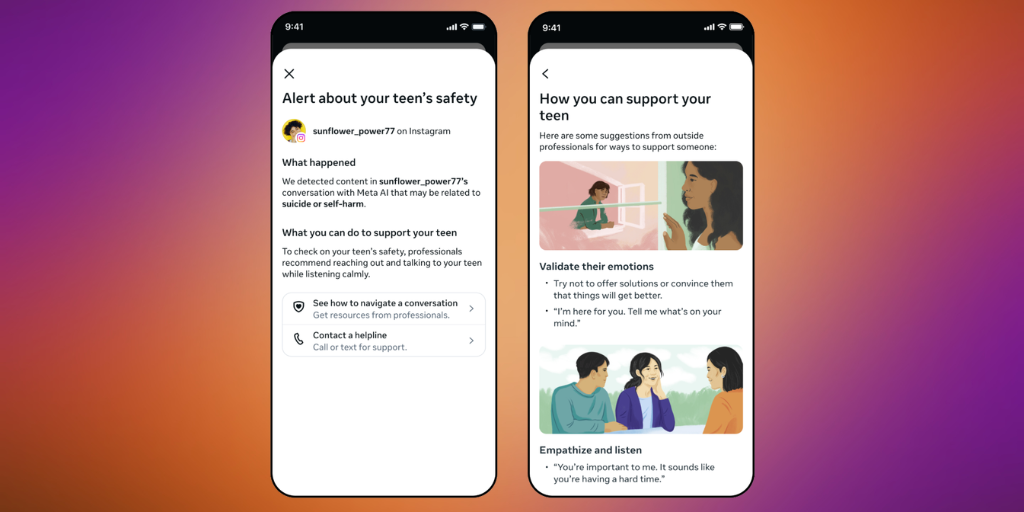
👀 Meta and OpenAI roll out new AI safety features for teens: If your teen uses any Meta platforms (Instagram, WhatsApp, and Facebook), make sure they’re using Teen Accounts. The company announced that parents will be notified if teens talk to Meta AI about suicide, along with expert researchers to help parents approach the conversation. Meta AI is a standalone AI chatbot that is accessible across Meta platforms, and we’ve covered it before (spoiler: not big fans). The company also announced an expansion of its Limited Content setting to the AI chatbot: when parents opt their teen into Limited Content on Instagram, that stricter filter will now also apply to their chatbot conversations, limiting the range of topics the AI will engage with.
The catch is that these features only work if your child is using a Teen Account, which automatically gives users between the ages of 13–17 stricter privacy settings. There’s nothing stopping a teen from creating a secondary account without parental supervision, which is why it’s important to continue supervising your child’s social media activity if you allow them to use it.
OpenAI also announced that parents with linked teen accounts will now receive a notification if their child is kicked off ChatGPT. Teen accounts can be deactivated for violating policies on violent threats or acts of violence. The notification includes a brief explanation of what happened and encourages parents to have a conversation with their teen offline — but, again, all of this relies on setting up ChatGPT parental controls.
It’s good to see that major companies are rolling out common-sense safety settings, but they’re guardrails on a road that many child safety experts think kids shouldn’t be on yet. Common Sense Media rates most AI chatbot use by children as an unacceptable risk, particularly for companionship. Robbie Torney, senior director of AI programs at Common Sense Media, said in a press release: "While companies have focused on necessary safety improvements in suicide prevention, our testing revealed systematic failures across a range of conditions including anxiety, depression, ADHD, eating disorders, mania, and psychosis—conditions that collectively affect approximately 20% of young people. This is about how AI chatbots interface with the everyday mental health of millions of teens."
These safety settings aren’t a set-it-and-forget-it situation. If you let your child use social media and AI, stay involved with what they’re doing. There’s no guarantee that those safety settings work the way they should (and, as we shared in our last issue, more than half of social media safety features aren’t working), and it’s an unfortunate truth that things will always slip through the cracks.
If your child is using AI — which, based on Common Sense Media's research, 86% of kids ages 9–17 are — BrightCanary monitors everything they type across all AI apps, including Meta AI and ChatGPT, and sends you real-time alerts if anything concerning comes up. This works regardless of whether your child is using a teen account, because BrightCanary monitors at the device level, not the account level.
It feels like there’s a new app to worry about every few weeks, right? And with each one comes the same question: “Is this okay for my kid?” Before you say yes (or no), here are five questions worth asking together:
🧵 Threads is rolling out new parental supervision tools through Meta Family Center. Parents will be able to set limits around how much time their kids spend on Threads, manage who can tag their teen in posts, and manage privacy settings and sensitive content filters.
🔑 Free guide: How to talk to your child about passwords. Most parents know they should have access to their child's accounts — actually having that conversation is where things stall. Our free guide walks you through which passwords matter, how to ask for them, and what to say if your child pushes back.
🤖 Is your child asking AI for diet advice? We shared a carousel on Instagram this week about why AI diet advice is dangerous for kids. It includes research showing AI diet plans average nearly 700 fewer daily calories than a dietitian would recommend, and our own writer's testing. Check it out.