Welcome to Parent Pixels, a parenting newsletter filled with practical advice, news, and resources to support you and your kids in the digital age. This week:
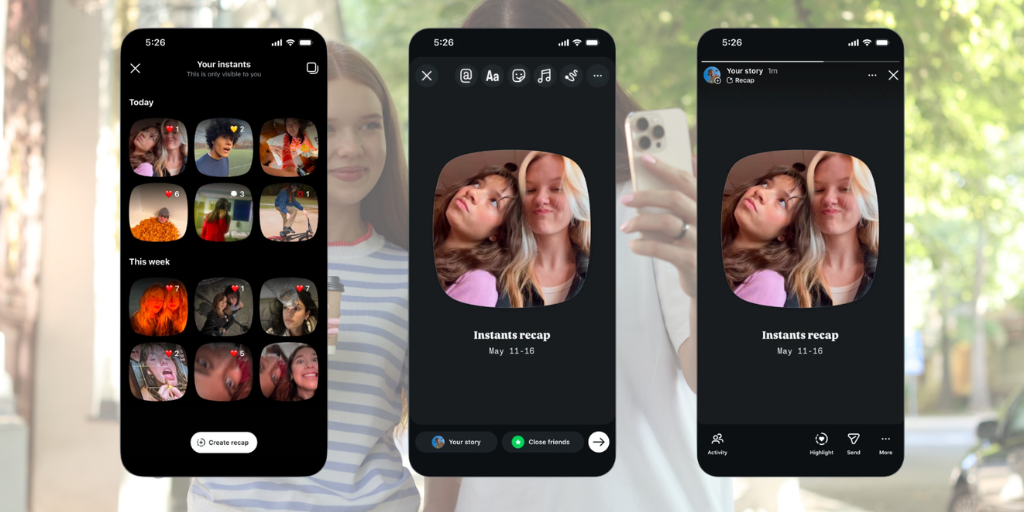
📸 Everything parents need to know about Instagram's new Instants feature: Instagram recently launched Instants, a new way for people to share spontaneous, unfiltered photos with friends — and we now have details on parental controls. Instants is kinda like Snap because photos disappear after someone views them, and friends can react and reply. If your child has a supervised Teen Account on Meta, they already have the following protections in place:
Here’s the catch: Instants is going to ruin someone’s day with an accidental share. The moment your teen taps the shutter button, the photo is automatically sent to everyone on their Friends list (accounts that mutually follow each other), unless they manually switch to Close friends beforehand. Every time. By default. It’s worth having a conversation about what’s okay and not okay to share, like personal information, location, and anything they wouldn’t normally share online. If you’d rather skip the feature altogether, here’s how to turn Instants off: go to your teen's profile → three-line menu → Settings → Content Preferences → toggle off "Hide Instants in Inbox."
In more Meta news: the platform has introduced new parental supervision tools that let parents view the general topics their teen engages with across Instagram, Facebook, Messenger, and Meta Horizon. Those topics might include things like fashion, sports, humor, and other content. To set it up, visit familycenter.meta.com/supervision.
🥸 Kids are getting around age checks, and parents are helping: A new report from UK online safety group Internet Matters surveyed over 1,000 children and their parents about the UK’s Online Safety Act — and found that age verification isn’t exactly working. Nearly half of kids (46%) think age checks are easy to get around, and a third (32%) have bypassed them by using methods like entering a fake birthday or, yes, drawing on a fake mustache. Perhaps most surprising: a quarter of parents (26%) have allowed their kids to bypass age checks in order to use certain apps. Despite the new Online Safety Act protections, 49% of children say they’ve experienced some form of harm online in the past month.
This is the issue with age verification and bans: they don’t cover everything, nor do they actually teach kids what to do if they deal with something dangerous or alarming, like harassment or violent content. The best protection is talking to your child often about online safety, using available child monitoring tools and parental controls, and understanding what content they consume online. Want to know if your child is faking their age to access restricted content? Here’s how to check — and how to talk to them about it.
📱 New data: American kids are getting devices young — with few guardrails: A new report from the Institute for Family Studies paints a pretty striking picture of how early American kids are getting connected … and how little oversight most of them have. By age 11, smartphones are the primary way American kids access the internet, and over 60% have one. Nearly 50% of 3-year-olds use a tablet, iPad, or Kindle. But the restrictions on these devices are minimal. The use of content filters peak at age 4 and decline steadily from there. By age 5, fewer than 10% of kids are using internet-disabled smartphones. By 17, the most common parental control is location tracking. More parents require passwords to make purchases than implement content filters.
There is no set age for screen time or the amount of time kids should spend on devices. The American Academy of Child and Adolescent Psychiatry recommends teaching healthy habits, rather than sticking to certain numbers of screen time hours, for kids 6 and older. But quantity and quality matter. Parenting today is different now, and kids have access to concerning content and interactions within just a few swipes and taps. This is why we advocate for parents to keep tabs on not only how long their kids are using devices, but also what they encounter online. Here’s what to do if you find something alarming on your child’s phone.
Parent Pixels is a biweekly newsletter filled with practical advice, news, and resources to support you and your kids in the digital age. Want this newsletter delivered to your inbox a day early? Subscribe here.
Experts recommend banning devices from the dinner table — partially because it’s prime conversation time, and partially because nobody wants marinara on their iPhone 17. Add these conversation-starters to your rotation this week:
🚫 Minnesota bans AI nudification apps. Starting August 1, apps and websites that digitally alter clothed photos into intimate images without consent will be illegal to operate in Minnesota — the first state in the U.S. to do so. Developers face up to $500,000 per violation, and companies must geoblock Minnesota users. Learn more about the problems with deepfake nudes.
🎵 You can now turn off videos on Spotify. Did you know? Spotify shows music videos with certain songs. Did you also know? Some of those videos contain explicit content. The good news is that you can turn off video content by going to Settings > Content and Display > toggle off Canvas or videos for music or podcasts. This applies across mobile, desktop, TV, and web.
🍎 Health influencers make young people anxious: New Pew data finds that 40% of US adults get health and wellness information from people who record videos talking in front of grocery store aisles, aka social media influencers or podcasts. Among 18–29-year-olds who consume their content, 36% say it makes them feel more worried about their health — not less. Worth a conversation with your teen about how to evaluate health information they find online. Here’s more about how to talk to your teen about social media content and disordered eating.