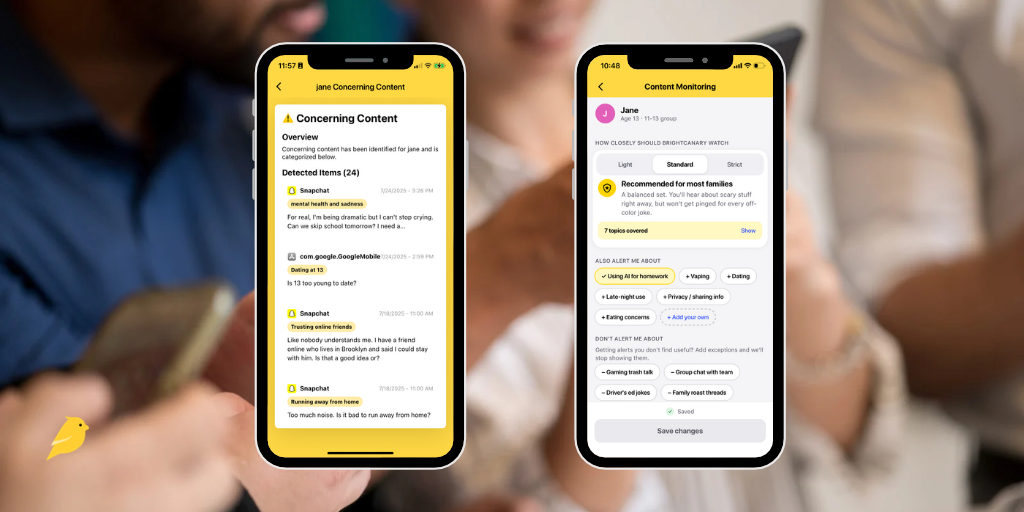
At BrightCanary, we believe in respecting kids’ privacy while also protecting their safety. Our concerning content alerts were designed with just that balance in mind. But you might worry about how your child will react when you tell them about an alert you received. Will they get angry or feel it’s an invasion of their privacy?
I get it. Those concerns are valid. They’re also manageable. Here are some tips and conversation starters for using BrightCanary’s concerning content alerts in a way that’s positive and productive for everyone.
BrightCanary scans everything your child types on their device and sends you real-time alerts to any red flags.
The alert system automatically looks for common concerns like alcohol and drugs, extremist ideology, and weapons. It’s also frequently trained on the latest slang and internet trends, and you can add custom keywords. You can always access full transcripts if you need more context.
Take these steps when you first start using BrightCanary to set your family up for success.
Talk to your child before you ever get an alert. Monitoring your child without telling them is spying, and this breach of trust is likely to upset them. Explain to your child why and how you’ll be using BrightCanary.
Talking points:
If you have expectations about your child’s online behavior (e.g. not bullying or posting provocative photos) be explicit and put it in writing. If something comes up, everyone might not be happy, but at least you’ll be on the same page.
Talking points:
I can’t promise your kid will be happy when you tell them about BrightCanary. (Neutral might be the best you can hope for.) What I do know is that it’s totally possible to respect their feelings while standing firm.
If your child is upset, give them space to air their concerns, compromise if you truly feel it’s right, and hold your ground on what’s important to you.
Talking points:
When you get a BrightCanary alert, what you do next matters. Here’s how to handle those tough conversations.
Be prepared to let some things go. I know, I know … it’s not easy, but mistakes are how kids learn. Plus, if you make a big deal out of every little thing, they’re liable to start tuning you out.
Staying quiet on smaller things that don’t impact their safety (profanity or a new boyfriend they’re keeping under wraps, for example) will give more weight to the things that truly matter.
I recently got an alert that my son was trying to create a code to talk to his friend in secret.
A quick peek at the full transcript revealed it was his cousin, and they were replicating a game they’d started ages ago through snail mail, where they say innocent (though sometimes boy-gross) things.
My point is, before you jump to the worst-case conclusion, get some context.
Speaking of context, when you get an alert, don’t forget to ask your kid what happened. Listen without interrupting, and keep an open mind. Combine their perspective with what you find on the BrightCanary transcript and make a plan. (Hint: It’s okay to tell them you need time to think, as long as you regroup soon.)
Talking points:
Concerning content alerts may bring up strong feelings for you, but freaking out won’t help the situation. When you talk to your child, do your best to stay calm and lead with love.
Remember: they're still learning, and your job is to guide them with as much empathy and patience as you can muster. (Hugs can help, even if your tween or teen will never admit it.)
Talking points:
BrightCanary’s concerning content alerts might bring up big feelings for both you and your child. Transparency and clear expectations help build trust from the get-go. If you get an alert, use BrightCanary’s full transcripts and talk to your child to get the full picture. Lead with love and remember you and your child are on the same team, with a shared goal of keeping them safe.