

Welcome to Parent Pixels, a parenting newsletter filled with practical advice, news, and resources to support you and your kids in the digital age. This week:
📱Apple rolls out new parental controls this fall: Just in time for back-to-school season (and kids asking for new iPhones), Apple is rolling out new parental control features with the release of iOS 26 later this year. The updates will give parents more ways to create safer, age-appropriate experiences for kids and teens on Apple devices.
Here’s what’s coming:
These new tools will be free when iOS 26 launches later this year. In the meantime, you can already access Apple’s built-in parental controls — including screen time limits, app approvals, and purchase restrictions — by adding your child to a Family Sharing group. Here’s how to get started.
🤖 APA releases advisory on kids and AI: Artificial intelligence (AI) is popping up everywhere — but how can parents ensure their kids are using it safely? The American Psychological Association (APA) recently released a health advisory on AI and adolescent well-being, with recommendations for parents, tech companies, educators, and policymakers, and more.
Some takeaways for parents include:
The health advisory also includes common-sense recommendations for tech companies that are similar to ongoing conversations about social media safety: kids need better protections from harmful content, and tech companies should take greater steps to create age-appropriate experiences for their youngest users.
For parents, it’s more important than ever to stay involved in what their kids do online, including what apps they use and what they type. If you don’t feel comfortable talking to your kid about AI, that’s understandable — but kids are using it, and it’s shaping their online experiences.
Here’s a place to start: We put together a guide to talking to your kids about the difference between AI friendships and in-person ones. Check it out.
Coming soon: Want to monitor what your child sends on Snapchat, Discord, Roblox, and more? Keep your eyes peeled on the BrightCanary app 👀
Parent Pixels is a biweekly newsletter filled with practical advice, news, and resources to support you and your kids in the digital age. Want this newsletter delivered to your inbox a day early? Subscribe here.
AI tools can be helpful when used wisely, but they can also blur boundaries and spread misinformation. Whether your child is using ChatGPT to study or exploring AI companions like Replika or Character.ai, it’s important to check in regularly. Here are some conversation starters to help your child think critically, stay safe, and understand the limits of AI.
⏲️ Remember the TikTok ban? President Trump has pushed back the sell-by date again — and he says he has a buyer lined up. The Chinese government would need to approve the sale before it’s official, though.
🛑 The Dutch government recommends that children under 15 stay off TikTok and Instagram, citing psychological and physical problems among kids that use the platforms.
🤨 How can you tell real parenting advice from misinformation on social media? CBS spoke with Emily Oster of Parent Data. Her recommendations include looking for credentials, being mindful if someone is selling an easy solution to a hard problem, and more.
Welcome to Parent Pixels, a parenting newsletter filled with practical advice, news, and resources to support you and your kids in the digital age. This week:
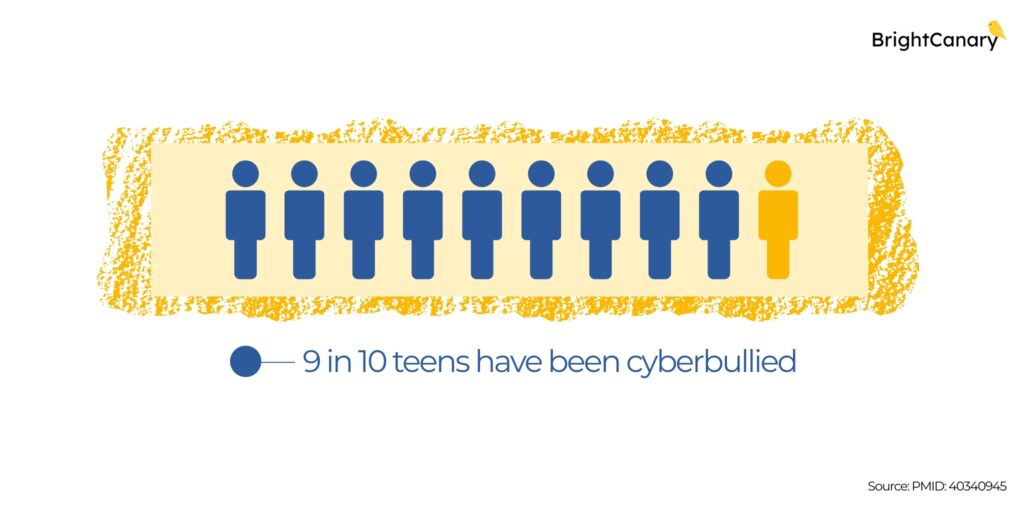
😕 9 in 10 teens have been cyberbullied, study says: If your child is online, there’s a good chance they’ve dealt with harassment. Cyberbullying is defined as willful and repeated harm inflicted through electronic devices, typically through social media, gaming platforms, or chat environments. Researchers surveyed nearly 2,700 middle and high school students in the U.S. and found that cyberbullying is widespread among adolescents, and it can lead to serious psychological harm.
The most common forms of cyberbullying reported by adolescents were:
The study found that cyberbullying of any type (no matter how subtle) could contribute to trauma symptoms, such as PTSD, anxiety, and emotional distress. “What mattered most was the overall amount of cyberbullying: the more often a student was targeted, the more trauma symptoms they showed,” lead researcher Sameer Hinduja said in a news release.
Kids might struggle to talk about cyberbullying because they fear social repercussions, like getting in trouble with their friend group or having their device taken away. If you haven’t already, talk to your child about what to do if someone makes them uncomfortable online and how to deal with a bully. For more tips, check out our guides on how to deal with cyberbullying through texting and what to do if you find out your child is the bully.
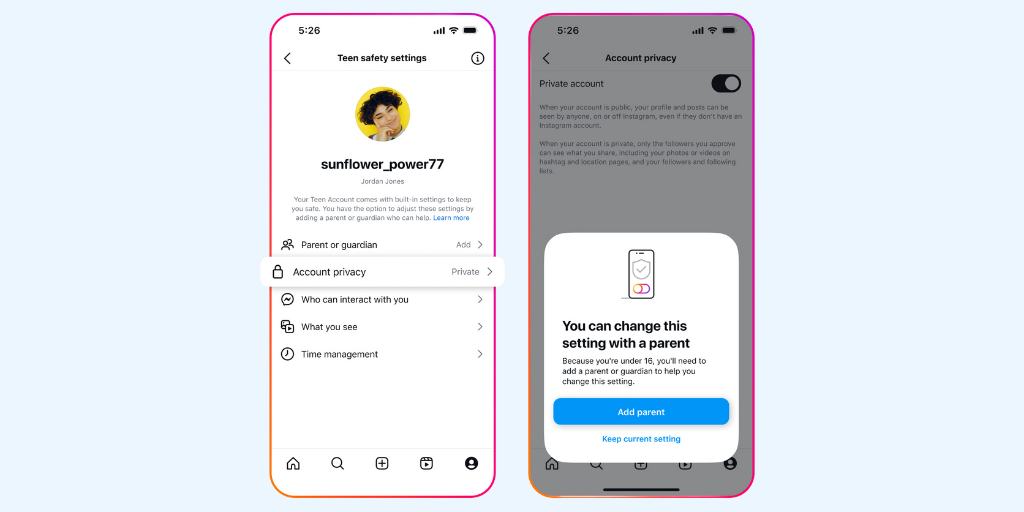
🤦 Instagram Teen Accounts still show sensitive content: Meta’s Teen Accounts are meant to give added protections to teen users, including limiting the ability for strangers to contact them and filter out sensitive content. But users report receiving recommended content that promoted eating disorders, explicit acts, and hate content, despite using Teen Accounts.
“The danger they face isn’t just bad people on the internet — it’s also the app’s recommendation algorithm, which decides what your kids see and demonstrates the frightening habit of taking them in dark directions,” writes Geoffrey A. Fowler of The Washington Post.
This is just another frustrating reminder that social media companies’ solutions aren’t foolproof and can fail in the places they’re meant to protect kids. This is also why a growing number of experts advocate for more parental oversight on their kids’ devices and regular online safety discussions. It’s still a good idea to set parental controls, but monitoring doesn’t stop there — it’s an ongoing series of conversations and check-ins.
Parent Pixels is a biweekly newsletter filled with practical advice, news, and resources to support you and your kids in the digital age. Want this newsletter delivered to your inbox a day early? Subscribe here.
Not all screen time is created equal. While it’s easy for kids to fall into endless scrolling mode, screens can also be tools for connection, creativity, and fun. Here are five conversation-starters to help your tween or teen think about healthier, more intentional ways to use their devices this summer:
🍿 Need ideas for family movie night? Check out this list of new kids shows and movies coming to Netflix this month.
📵 “Teachers don’t have to fight an impossible battle against tech. Students talk to each other between classes. The cafeteria has the sound of conversation. Teachers cover material faster. Cyberbullying has fallen.” Gilbert Schuerch, a veteran high school teacher in Harlem, NYC, shares what happened at his school after they banned phones for a year.
🤯 Did you know that teens use an average of 40 apps per week? That’s a lot to keep up with. We’re working on an easier way to stay informed — stay tuned for news from BrightCanary.

Welcome to Parent Pixels, a parenting newsletter filled with practical advice, news, and resources to support you and your kids in the digital age. This week:
😵💫 Is social media distracting you from connecting with your child? A new study found that excessive social media use makes it more difficult to build a meaningful relationship with your child. Studies have shown that social media can actually benefit parent-child interaction, like watching educational videos or helping parents learn more about their children’s interests … but there’s a limit. Excessive social media use can weaken both the frequency and quality of face-to-face communication. Plus, there’s a significant correlation between overall family stress and social media addiction, which means kids dealing with family conflict and pressure are more likely to relieve their emotions by using social media — which reduces communication and interaction with their parents. Talk about a vicious cycle.
These findings come on the heels of a separate study that found parents’ use of technology in their child’s presence led to negative behaviors in kids under 5, including poorer cognition and social behavior, lower attachment, and higher levels of screen time. Big yikes. The author doesn’t define “excessive social media use,” but we define it as any level of social media use that interferes with your ability to be present with your child (a phenomenon also known as “technoference”). If you’re struggling with your own screen time, here are our tips on how parents can be great digital role models for their kids.
🚫 A majority of kids aren’t reporting online harassment: Seventy-one percent of kids say they’ve experienced harm online, but only 36% say they’ve reported it, according to new findings from Internet Matters. Blocking and reporting tools are meant to help people protect their online experiences by limiting interactions with bullies and flagging inappropriate content for removal, and they’re widely available on platforms like Roblox, TikTok, and Instagram. So, why aren’t kids using them? The report highlighted the following roadblocks in the reporting process: unclear language, confusing processes, concerns about anonymity, and lack of clarity about what happens after a report is submitted.
Blocking and reporting tools are only as good as our ability to use them, and that goes double for kids. While there are steps platforms can take to make their reporting tools better (like making the process clearer and prioritizing reports from kids), parents can play a role, too. Have a conversation with your child about how reporting tools work and when to use them, and make it clear that you’re in this together — your child doesn’t have to navigate problematic comments on their own.
🚨 Kids are destroying Chromebooks for TikTok clout: Kids are letting out some steam at the end of the school year … by vandalizing school-issued Chromebooks. The latest TikTok challenge has students purposefully sticking things in the USB ports, like pencils or pushpins, to short-circuit the system. Some Chromebooks issue a small cloud of smoke. Others ignite. At least one middle schooler is being referred to juvenile court to face charges. Like other viral challenges, TikTok is getting the blame for popularizing the so-called “Chromebook Challenge” — but the reality is that any social platform, like YouTube Shorts or Instagram Reels, can expose your child to ridiculous-bordering-on-dangerous trends. On the BrightCanary blog, we’re sharing some tips for how to talk to your child about TikTok challenges and the consequences of their actions.
Parent Pixels is a biweekly newsletter filled with practical advice, news, and resources to support you and your kids in the digital age. Want this newsletter delivered to your inbox a day early? Subscribe here.
It’s 10 p.m. Do you know where your children are? If they’re in their bedroom watching fan theories about the next Marvel movie on YouTube, this is your sign to set summer screen time limits. At the end of the school year, your kid might be tempted to use their devices 24/7. Here are some ways to talk about screen time limits, why they’re a good idea, and how to set them.
✔️ President Trump has signed the Take It Down Act into law, which would criminalize sharing intimate images without consent.
📵 “Until you’re an adult and able to recognise the many ways in which people act deviantly to advance their own interests, you should not be online. The minute there is instant messaging I think it gets dangerous.” The Guardian spoke with digital natives about access to technology and why parents should rethink giving their kids unrestricted access to the internet and social media.
🙅 Former Surgeon General Vivek Murthy recommends delaying social media access for as long as possible. He cited 16 years old as a benchmark, but the exact age varies from child to child.

Welcome to Parent Pixels, a parenting newsletter filled with practical advice, news, and resources to support you and your kids in the digital age. This week:
🚫 Don’t let teens make friends with AI chatbots, experts say: The AI characters on platforms like Character.ai and Replika call themselves virtual friends — but they’re more dangerous than they seem, particularly for young people. That’s according to a new risk assessment recently released by Common Sense Media, which concludes that all AI social platforms should be off-limits for anyone under 18. Some of the risks include easily bypassed safety features, harmful advice, and readily available sexual interactions despite speaking with underage users.
"Our testing showed these systems easily produce harmful responses including sexual misconduct, stereotypes, and dangerous 'advice' that, if followed, could have life-threatening or deadly real-world impact for teens and other vulnerable people,” said James P. Steyer, founder and CEO of Common Sense Media.
Learn more about the rise and risks of social AI platforms and why teens use them.
🏛️ The Kids Online Safety Act is back: Guess who’s back, back again? Sorry, Eminem — we’re talking about KOSA. The child safety bill aims to boost online privacy and safety for children, creating sweeping regulations that reduce the addictive nature and mental health impact of social media platforms. As a recap, it sailed through the Senate last year but failed to pass the House of Representatives. The new bill, reintroduced by Sens. Marsha Blackburn (R-TN) and Richard Blumenthal (D-CT), contains the same text approved by the Senate, with several changes to “make clear that KOSA would not censor, limit, or remove any content from the internet.” KOSA has received bipartisan support, including endorsements from Apple and X, but has faced criticism from other organizations due to free speech concerns. It’s not clear yet if the House will put the bill to a vote, but we’ll keep you posted.
📱 Teens with mental health conditions spend more time on social media: Why do we talk so often about the risks of unrestricted social media access? Because emerging research shows that it’s hurting our kids. Young people with mental health conditions like anxiety or depression are more likely to compare themselves to others on social media, struggle with self-control, and experience mood changes tied to likes and comments, according to a new study led by University of Cambridge researchers. On average, teens with any mental health condition spent about 50 minutes more daily on social media than those without. Correlation doesn’t equal causation, but these findings suggest that social media may amplify emotional challenges among teens — all the more reason to have a discussion not only about what social platforms your child uses, but also how often they use them and what content they consume. Keep reading about the relationship between social media and teen mental health, or dig into how social media impacts teen anxiety.
Parent Pixels is a biweekly newsletter filled with practical advice, news, and resources to support you and your kids in the digital age. Want this newsletter delivered to your inbox a day early? Subscribe here.
We’re rapidly approaching finals season. Is your teen more stressed than normal? Here are some tips on how to talk to them about managing and navigating academic stress.
📵 It’s time to keep phones out of classrooms, argues Pinterest CEO Bill Ready. “Rather than focusing solely on increasing view time through addictive features, we must help young people be more intentional with how they spend their time online.”
☁️ In the age of smartphones, parents and their kids are losing the ability to daydream — and losing the positive effects of a wandering mind, including self-awareness, creativity, and reflective compassion. Here’s how to fight it. Spoiler: Try being bored more often.
🤝 Share this newsletter to a friend and help them be the most informed parent in the room. Subscribe here.
Welcome to Parent Pixels, a parenting newsletter filled with practical advice, news, and resources to support you and your kids in the digital age. This week:
📉 Teens say social media is hurting their mental health, and many are cutting back: According to a new Pew Research Center report, nearly half of U.S. teens say social media has a mostly negative effect on people their age. That’s a significant jump from 2022, when just 32% said the same. Nearly half of teens (45%) say they spend too much time scrolling their feeds, and 44% say they’ve tried to cut back. Some other sobering stats that will make you want to delete Instagram and Snap:
One teen summed it up: "People seem to let themselves be affected by the opinions of people they don’t know, and it wreaks havoc upon people’s states of mind."
More teens are starting to recognize the toll social media can take — and many are already trying to build better digital habits. Parents can help by modeling those habits, encouraging breaks, and keeping lines of communication open. Talk to your teen about what they’re seeing, who they’re following, and how they feel after being online. Their answers might surprise you.
🤖 Instagram will use AI to catch kids lying about their age: Meta, Instagram’s parent company, announced that it will use artificial intelligence to proactively detect users who have lied about their age when signing up. Instagram has restricted settings for teen users, but it’s relatively easy for kids to bypass age verification. This new feature will look at the type of content a user interacts with, their profile information, and when the account was created to determine if they’re underage. Meta says the goal is to make Instagram safer for younger users, but it also comes at a time when more states are pushing for stronger age verification laws and fed-up parents protest outside of the headquarters of major social media companies.
AI can help flag accounts, but it’s not foolproof. This is a good time to double-check that your child has the right birthdate listed in their account, that they’re using a Teen Account, and that you’ve reviewed their privacy settings. Learn more about how Instagram compares to Snapchat and TikTok in terms of safety settings.
Parent Pixels is a biweekly newsletter filled with practical advice, news, and resources to support you and your kids in the digital age. Want this newsletter delivered to your inbox a day early? Subscribe here.
From social media apps to search history, kids and teens are navigating a digital world that collects more data than they may realize. But not all of it is used in ways they understand or would agree to. Here are a few conversation-starters to help you talk with your child about online privacy.
💸 How young is too young to have a credit card? This essay on Salon explores consumerism among Gen Alpha and the problem with learning how to spend before learning how to save.
🫥 Online interactions will never beat the experience of face-to-face conversations — but when kids grow up mostly with screens, they miss out on interactions that matter, per this essay on After Babel. “The bottom line is that every in-person conversation that is replaced or disrupted by a device is a missed opportunity for kids to feel more connected, loved, and alive in the short term; to foster meaningful relationships over time; and to become even passable communicators by the time they reach adulthood.”
⚖️ Texas lawmakers have advanced bills that would ban kids under age 16 from using social media and would require social media platforms to add warning labels. The bills head to the state’s Senate next.
Welcome to Parent Pixels, a parenting newsletter filled with practical advice, news, and resources to support you and your kids in the digital age. This week:
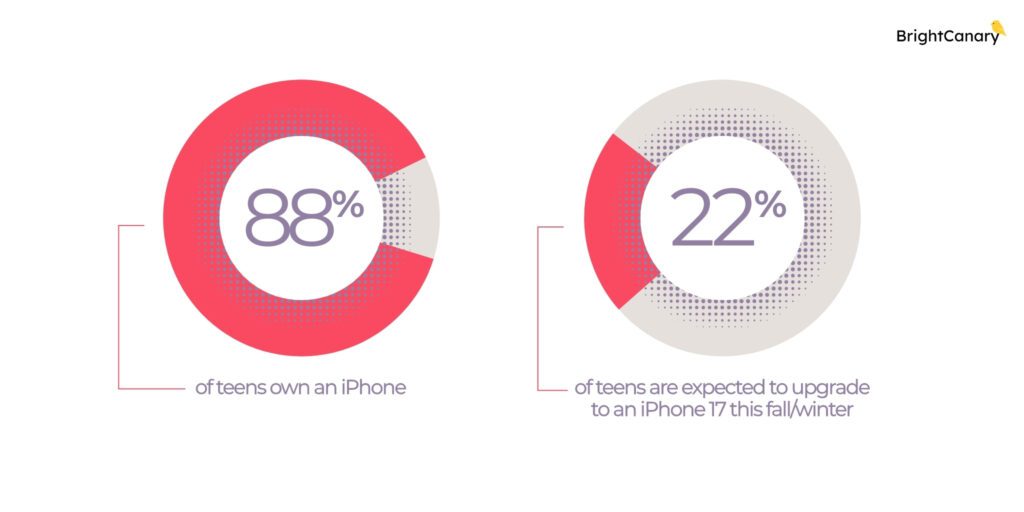
📱Majority of teens use iPhones, Instagram, and Netflix: Android users are feeling lonely these days. An overwhelming majority (88%) of teens own an iPhone, and 25% of teens are expected to upgrade to an iPhone 17 later this year. That data comes from the latest Piper Sandler survey of more than 6,000 teens (average age: 16.2 years). Other highlights from the survey:
Our take: If your teen doesn’t have an iPhone, expect pressure from their friends about it. Now’s a good time to talk about how to navigate peer pressure together, and if you do decide to give them an iPhone, make sure you take time to set up free Apple parental controls.
🪣 Why do kids fall for social media trends? If you’ve seen your feed flooded with AI-generated Studio Ghibli-style images lately, you're witnessing the latest viral social media trend. But why do these trends spread so fast—and how might they influence your teen? A recent Psychology Today article breaks it down:
Herd mentality: Teens are hardwired to seek belonging. When everyone is jumping on a trend, it feels natural, and even necessary, to join in. Not participating feels like being left out of an inside joke.
Identity exploration: Trends offer a low-stakes way for teens to try on different versions of themselves and signal who they are (or who they want to be).
Dopamine boost: Every like, share, and positive comment triggers the brain’s reward system, making social media feel even more addictive.
Not all trends are harmless. Risky challenges like the "Blackout Challenge" or the "Tide Pod Challenge" exploit the same psychological wiring: peer pressure, the search for approval, and the need to fit in. Teens may engage in risky behavior without fully understanding the consequences.
Talk to your teen about why trends are so tempting — and why not every trend is worth following. Remind them that it’s okay to sit out a trend, even if everyone else seems to be doing it.
🥱 Social media before bedtime is wrecking your child’s sleep quality: Here’s yet another reason to keep phones out of the bedroom. A new study found that late-night social media use — specifically, scrolling through emotionally charged (doomscrolling, political posts) and comparing oneself to others — is linked to poor sleep quality. As one of the study’s co-authors, Brian Chin, writes on The Conversation, “In other words, that late-night scroll isn’t harmless − it’s quietly rewiring your sleep and well-being.”
The study focused on people between the ages of 18–30, but the findings are even more alarming when we think about our kids and their developing brains. We recommend keeping phones out of the bedroom and winding down an hour before bed. Bonus points if you do this as a family — here are 11 of our favorite screen-free activities to help everyone unplug and relax before lights out.
Parent Pixels is a biweekly newsletter filled with practical advice, news, and resources to support you and your kids in the digital age. Want this newsletter delivered to your inbox a day early? Subscribe here.
Let’s talk about peer pressure. Whether it’s a friend pushing your teen to upgrade their phone (sorry, green bubble crew) or encouraging them to do something that feels wrong, it’s important to help your teen recognize peer pressure and know when to step back — or ask an adult for help. Here are a few ways to start the conversation.
🔒 Meta recently announced more teen safety features across its platforms: teens can no longer use Instagram Live unless a parent or guardian enables the feature, and any potentially explicit images in direct messages will automatically be blurred for users under 16. (Seems like those should have been implemented years ago, but hey, better late than never.) Instagram’s Teen Accounts, which feature built-in privacy and content controls, are also rolling out to Facebook and Messenger.
🚬 Are Google, X, and Facebook modern-day tobacco companies? Check out this opinion article in Scientific American and let us know what you think.
🎮 Is your child on Roblox? Take a closer look at their privacy settings and who they interact with on the platform. The Guardian reports that Roblox is exposing children to grooming, pornography, violent content, and abusive speech. Here’s our guide to Roblox parental controls.

Welcome to Parent Pixels, a parenting newsletter filled with practical advice, news, and resources to support you and your kids in the digital age. This week:
🙅 Smartphones can be good for kids … if they avoid social media: Initial data from a survey of more than 1,500 children suggests that smartphones can be beneficial to mental health and social well-being — unless Timmy starts using TikTok or any other social media. Researchers surveyed children ages 11–13 and found that:
The findings align with results from a separate study, which found that social media use is associated with a rise in loneliness, and feeling lonely can also lead to more social media use over time — creating a feedback loop that’s hard to break.
Our take: More parents are talking about delaying giving kids access to social media. But it’s important to remember that smartphones themselves can be risky, too, due to risks like texts from strangers and cyberbullies. Use those parental controls, monitor your child’s texts, and teach your child how to use their devices responsibly.
⚠️ FOMO makes young adults more susceptible to online scams: Two recent studies of Instagram users between the ages of 16–29 show that kids don’t want to miss out on a social experience, even if they end up falling for a phishing scam. Researchers found that 82.9% fell for a suspicious link in a message at least once, and particularly for those that appeared to be from a friend or a follower with a message like “Check out this private event happening tonight!” The reason: Fear of Missing Out, or FOMO — the fear of not being included in something fun with their peers.
In an interview with the Wall Street Journal, the lead author of both studies, Jennifer Klütsch, shared the following advice to protect young adults from phishing scams:
🤳 Most parents admit their kids need a digital detox: According to research from the Modern Family Index, a majority of parents (73%) say their kids could need to take a break from screens and devices. Broken down by age:
A “digital detox” is a set period where a person intentionally avoids digital devices, such as smartphones or tablets, with the goal of breaking problematic behaviors and learning balance. Interested in trying out a digital detox for your child? Here are our tips on how to take a screen break successfully. (Psst: It’s even better when you do it as a family.)
Parent Pixels is a biweekly newsletter filled with practical advice, news, and resources to support you and your kids in the digital age. Want this newsletter delivered to your inbox a day early? Subscribe here.
Online scams can happen to anyone, but scammers are getting more creative — and they’re increasingly targeting kids. Parents, talk to your kids about online safety and how to stop a scammer in their tracks. Here’s how to approach the conversation.
🤷 TikTok lives again — for another 75 days, at least. President Trump has extended the deadline for ByteDance to sell its social media platform to an American buyer. Interested purchasers include Amazon, MrBeast, and Perplexity AI.
📲 Utah recently became the first state to pass a law that requires app stores to verify users’ ages and receive parental consent for minors to download applications.
🫥 “Our kids are the least flourishing generation we know of.” We’re sitting with this conversation between Ezra Klein and Jonathan Haidt, social psychologist and author of The Anxious Generation.

Welcome to Parent Pixels, a parenting newsletter filled with practical advice, news, and resources to support you and your kids in the digital age. This week:
▶️ How to support healthier video viewing habits for teens: If your teen uses YouTube — and they likely do, given that 90% of teens report using the site — you’ll want to check out this free guide from the American Psychological Association (APA), which was developed in partnership with YouTube.
The guide helps parents understand the effects of different types of video content and start conversations with their teens about their video viewing habits, including tips like:
🐤 Heads up: BrightCanary monitors YouTube content and helps you stay informed about what your teen is watching and searching.
🛡️ TikTok expands parental control features: TikTok just handed parents a few more tools to fight the bedtime scrolling battle. The app rolled out new updates to its Family Pairing feature, because apparently “go to sleep” wasn’t cutting it. Parents can now:
If your teen uses TikTok, we recommend setting up Family Pairing, confirming your teen’s privacy settings are set to your family’s comfort level, and using those screen time limits. Here’s how to set up Family Pairing.
Parent Pixels is a biweekly newsletter filled with practical advice, news, and resources to support you and your kids in the digital age. Want this newsletter delivered to your inbox a day early? Subscribe here.
Did you know that Apple has a full suite of free parental controls? It’s called Apple Screen Time, and it allows you to restrict explicit content, adjust privacy settings, and more on your child’s device. But before you dive into settings, start with a conversation. Here are some ways to talk with your child about why you’re putting parental controls in place — not as a punishment, but as part of your job to help keep them safe online.
📱 Want help setting up Apple parental controls the right way? Check out All About Apple, an on-demand course from digital parenting expert Sarah Gallagher Trombley (The Digital Mom). It covers everything from what Apple parental controls do to how to use them effectively. Use the code BRIGHTCANARY10 for 10% off!
😮💨 Do you want to spend less time on social media? Is your child struggling to step away from Instagram and Snap? Find out how your phone can help you manage your time online, courtesy of the New York Times.
😳 Dark and strange content is slipping through social media’s filters for kids and adults alike, including violent videos, AI oddities, and other unsettling content, as reported by the Washington Post.
🫥 Does social media push vulnerable teens toward eating disorders? After Babel covers the ways in which social media algorithms can fuel body dissatisfaction. For more on this topic, here are tips on how to talk to your child about videos that encourage an unhealthy relationship with food.
I’ll never forget when my 10-year-old niece sent her first text. It was a simple “Hi,” but it also marked the start of a new chapter for her — and a whole new set of safety concerns for her parents. How would they prevent her from texting strangers? What if someone bullied her in a group chat?
This is why a reliable app for parents to monitor text messages is essential. While Apple offers strong parental controls, they don’t let parents see their child’s actual text messages. Most monitoring apps don’t work well on iPhone, but BrightCanary was built for Apple devices — so it actually delivers.
Here’s how BrightCanary’s monitoring plans work, plus how to set it up and keep your child safe.
When parents think about online safety, they often forget about the risks associated with text messaging. Texting seems like a private form of one-to-one communication, but it really isn’t.
Texts can expose kids to risks:
Plus, anything your child sends in a text thread can be screenshotted, saved, and shared with others.
Text message monitoring is like asking your child about their school friends — who they’re talking to, what they discuss, and whether anyone makes them feel uncomfortable. Supervising texts helps parents stay involved and guide their kids through these interactions, especially as their social circle expands.
You can monitor texts in a few different ways, like spot-checking your child’s phone, scheduling weekly check-ins, or using a third-party monitoring app like BrightCanary. Combining methods generally works best because communication is really key at this point in your child’s digital literacy education — you want to give them the space they need to explore different social dynamics in healthy ways, while also staying on top of anything potentially concerning.
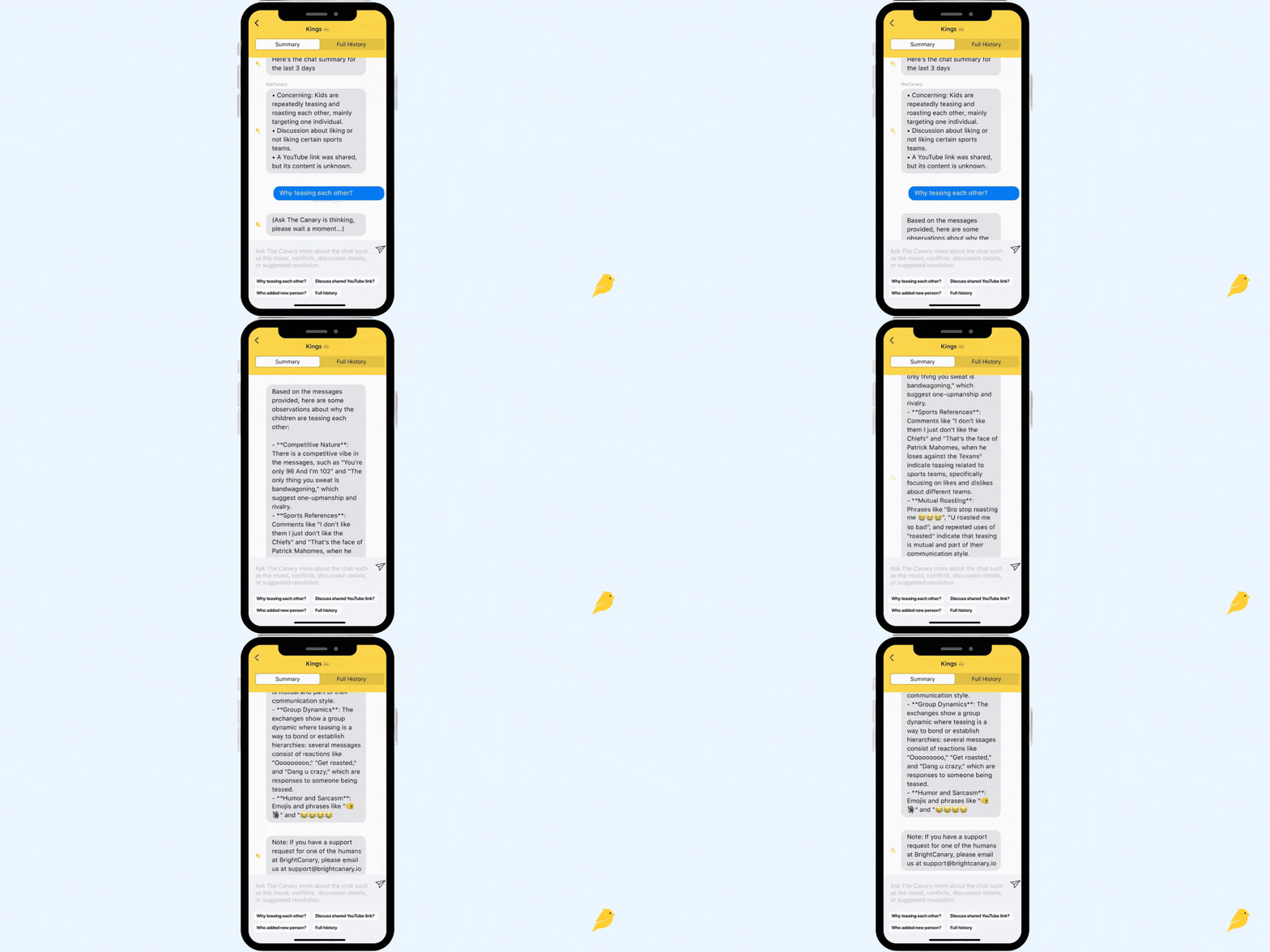
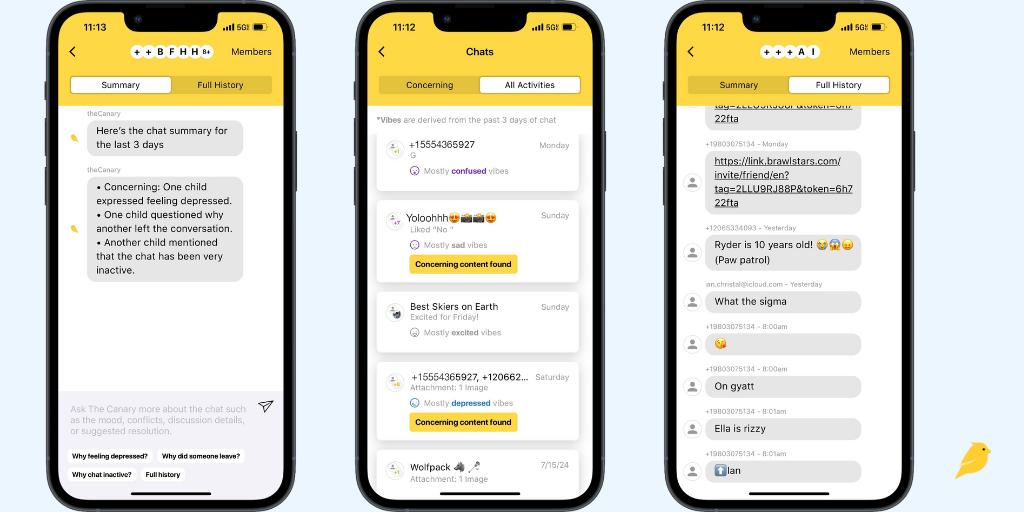
BrightCanary uses advanced AI technology designed for parents. The app’s AI is like a hall monitor, keeping track of what your child types across their favorite apps — including texts, searches, and social media — and flagging anything concerning. You'll get:
BrightCanary helps you stay connected and informed — without needing to check every message manually.
To get started, download BrightCanary on your iPhone and set up your child’s profile. You’ll need your child’s device on hand to complete setup.
The BrightCanary Keyboard is the key to monitoring your child’s text activity across all the apps they use — including iMessage, Snapchat, TikTok, and more.
On your child’s iPhone or iPad:
Once installed, you’ll begin receiving transcripts and AI-powered insights on what your child types in real time.
To access both sides of your child’s iMessage and SMS conversations — including group chats, deleted texts, and shared images or videos — set up your child's iCloud in the app. This plan requires your child’s Apple ID login and a one-time setup using two-factor authentication.
What you’ll need:
Step-by-step setup:
It may take several hours to begin receiving texts while your child’s messages are processed.
Pro tip: If your child doesn’t have an Apple ID, you can create one using Apple Family Sharing. Apple has a handy guide on how to create an account for your child.
AI chatbots offer an anonymous, judgment-free way to ask questions and get more information about important topics. The BrightCanary app’s AI, Ask the Canary, is seamlessly integrated into the monitoring experience.
For example, you might see that your child is using the slang "sigma" in their texts, but you’re not sure what that is — so you use Ask the Canary for more details. All of that can happen in just a few taps in the BrightCanary app.
Ask the Canary is also helpful for general questions about digital parenting. You can access the chatbot in the app and ask your toughest digital parenting questions, like how to handle your child’s first bully or tips on talking to your child about online safety.
It’s normal for parents to feel a little worried about how their child will respond to text message monitoring. You might feel like you trust your child, but you also want to make sure they’re staying safe. It’s important to stay involved for the same reason that you wouldn’t just drop your child off in the middle of a crowded city without any guidance — you want to guide and protect them, while also helping them learn how to navigate any challenges that arise.
That’s why we recommend approaching your child with their safety in mind. Explain how BrightCanary works and why you want to use it. If you’ve already given them a device and they’ve been texting independently without any restrictions, you can always go back and add rules. Some of our parents make BrightCanary a condition for device use — if the child wants their own phone, they also need to agree to parental monitoring.
Set your rules, explain how you’ll work together on this, and put the rules in writing in a digital device contract.
The best app for parents to monitor text messages gives you flexibility — the ability to give your child their independence by only looking at concerning content, and the ability to look at more detailed conversations if the need pops up. After all, there’s no one way to parent in the digital age, and every family has different needs.
BrightCanary gives parents a comprehensive solution for iPhone text message monitoring, and it happens all on your phone. Download BrightCanary on the App Store today and start your free trial.

Welcome to Parent Pixels, a parenting newsletter filled with practical advice, news, and resources to support you and your kids in the digital age. This week:
😬 Instagram accidentally recommends a flood of graphic Reels: Meta, Instagram’s parent company, recently apologized for an “error” after Instagram users reported seeing back-to-back disturbing content on their feeds. The issue impacted Instagram users worldwide, who saw Reels showing gore, violence, and killings. The videos were marked with the “sensitive content” label, but were still recommended back-to-back. Meta recently changed its content moderation policies to be more lax — but an error at this scale is concerning, especially if it increased the likelihood of kids encountering inappropriate material. If your child uses Instagram, it’s worth checking in:
📲 Apple will let parents share kids’ ages to limit app access: Apple recently announced several new child safety initiatives, including letting parents share their kids’ age ranges with apps, improving the App Store’s age ratings system, and making it easier for parents to set up Child Accounts. The features will roll out later this year. Notably, parents will be able to share their child’s age range (not their birthdate), allowing app developers to provide age-appropriate content. This also impacts the App Store: in addition to more age thresholds (Age 4 plus, 9 plus, 13 plus, 16 plus, and 18 plus), product pages will be updated to include details for parents, like whether an app features user-generated content, ads, or parental controls. As for Child Accounts, one of the biggest changes there is that parents can now update their child’s age after it’s created. Curious about Child Accounts and why your child might need their own Apple ID? Check out our guide for more details.
Parent Pixels is a biweekly newsletter filled with practical advice, news, and resources to support you and your kids in the digital age. Want this newsletter delivered to your inbox a day early? Subscribe here.
Your child says they feel weird because they stumbled upon a really graphic video on Instagram. They didn’t mean to see it, but it just popped up on their feed. How do you handle the convo? Here are a few places to start:
😰 Is social media causing your teen’s anxiety? Here are seven steps you can take to help your teen detox from their phone, via Psychology Today.
👋 Are you following us on Instagram? Every week, we share digital parenting tips and advice you won’t want to miss.
👀 Did you know? BrightCanary comprehensively monitors text messages on Apple devices without requiring any extra software on your child’s phone. Get started for free today.





