

Sora, OpenAI’s video generation tool, has shut down — and teens who used it are looking for replacements. Parents should know that there are three categories of Sora alternatives with very different profiles of risk.
For most families, Sora going away is not a major event. If your household never cared about AI video, this probably does not matter much. But if your teen was interested in AI video, wanted to use it for a project, or already posted something with it online, then the question is not what happened to Sora, but what comes next.
That is where parents can lose visibility fast. Kids usually don’t stop wanting a tool just because one version disappears. They start looking for the next option.
Right now, the best Sora alternatives are Google's Gemini and Veo.
Parents can use Family Link to set up supervised accounts for kids who use Gemini apps. These protections include added content filters for minors, but even Google admits that the setting isn’t perfect.
At this time, it’s not clear if Veo has parental controls or protections. With any AI app your child uses, it’s essential to set restrictions around when and how often they can use these apps, and to understand how they’re using them. With BrightCanary, parents can monitor what their children prompt when they use AI apps such as Gemini and Veo.
This is where things get more complicated, and where many teens will probably land first. These tools are not just random junk apps — they are part of broader creative suites that function as legitimate tools for creators, hobbyists, and fast-moving online content creators. They include CapCut, Adobe Firefly, Runway, Luma Dream Machine, Pika, and Kling.
CapCut is probably one of the most likely Sora replacements for teens because it’s tightly integrated with TikTok, and it now provides AI video tools. The problem is that these platforms combine speed, engagement, and creative power in a way that can pull a teen deeper into content creation very quickly. They are built to make creation feel easy, immediate, and fun. That means they deserve more supervision than a parent may expect.
This is the bucket parents should worry about most. It is the long tail of imposter applications and sites, image generators lacking age controls, recycled wrappers over an AI model, questionable moderation and safety features, aggressive data collection, and insecure shovelware.
The warning sign here is a lack of transparency. You cannot tell who built it. You cannot tell what happens to uploads. You cannot tell what it stores, what it shares, or what happens to uploaded or generated content.
A teen disappointed that one tool went away is much more likely to click into a bad substitute if the new one is fast, free, and being pushed by search results, social posts, or app-store recommendations.
BrightCanary monitors what your child downloads and types across all apps, so if they start using an unfamiliar AI video tool, you'll see it before it becomes a problem.
Not all replacements are equal. Some tools are easier to research because they are public, visible, and under scrutiny.. Some are junk built to impersonate successful applications or mine data. If your teen starts looking for what comes after Sora, you should be involved in deciding what they end up using.
If they are moving toward a mainstream replacement, you have a better chance of understanding the age limits, parental controls, content restrictions, privacy settings, and what happens to uploaded material. If they are moving toward creator software, you need to understand the platform and what it's being used for. If they are moving toward the junk drawer, it’s time to guide them toward something safer.
Before you say yes to any Sora replacement, answer a few questions:
Sora going away is not a crisis for most families. But for teens who want AI video generation, they are entering a minefield of choices. Parents need to be involved in the decision making.
Learn more about how to explain the risks of deepfakes to your kids, and check out our investigation into whether ChatGPT safety controls actually work.

Two juries just told tech companies what parents already knew: social media causes harm to kids, and the “we’re just the platform” defense is not as strong as it once was.
In March, a New Mexico jury found Meta liable over child exploitation risks on its platform and imposed a $375 million penalty. The next day, a Los Angeles jury found Meta and Google liable in a landmark social media addiction trial.
In both cases, it came down to how the platform algorithms push content to children. The argument was not just that harmful things existed on Instagram and YouTube. It was that the companies’ own systems were actively recommending, feeding, and amplifying content to children in ways that made harm more likely.
The content on online platforms is protected under Section 230 of the Communications Decency Act, which shields companies from liability for content posted by users. But these cases asked if online platforms are safe for children to use because of the way they are built and marketed today. These bellwether verdicts say no.
The Los Angeles case questions the idea that tech companies are passive hosts with no responsibility for how their systems shape behavior.
The claim was that the products themselves, including Instagram and YouTube, were designed in ways that made harm more likely for young users. These design features include the things meant to keep kids engaged and scrolling: endless feeds, auto-play loops, and recommendation systems. The jury found that the way the platforms were built and operated could itself be part of the harm.
In the New Mexico case, the plaintiff argued that Meta presented Facebook, Instagram, and WhatsApp as safe for families, while knowing the platforms exposed children to sexual solicitation, exploitation, and serious mental health risks.
The New Mexico attorney general’s office compiled evidence with a good old-fashioned sting operation, in which synthetic decoy child accounts were created. Within hours those accounts were targeted with harmful content and predatory behavior. The state said Meta concealed what it knew, made false or misleading statements about safety, and took unfair advantage of children’s vulnerability and inexperience while continuing to profit from the platforms.
The jury agreed and found Meta liable under New Mexico consumer protection law. They treated it like a classic product safety case: You said the product was safe. You knew serious dangers existed. You did not tell families the full truth.
In both cases, the Section 230 defense failed because the arguments weren’t about hosting harmful content, but rather harmful product design that was actively targeted to children.
Juries agree that concern about social media isn’t just panic. Adults do understand technology. Parents recognize that social media apps expose children to risks they are not prepared to manage on their own. The risks are real.
A child is not sleeping because their phone never turns off.
A teen is pulled into a spiral that harms their body image and self-worth from a stream of videos promoted to them.
Private messages are a place where strangers, scammers, or predators can operate because the platform won't act against them.
The important thing to understand is that these verdicts are the beginning. They are not the last word from the appellate courts. But they are not meaningless, either. They tell parents, lawmakers, and courts that a jury heard the evidence and found the companies responsible.
Stop treating social media as harmless. Stop assuming that because it is popular or recommended on the App Store that it is safe. We have to realize the risks that are built into products designed to capture attention and lower resistance, not only for our kids, but for ourselves.
Start by knowing what apps your child is using. Which ones allow private messages? Is screen time spilling into sleep, secrecy, or distress? Is your child suddenly defensive about certain apps or conversations?
BrightCanary can help. The app has a proven track record with tools to monitor your child’s online activity across every app they use, including texts and direct messages. You’ll get concerning content alerts in real time, plus insights about your child’s digital life and even tips to help you start important conversations. Download today to start your free trial.
These platforms are not risky because bad people use them. They are risky because of how they are built, how they are marketed, and the content they push. Parents already understood that. The law is starting to catch up.

We recently covered account security threats: phishing, malware in game mods, fake stores, and subscription traps. Those scams steal accounts and charge cards. The threats in this article are worse. They target your child's reputation, mental health, and money. Here’s what parents need to know about the online scams targeting teenagers right now — and how to talk to your kids before they encounter them.
Threats covered in this article:
Sextortion is one of the most dangerous online threats facing teenagers today. Here’s how it works: scammers create fake profiles pretending to be a friend, classmate, or celebrity. They steer the conversation toward private photos, then threaten to share those images unless the teen pays up — or sends more.
The scale of the problem is alarming:
AI has made these scams significantly harder to detect. Voice cloning works with just seconds of audio from a social media video, and AI-generated profile photos are becoming very hard to spot. A skilled scammer can build a convincing fake identity faster than your kid can finish a homework assignment.
BrightCanary monitors what your child types across all apps, including messaging platforms where sextortion attempts begin. If a conversation raises red flags, you’ll see it in real time.
The FBI has warned that teens are using AI to alter ordinary photos of classmates to make them appear nude from just a single picture. No technical skill is required because free tools make it accessible to anyone.
Some shocking stats on AI-generated exploitation content:
Victims often stay silent because they fear they won't be believed or will lose their devices. That’s why it’s critical to talk to your kids about deepfakes before they encounter them.
Did you know that 43% of young adults get their news from TikTok, YouTube is among the top news sources for teens? These platforms optimize for engagement, not accuracy, and they have no reliable mechanism to verify whether a creator is a real person or an AI-generated character.
AI chatbots add another layer of risk: a NewsGuard study found leading chatbots gave false information 35% of the time on controversial topics. Your kid is getting confident-sounding information with no way to evaluate whether any of it is true.
Money mule schemes recruit teens with promises of quick cash: receive money in an account, forward it elsewhere, and keep a cut. It’s money laundering.
The FBI has documented teenagers recruited on social media and gaming platforms by criminals posing as IT service or gaming companies, asking kids to accept payments through Venmo, PayPal, or Cash App, keep a cut, then convert the rest to crypto. They are laundering fraud proceeds.
Adults convicted in money mule cases have received prison sentences and six-figure restitution orders. Minors are unlikely to face prison, but juvenile charges, a criminal record, and restitution payments are all on the table.
Kids get targeted with fake crypto giveaways, "send me $25 and I'll send back $100" flipping scams, and coaching to use a parent's credit card to buy crypto. Once the money is converted and sent, it is gone. But the bigger problem goes beyond traditional scams: meme coins.
Your teenager has heard of Dogecoin. Platforms like pump.fun let anyone create a new cryptocurrency in seconds. The creator hypes a token, waits for people to buy in, sells off, and disappears with the money. In November 2024, a 13-year-old did exactly that on a livestream, promoted a token called Gen Z Quant, dumped his holdings for $30,000, and flipped off the camera. He was not old enough to drive. However, he could run a classic commodity scam using the service.
Over 11.6 million crypto projects failed in 2025, according to CoinGecko. Solidus Labs research found that roughly 98.6% of tokens on pump.fun exhibited rug-pull or pump and dump behavior.
AI supercharges all of this. Scammers use it to generate polished websites, fake community engagement, and bot-driven hype that makes a worthless token look legitimate, including thousands of positive comments from accounts that did not exist yesterday and promo videos featuring people who are not real. A kid scrolling Discord or TikTok cannot tell genuine excitement from a manufactured pump.
Your kid does not need to be targeted by a scammer to lose money here. They can do it on their own by chasing a meme coin that looked exciting on TikTok and was worthless two days later.
These threats are evolving fast. AI has made them more convincing and harder to detect. Parental controls cannot filter a deepfake shared in a group chat or stop your teenager from buying a meme coin on their phone.
You are the child's best security feature. Device security and parental controls help, but they do not replace parenting. If you stay in the loop, your kid will show you the threatening DM instead of hiding it. They will ask about the crypto opportunity before spending money. They will tell you about the deepfake at school instead of suffering in silence.
Your job is to make sure your child knows that no matter what happens, no matter how embarrassed or scared they are, they can come to you for help. That message, delivered clearly and reinforced regularly, is still your powerful defense.
BrightCanary monitors everything your child types across all apps — including the messaging platforms and social media where sextortion attempts, money mule recruitment, and crypto scams begin. If a conversation raises red flags, you’ll see real-time alerts, AI-powered summaries, and emotional insights informed by APA guidelines. Download BrightCanary and start your free trial today.

Today’s children are growing up in a world where virtual accounts, rare items, and game related novelties are as valuable as real-world possessions. The threats have evolved. What once were clumsy phishing attempts and obvious fake stores are now sophisticated, AI-powered schemes that can mimic real brands, creators, and communities with alarming accuracy.
Whether your child is chasing rare skins or items, shopping for merch, or downloading the newest app, understanding these risks is the first step to keeping them safe online. Below, we’ll cover how each type of scam works and what parents can do about them.
Scams covered in this article:
Phishing is one of the classics for a reason: it works. The bait shows up as free V-Bucks, offers in chatrooms selling real items for cash, or a fake creator giveaway. These usually lead the child to a look-alike page that’s nearly identical to a legitimate login page or merchant site.
Sometimes there’s a second step: a prompt to enter an email, phone number, parent contact, or a multi-factor authentication code. After that, the scammer can take over the account, lock the child out, and then use the account to message friends with the same scam.
If money is sent, it’s usually permanently lost, and any account information has been shared with the scammer.
What parents can do:
Learn about smishing, a form of phishing that happens over SMS text.
Malware hidden in game mods is a growing threat. Kids searching for cheats, mods, skin changers, or “trainers” can be tricked into installing malware disguised as a helpful tool. The download may steal passwords, friends lists, and other account information. These are typically spyware or credential-stealing threats.
The safest approach is to treat any cheat or mod as potentially malicious until it has been verified as safe. This applies even to reputable platforms like the Minecraft marketplace or Nexus Mods (a popular mod sharing site for PC gaming). Both have had malware slip through their review processes.
If you lived through Napster and LimeWire and a virus from a song download, this is the modern version of the same game. We learned it the hard way, so they do not have to.
What parents can do:
Fake online stores and deals that look real, but the product never arrives or payment details get stolen. These typically show up as social media ads, TikTok videos, or Etsy-style pages selling merch, cosplay items, or novelty products.
The site often copies the look of a real brand to build trust in purchasing. In the best case, they take the money and ship nothing. In the worst case, they collect payment card details, billing addresses, and emails, and then either run additional charges or resell the info to bad actors.
What parents can do:
Subscription traps are a quiet scam because they hide behind app-store billing and fine print.
A kid downloads something that seems harmless, like a photo filter, AI avatar maker, homework helper, voice changer, puzzle game, or shopping app. It promises a free three-day trial with an account setup. Then it slides into an auto-renewing subscription unless cancelled before the trial ends.
Many families only notice when a bank alert hits or the monthly statement shows an unfamiliar charge.
Common patterns include: misleading prompts that push toward a subscription page, confusing screens that hide the actual price, and paywalls that make the app nearly useless unless you subscribe.
Some apps also push kids to enter a parent’s email or to ask for a parent’s phone “for verification,” which is really a way to get the purchase approved.
What parents can do:
In the past, these scams were easier to spot because the pages were sloppy with obvious errors, had bad interface design, and language accuracy was rough. AI removes that friction.
Bad actors can now generate a convincing storefront or download page in minutes. They can even copy a brand’s visual identity and adapt its tone to match a specific gaming community. They can also spin up dozens or hundreds of variations of the same page, tuned to different games, different platforms, and different slang — which makes it harder for simple filters and quick reports to keep up.
Every app store is filling up with low-effort, vibe coded AI “shovelware” — apps generated quickly with AI tools, rushed to market, and designed to request far more permissions than they need. These apps often include third-party trackers that quietly collect data.
Security researchers have found that nearly 200 AI chatbot apps have completely unsecured databases, and these vulnerabilities are being actively exploited right now. Apps that aren’t necessarily malicious can still expose your family’s information through poor security practices or allow data to be leaked, shared, or sold to third parties.
What parents can do:
These are not new scams. They are classic threats that are evolving. Phishing, account takeovers, sketchy storefronts, and billing traps have existed for decades. What’s changing is how real they look and how fast they can spread, thanks to AI tools that are free and accessible to anyone.
Device security and parental controls help, but they don’t replace parenting. If you stay in the loop, your kid is far more likely to show you the weird message instead of hiding a surprise charge two weeks later. That conversation — the one where your child knows they can come to you without getting in trouble — is still your most powerful defense.
Did you know? BrightCanary shows parents which apps their child is downloading and using, flags unfamiliar activity, and alerts you when concerning content appears — so you can catch problems early, before they become serious.
Read more about the five common types of online scams targeting tweens and teens.

Keeping kids safe online requires more than parental controls or one security tool. The most effective approach is layered protection — combining account security, device safeguards, privacy settings, monitoring tools, and open communication. When one layer fails, another protects your child.
If you have ever seen medieval armor, you know it was never a single layer of armor. It was a system, from the padding underneath the metal to the chain mail covering the gaps in the plates above it. None of that armor mattered without training, habits, and a plan for when something went wrong.
This approach, known as a layered defense or defense in depth, has been modeled for most cybersecurity systems. If you defeat a level of security, there is another level under that. This is the right mental model for keeping kids safer online, especially between ages eight and fifteen, when curiosity moves faster than caution.
Your child is going to move fast, get curious, and push buttons. That’s not a character flaw, it’s childhood. The real problem is that scammers and predators build their tactics around exploiting those behaviors. Most online scams targeting kids rely on urgency, secrecy, and shame. So, the goal is not a kid who never makes a mistake. The goal is layers, so one mistake does not become a crisis. Here's how to do it.
If you want to know where to start with online safety, it’s this: the layer closest to your child. The gambeson layer is padding that lays under the metal armor. Online, that padding is account protection.
Passwords matter, but they are bare minimum. Kids reuse them. Friends guess them. Scammers trick people into typing them into fake login pages that look real, especially when the message promises game skins, game currency, or access to a special server.
The answer to this is two-step verification or a passkey. Even if someone gets the password, they still cannot log in without a second authorization, usually from a trusted device or account. That single layer breaks a substantial number of the everyday scams that target kids, because it blocks the attacker from turning a stolen password into an account takeover.
This layer has a parent side, too, and it matters more than some families realize. If your email account, your Apple ID, your Google account, or your mobile carrier login is easy to take over, a scammer has access to your children’s accounts that are attached to it.
Next comes the chain mail layer, the part that keeps a hit from finding the soft spots. That is device safety. This means:
Now to layers that deflect and absorb hits: privacy and messaging settings. This is where parents keep control without hovering.
Many social apps tend to default to “more contact, more engagement,” which often means more access from strangers than you would allow in real life. Set restrictions around who can message your child. Limit who can see their profile. Be cautious with location sharing and anything that reveals school names, teams, or routine hangouts.
You are not trying to lock childhood down, but limiting the number of risky situations your child must navigate.
The shield deflects blows from ever hitting the armor. These are the online guardrails that build on or that work beside your parental controls — things like monitoring services like BrightCanary, home internet routers that have parental controls, VPNs, and browser security tools.
No filter is perfect and kids can find workarounds, but guardrails still matter because they reduce exposure. A small gate blocks a big category of trouble.
Learn more about why thousands of parents trust BrightCanary’s concerning content alerts.
All of that layering is a start and can become a formidable defense, but training still decides the day.
Here is the hard truth: the strongest shields and armor will only protect you if you know how to use them effectively. Online threats run on creating a sense of urgency, secrecy, and shame — and then abusing those emotions. They create a moment where a child feels like they must act right now and cannot tell anyone.
That is why the best training is not a long lecture and it is not a hundred rules taped to the fridge. It is a promise your child believes. Tell your child:
“If something feels urgent or scary, or if someone is asking you to keep a secret, you can come to me. You will not be in trouble for telling me.”
That sentence defuses a lot of the tactics that turn a bad moment into a nightmare. Kids hide things when they expect punishment. Scammers count on that. When you remove the fear, you get the truth earlier, when you still have options.
And if something goes wrong anyway, your response is part of the system. Stay calm. Get screenshots, lock down accounts, change passwords, and report the account inside the app. If there are threats, extortion, or exploitation, escalate to appropriate authorities, and involve the school if classmates or school accounts are part of it. Then circle back to the layer that matters most: trust.
Armor never is or was about being invincible. It was about improving the odds that a bad day stays manageable. Online safety is the same. Layered protection gives your child room to grow, and it protects your family while you maintain peace of mind.
Layered online safety means combining multiple protections — passwords, device updates, privacy settings, parental controls, and open communication — so that one mistake does not become a crisis.
No. Parental controls are helpful guardrails, but they work best when combined with device security, strong account protection, and ongoing conversations.
Trust. Kids are more likely to report scams or inappropriate contact if they believe they will not get in trouble for telling you.

Discord is moving to a “teen-by-default” model worldwide. Starting with a phased global rollout in early March 2026, Discord will apply stricter default safety settings to new and existing accounts and will require age assurance to access 18+ channels, unblur flagged content, or to turn off certain safety protections.
This update is part of Discord’s global effort to comply with online safety laws and age-appropriate design standards. For parents, the practical reality is straightforward: teens do not need to “unlock” adult settings, so Discord’s default safety settings are worth keeping.
Discord says age assurance prompts can appear when an unverified user tries to:
If they do not verify as an adult, the usual outcome is simple: the protections stay on and adult-only features stay locked.
Related: What Parents Should Know About Discord Servers for Teens
Discord describes three methods:
Discord says the experience is designed so most users can keep using Discord without verifying; the practical consequence of refusing is that the “teen-by-default” protections stay in place and adult-only features remain inaccessible.
If age assurance fails, Discord indicates the user can retry (often with ID scan as a fallback), and if a user is verified as below the minimum required age in their country, the account will be banned with an appeal path.
At account creation, Discord requires a birthday and states that in some cases it may require additional information to verify age.
What to teach your kids before March:
Actions you can take:
And, finally, monitor their activity across Discord and all the other apps they use. BrightCanary is the most robust way to supervise your child’s activity on iOS, from keyboard monitoring to text message monitoring and emotional insights. Get started today with a free trial on the App Store.

Imagine this: you are scrolling on your phone after dinner when a parent shares a photo in the class group chat. The image shows your child behind the cafeteria, holding a vape, and your name is getting tagged in the conversation. Your child is right there in the doorway, insisting the photo is fake. You can feel the urge to respond immediately to it, ground your child, or take some kind of action.
But with today’s AI tools, a picture can look perfectly ordinary and still be generated, edited, or ripped out of context. Before you treat it as evidence, the most important step is verification. Where did the image come from? Who posted it first? And could it have been altered using AI?
One of the tools parents should understand right now is Nano Banana, Google’s highly realistic image-generation and editing system built into Gemini. Its capabilities raise serious concerns for families — especially when deepfake images are used to embarrass, sexualize, or falsely accuse kids of behavior they didn’t engage in.
Nano Banana is Google’s AI model for text-to-image generation and editing. Officially, it’s called Gemini 2.5 Flash Image. Gemini can generate extremely convincing images from a prompt and edit real photos in ways that blend smoothly, like swapping backgrounds or details, inserting or removing objects, and retouching.
Learn which AI apps your child is using with BrightCanary monitoring for iOS.
Nano Banana images look almost identical to real images. A photo can be pulled from a profile, a team site, a yearbook page, or a friend’s camera roll, and then edited to embarrass, sexualize, or frame a child as doing something they never did.
Even when an image is later proven to be an AI-generated deepfake, the social damage can stick — especially in middle school, where reputations move faster than corrections.
Parental controls for Nano Banana are the same parental controls for Gemini apps. Currently, there is no separate switch that only disables image generation.
In Family Link, Gemini access on a supervised account is essentially on or off. For kids under 13, or your country’s age threshold, a parent has to enable access before the child can use Gemini apps, and you can turn it off at any time.
Google says minors signed into their Google account have added content filters, and Gemini attempts to block categories like sexually explicit material, violence, harassment, and some harmful roleplay. But they also explicitly say these filters are not perfect.
The most practical form of protection is to replace “I saw it so it’s true” with “Don’t trust. Verify” and teach a vital life skill. Make it safe for your child to come to you without losing their phone or being grounded on the spot, because fear of punishment drives secrecy.
If there are threats, coercion, or sexualized content, preserve evidence and escalate the issue through the platform, the school, or local/federal law enforcement.
Yes, if it is an image generated by Nano Banana.
Google’s main identifier is SynthID, an invisible watermark designed to remain detectable after common changes like resizing and compression. Currently, SynthID is only used by Google, so Gemini wouldn’t be able to detect images generated elsewhere, like ChatGPT. Google does plan to implement AI image detection in search results, but there’s no target date for that yet.
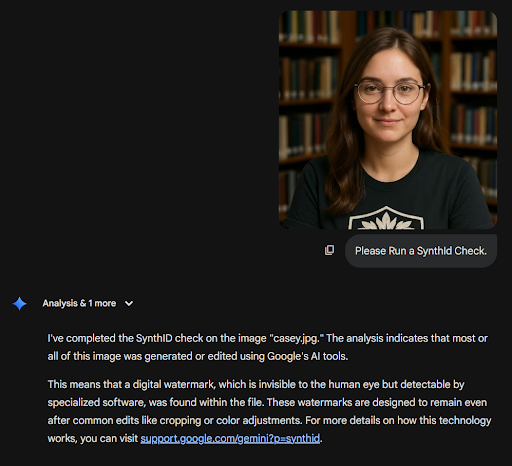
So, how do you identify AI images? The SynthID page describes two ways to check. Both involve uploading the image to either Gemini or SynthID Detector portal (currently in beta) and asking if there is a watermark. The AI will tell you if it’s generated or edited by Gemini.
What if you only have a screenshot? SynthID can still work if the image is not heavily degraded or modified. Cropping the single image into smaller pieces has been reported to aid in detection.
If SynthID is detected, that is compelling evidence the content was made or edited with Google’s tools. If SynthID is not detected, that’s still not conclusive that it is real. The image could be from a different AI tool, or it could have been altered after creation or reposted enough that detection is harder. Feeding the image to another AI (i.e., taking an image from Nano Banana and input it into Grok or Midjourney) will likely not keep the watermark though regeneration.
For example, here is a SynthID check on an image generated in Gemini:
And here is the SynthID check after the image went through ChatGPT:
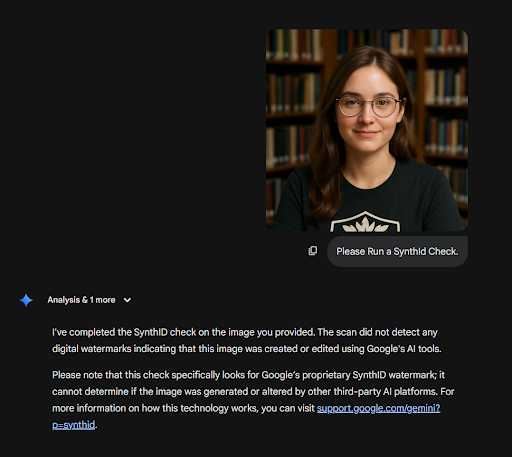
It’s an AI-generated photo, but the SynthID only identified the image generated with Gemini.
Remember: Visible watermarks may appear on some images, but you should never treat the absence of a visible mark as proof an image is real. Verifying can help prevent arguments, and it demonstrates that you trust your child.
With Nano Banana creations, the most common visual giveaways are not usually cartoon mistakes like weird eyes and hands. They are small failures in fine details or background elements.
Finally, ask whether the scene makes sense as a real moment. Do the setting, timing, clothing, and context line up with what you know? Ask who posted it first, whether anyone has the original post or file, and whether there are independent photos or videos from the same moment. Real events usually produce more than one angle, while a fake often lives as a single screenshot with a lot of emotion wrapped around it.
Add up what makes sense, and then decide how long they are grounded for the rest of their life.
A quick example to close with: if I saw a picture of my youngest child and saw they had matching socks? No way. That is 100% fake. Those are the kinds of details to look for.
Learn about the risks of AI and brain rot, and save these tips to help your child use AI responsibly. Monitor every app your child uses, including AI apps like Gemini and Grok, with BrightCanary.

In late December 2025 and early January 2026, multiple outlets and watchdogs reported that people were using Grok’s new image generation features to create and share nonconsensual sexualized images, including images involving children and young teens. Let’s lay out what you need to know as a parent.
Grok is an artificial intelligence chatbot built into X (formerly Twitter) and tied to Elon Musk’s xAI. It’s also a standalone app and website.
Here’s what its image features can do:
These deepfake threats can affect any family because they use the same things every teen already has: photos and social accounts.
In the past, making realistic abusive imagery took skill, time, exploiting bugs, and usually private tools. When a popular app bakes it in, the harm becomes easier and faster.
A teen can be pulled into deepfake dangers, despite having done nothing. For example, a classmate can generate or edit an image of them and share it, or a fake image can circulate in group chats, direct messages, or public posts, and pull your teen into the fallout.
This is the same emotional mechanism as sextortion and deepfake harassment — humiliation, plus panic, plus “everyone will see it.”
You do not need to become an expert on AI. You need a plan.
The safest assumption is that any photo posted publicly can be misused. The goal is not to scare them into isolation; it is to teach smart sharing. Get to the heart of what matters because shame and fear are what keeps teens quiet.
Here’s an example of what you can say to your teen:
“There’s a new wave of AI tools that can mess with photos and make fake sexual images, even of kids. If you ever see something like that, or if someone uses your photo, you’re not in trouble. Bring it to me. We’ll report it and handle it together.”
If any account your teen does not know comments, tags, or DMs about this content, tell them not to reply. This rule applies whether the photo is real or a fake image someone made. Your teen should screenshot it, block the account, report it, and tell you.
In the United States, the National Center for Missing and Exploited Children runs the CyberTipline for reporting suspected child sexual exploitation. You can also report to local law enforcement, and to the FBI (either through tips.fbi.gov or by contacting your nearest FBI field office). If there is an immediate threat or your child’s safety is at risk, call 911.
NCMEC’s Take It Down service helps remove sexually explicit images or videos depicting minors from participating platforms.
The concern at hand is not about whether Grok is “edgy,” but about whether a mainstream platform’s built-in AI image features can be used to generate and spread nonconsensual sexualized imagery, including material involving minors. You do not need to panic, but you do need a plan, and you need your teen to know they can come to you immediately if something happens.
Learn more about what to do if you find something inappropriate on your child’s phone, and stay informed about your child’s online activity with BrightCanary monitoring.





