
Imagine this: you are scrolling on your phone after dinner when a parent shares a photo in the class group chat. The image shows your child behind the cafeteria, holding a vape, and your name is getting tagged in the conversation. Your child is right there in the doorway, insisting the photo is fake. You can feel the urge to respond immediately to it, ground your child, or take some kind of action.
But with today’s AI tools, a picture can look perfectly ordinary and still be generated, edited, or ripped out of context. Before you treat it as evidence, the most important step is verification. Where did the image come from? Who posted it first? And could it have been altered using AI?
One of the tools parents should understand right now is Nano Banana, Google’s highly realistic image-generation and editing system built into Gemini. Its capabilities raise serious concerns for families — especially when deepfake images are used to embarrass, sexualize, or falsely accuse kids of behavior they didn’t engage in.
Nano Banana is Google’s AI model for text-to-image generation and editing. Officially, it’s called Gemini 2.5 Flash Image. Gemini can generate extremely convincing images from a prompt and edit real photos in ways that blend smoothly, like swapping backgrounds or details, inserting or removing objects, and retouching.
Learn which AI apps your child is using with BrightCanary monitoring for iOS.
Nano Banana images look almost identical to real images. A photo can be pulled from a profile, a team site, a yearbook page, or a friend’s camera roll, and then edited to embarrass, sexualize, or frame a child as doing something they never did.
Even when an image is later proven to be an AI-generated deepfake, the social damage can stick — especially in middle school, where reputations move faster than corrections.
Parental controls for Nano Banana are the same parental controls for Gemini apps. Currently, there is no separate switch that only disables image generation.
In Family Link, Gemini access on a supervised account is essentially on or off. For kids under 13, or your country’s age threshold, a parent has to enable access before the child can use Gemini apps, and you can turn it off at any time.
Google says minors signed into their Google account have added content filters, and Gemini attempts to block categories like sexually explicit material, violence, harassment, and some harmful roleplay. But they also explicitly say these filters are not perfect.
The most practical form of protection is to replace “I saw it so it’s true” with “Don’t trust. Verify” and teach a vital life skill. Make it safe for your child to come to you without losing their phone or being grounded on the spot, because fear of punishment drives secrecy.
If there are threats, coercion, or sexualized content, preserve evidence and escalate the issue through the platform, the school, or local/federal law enforcement.
Yes, if it is an image generated by Nano Banana.
Google’s main identifier is SynthID, an invisible watermark designed to remain detectable after common changes like resizing and compression. Currently, SynthID is only used by Google, so Gemini wouldn’t be able to detect images generated elsewhere, like ChatGPT. Google does plan to implement AI image detection in search results, but there’s no target date for that yet.
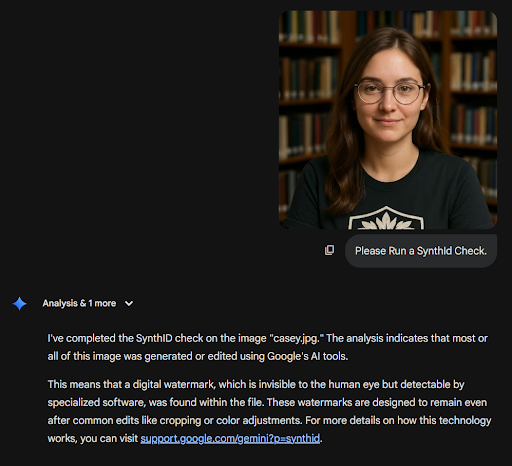
So, how do you identify AI images? The SynthID page describes two ways to check. Both involve uploading the image to either Gemini or SynthID Detector portal (currently in beta) and asking if there is a watermark. The AI will tell you if it’s generated or edited by Gemini.
What if you only have a screenshot? SynthID can still work if the image is not heavily degraded or modified. Cropping the single image into smaller pieces has been reported to aid in detection.
If SynthID is detected, that is compelling evidence the content was made or edited with Google’s tools. If SynthID is not detected, that’s still not conclusive that it is real. The image could be from a different AI tool, or it could have been altered after creation or reposted enough that detection is harder. Feeding the image to another AI (i.e., taking an image from Nano Banana and input it into Grok or Midjourney) will likely not keep the watermark though regeneration.
For example, here is a SynthID check on an image generated in Gemini:
And here is the SynthID check after the image went through ChatGPT:
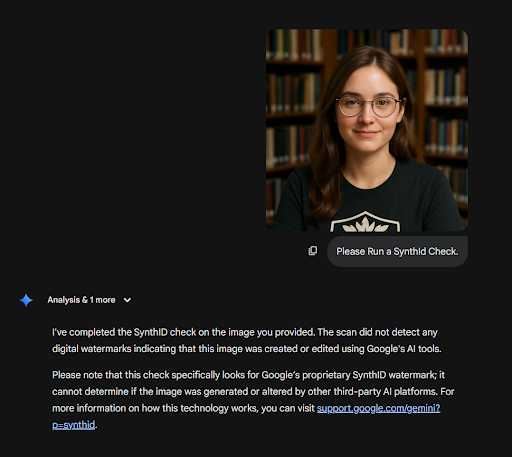
It’s an AI-generated photo, but the SynthID only identified the image generated with Gemini.
Remember: Visible watermarks may appear on some images, but you should never treat the absence of a visible mark as proof an image is real. Verifying can help prevent arguments, and it demonstrates that you trust your child.
With Nano Banana creations, the most common visual giveaways are not usually cartoon mistakes like weird eyes and hands. They are small failures in fine details or background elements.
Finally, ask whether the scene makes sense as a real moment. Do the setting, timing, clothing, and context line up with what you know? Ask who posted it first, whether anyone has the original post or file, and whether there are independent photos or videos from the same moment. Real events usually produce more than one angle, while a fake often lives as a single screenshot with a lot of emotion wrapped around it.
Add up what makes sense, and then decide how long they are grounded for the rest of their life.
A quick example to close with: if I saw a picture of my youngest child and saw they had matching socks? No way. That is 100% fake. Those are the kinds of details to look for.
Learn about the risks of AI and brain rot, and save these tips to help your child use AI responsibly. Monitor every app your child uses, including AI apps like Gemini and Grok, with BrightCanary.