
I’m not receiving the two-factor authentication code during setup.

If you’re having trouble receiving your child’s two-factor authentication code, this is usually related to how Apple delivers verification prompts.

Apple automatically sends the verification request to trusted devices and trusted phone numbers associated with your child’s Apple ID. You cannot manually choose which device receives it.

In some cases, the code may be delivered to:

  • Another iPhone or iPad signed into your child’s Apple ID
  • A trusted phone number listed on the account
  • The Family Organizer’s device (if your child is part of Family Sharing as a child account)

If your child is set up under Family Sharing as a child account, Apple may send the approval prompt to the parent or Family Organizer’s device instead of (or in addition to) the child’s device. This is expected behavior.
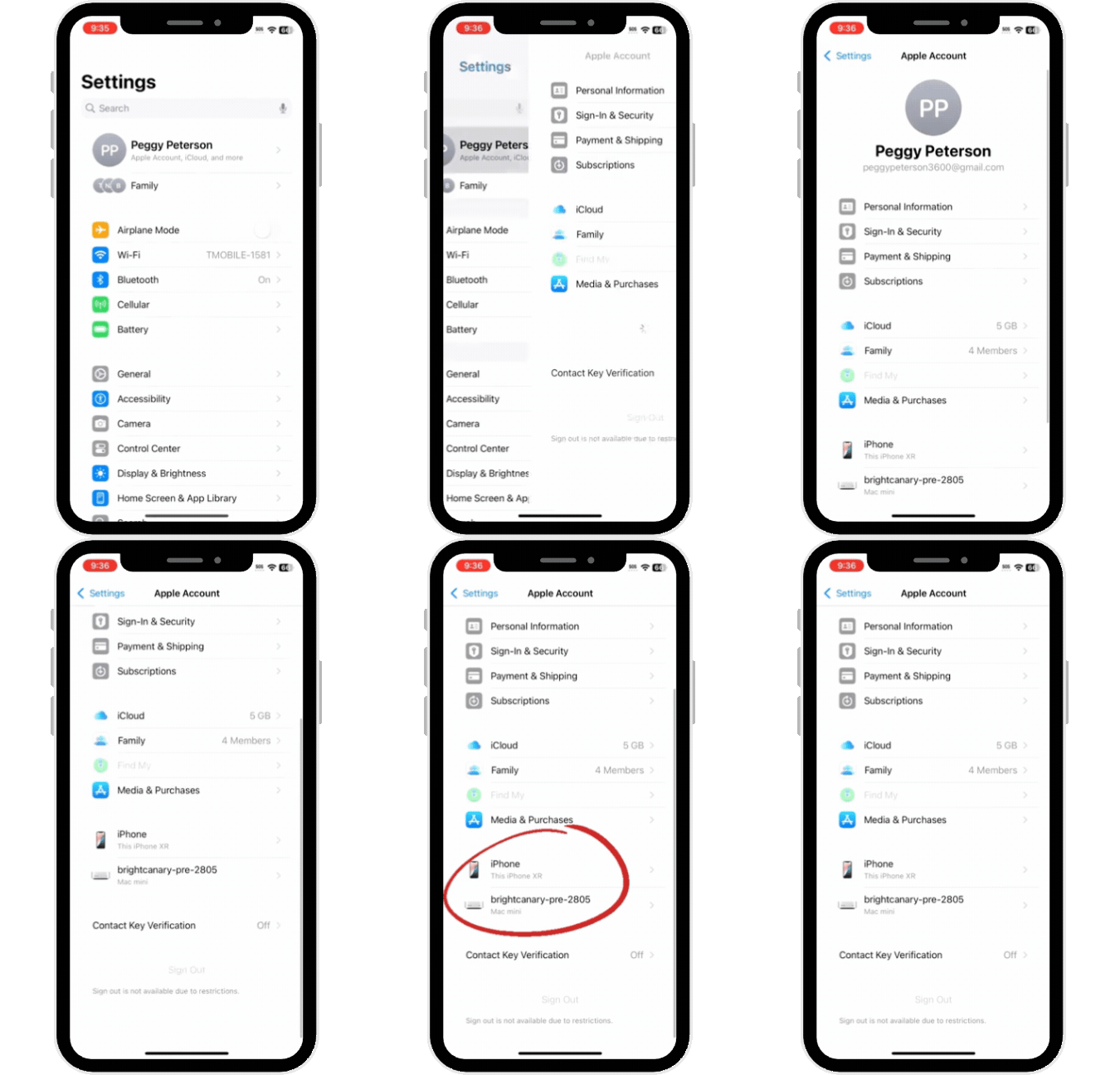
Check trusted devices

  1. On your child’s device, open Settings
  2. Tap the Apple ID name at the top
  3. Scroll down to view the list of trusted devices

Any device listed here can receive the two-factor authentication prompt.
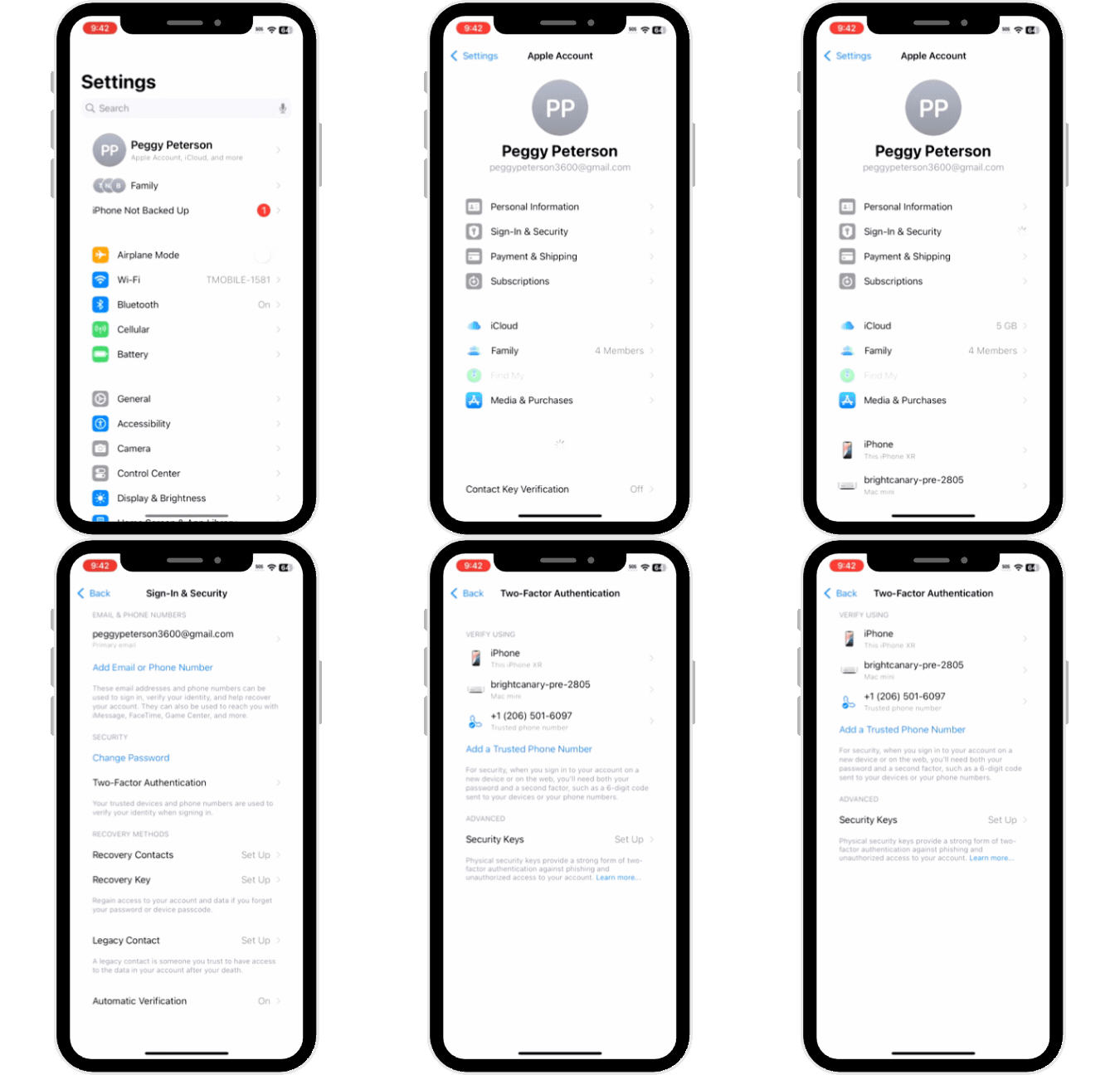
Check trusted phone numbers

  1. On your child’s device, open Settings
  2. Tap the Apple ID name at the top
  3. Tap Sign-In & Security
  4. Tap Two-Factor Authentication
  5. Review the trusted phone numbers listed

Any number listed here can receive a verification code by text message or automated call.

Check Family Sharing (if applicable)

If your child is part of Family Sharing:

  1. On the parent’s device, open Settings
  2. Tap the Apple ID name
  3. Tap Family Sharing
  4. Confirm your child is listed as a child account

If so, the verification prompt may appear on the Family Organizer’s device. Approve the request there and enter the code to complete login.

If you are still unable to receive the verification code after checking trusted devices, trusted phone numbers, and Family Sharing settings, contact BrightCanary Support (support@brightcanary.io) for further assistance. Include:

  • Your child’s Account ID
  • Confirmation that you checked trusted devices and phone numbers

This will allow us to investigate more quickly.

Instagram logo iconFacebook logo icontiktok logo iconYouTube logo iconLinkedIn logo icon
Be the most informed parent in the room.
Sign up for digital parenting updates.
APA Labs Digital Badge
We've earned the APA Labs Digital Badge
BrightCanary is honored to earn this designation from the American Psychological Association (APA). This APA Labs Digital Badge reflects alignment with APA Labs criteria for scientific principles, safety, ethical use, and usability. It is not an endorsement nor guarantee of effectiveness. APA Labs does not independently test products.
Mom's Choice Awards Honoring Excellence
Excellence in online safety
The Mom’s Choice Awards evaluates products and services created for children, families, and educators. The program is globally recognized for establishing the benchmark of excellence in family-friendly media, products and services. BrightCanary was recognized for our excellence in family-friendly online safety.
@2026 Tacita, Inc. All Rights Reserved.
