
I’m missing text messages.

If you're missing text messages or haven’t seen messages in a few days, there are a couple of possible causes.

Check Send & Receive settings

If your child’s device has a phone number, both the phone number and iCloud email should be selected.

  1. Open Settings
  2. Tap Messages
  3. Tap Send & Receive

Under “You can receive iMessages to and reply from”:

  • Ensure the phone number is selected
  • Ensure the Apple ID email is selected

Under “Start new conversations from”:

  • Select the phone number if available

If only one destination is selected, Apple may route some messages outside of the monitored session.

Are SMS messages (Android contacts) missing?

If your child is texting Android users, those messages use SMS rather than iMessage. Make sure Text Message forwarding is enabled.

  1. On your child’s iPhone, open Settings
  2. Search for Text Message Forwarding
  3. Turn it on
  4. Select the BrightCanary device from the list

Without Text Message Forwarding enabled, SMS messages cannot be monitored.

Are messages not populating after initial login?

If login completes but no messages appear, check whether Contact Key Verification is enabled.

Apple’s Contact Key Verification is an advanced security feature that can interfere with monitoring services.
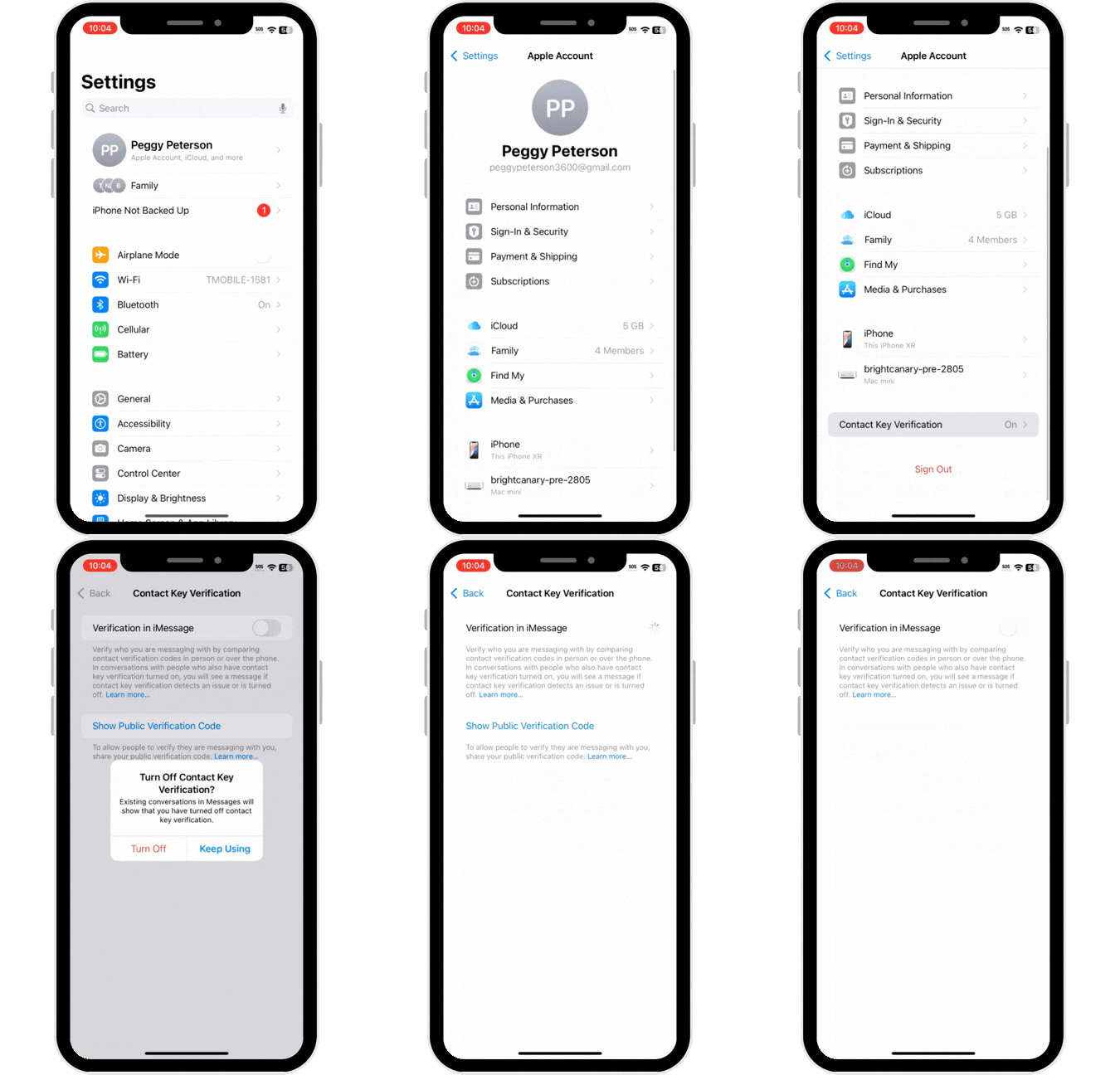
  1. On your child’s device, open Settings
  2. Tap the Apple ID name at the top
  3. Scroll down and tap Contact Key Verification
  4. Turn off Verification in iMessage

Make sure your child hasn’t deleted the BrightCanary server

Check to make sure they have not removed the BrightCanary server from the list of devices with access to their Apple ID information. This list is found by opening Settings on their device, then tapping iCloud (their name) at the top of the screen. Scroll down, and you should see a list of devices with access to their Apple ID, including their iPhone and/or iPad, as well as a BrightCanary server. 

If you do not see a BrightCanary server in the list, email support@brightcanary.io for help getting things set up again.


Instagram logo iconFacebook logo icontiktok logo iconYouTube logo iconLinkedIn logo icon
Be the most informed parent in the room.
Sign up for digital parenting updates.
APA Labs Digital Badge
We've earned the APA Labs Digital Badge
BrightCanary is honored to earn this designation from the American Psychological Association (APA). This APA Labs Digital Badge reflects alignment with APA Labs criteria for scientific principles, safety, ethical use, and usability. It is not an endorsement nor guarantee of effectiveness. APA Labs does not independently test products.
Mom's Choice Awards Honoring Excellence
Excellence in online safety
The Mom’s Choice Awards evaluates products and services created for children, families, and educators. The program is globally recognized for establishing the benchmark of excellence in family-friendly media, products and services. BrightCanary was recognized for our excellence in family-friendly online safety.
@2026 Tacita, Inc. All Rights Reserved.