

As an avid online thrifter, I’d never heard of Depop until my editor asked me to review it. Translation: Depop is for the youths, and I’m too old to know what it is. Maybe that’s true for you, too. If your child wants to use Depop, but you're left wondering, “What even is Depop?” or “Is Depop safe for kids?” — I looked into it so you don’t have to. Here’s what I found.
Depop is an online fashion resale marketplace that’s massively popular with the younger set. A whopping 90% of users are under 26, many of them teens.
Perhaps catering to its Gen Z base, Depop feels a lot like a social media platform. Users have a profile, complete with a picture and the option to link to other socials. They can “like” items, follow sellers, and DM other users.
Depop is a bit like a mashup of Instagram (without the parental controls) and eBay (with less robust protections).
Items on Depop are often offered at a steep discount of around 30-50% off retail. Some items, especially fast fashion, can be snagged for 80% less than new, while vintage, trendy, and hard-to-find items sometimes go for more than the original price tag.
Many teens turn to Depop for extra cash, offloading from their own closet or making bank by scooping up limited-edition items and flipping them on the site.
Gen Z on the whole is more focused on sustainable buying decisions than other generations, and used clothing has a substantially lower environmental impact (though there’s some nuance).
It might feel like the biggest risk from your kid using Depop is a sudden influx of packages on your porch or their questionable fashion choices (both very real), but the biggest danger comes from the fact that they’re buying and selling from strangers on the internet.
Users can DM each other (no images), even when not engaged in a transaction. If you know anything about child predators, it’s clear how a site populated by teens with a DM feature is a prime target. Predators can easily connect with your child over a perceived shared interest — “OMG, bestie, that dress is fire. Slay, baddie!” — gain their trust, and then lure them to another app and request explicit pictures.
Transactions completed through Depop include scam protection, but kids can still get duped. Common Depop scams include:
It’s just soooo easy to click that Buy Now or Add to Bag button, especially when you’re getting a good deal. But hundreds of dollars of clothing at 50% off retail is still hundreds of dollars.
Depop has zero parental controls and doesn’t require parental permission to buy or sell. I was able to get up and running with a test account for a 13-year-old in less than a minute.
Depop has no meaningful age verification.
If your child signs up for Depop through Google, and their Google account is set to their actual age, they’ll be informed they need parental permission to open an account. But all they need to do is pivot and sign up through email, then lie about their date of birth.
Despite the risks, Depop can be a positive place for kids. With a little vigilance, it can also be a safe one. Here’s what you should do:
Depop is an online clothing resale platform popular with teens. It’s possible for your child to use it safely, but you both need to understand the risks, like scams and predators. You should take steps to protect your child if they use Depop like teaching them safe online communication and monitoring their use.
Find out why thousands of parents trust their child monitoring to BrightCanary. Supervise your child across every platform and website, 24/7.

Research clearly demonstrates that social media can negatively impact kids. How it affects them depends largely on the algorithms that shape their feed. This complicated and covert process regularly exposes kids to content on eating disorders, self-harm and suicide, extreme gender viewpoints, and other harms. Here’s how algorithms put your child in danger and what you can do about it.
Social media algorithms are complex sets of rules and computations running behind the scenes to determine what content users see and in what order.
Algorithms are opaque and vary by platform and user; no two people have the same feed. One key building block is user behavior. Everything your child sees is partially shaped by what they’ve previously liked, commented on, or shared.
Algorithms have upsides, like keeping your feed clear of topics you don’t care about. But they also have a darker, potentially dangerous side for kids. Algorithms can fill a child’s feed with dangerous content at shocking speed. One recent study focusing on Snapchat found that one in three young users reported being exposed to unsafe content or messages at least weekly.
If your child likes or shares a #petglowup, more rescue-dog makeover videos are likely to enter their feed. On the other hand, if they interact with self-harm or disordered eating content, their feed can quickly fill with dangerous topics.
Researchers from the Center for Countering Digital Hate (CCDH) found that new TikTok users who paused on and liked videos about body image and mental health were then recommended suicide and eating disorder content within minutes.
We’re not talking about just a few videos. Teens face an onslaught of potentially harmful content. The CCDH study revealed that TikTok recommends body-image and mental-health videos to teens every 39 seconds.
Although your child’s social media behavior is a big factor in what the algorithm shows them, research shows they’re also likely to be shown harmful content they didn’t seek out.
Most egregiously, the algorithmic harm teens face using social media isn’t a flaw; it’s an intentional design feature.
To increase user engagement, social media companies capitalize on the harmful nature of their algorithms by targeting “vulnerable” accounts.
Research indicates that users who seek out eating disorder content often have usernames that incorporate words like “losing weight.” The CCDH study found that accounts with “lose weight” in their username were fed 12 times more self-harm and suicide videos than control accounts.
As parents, there’s a lot we can’t control about our children’s social media algorithms. But there are still steps you can take to protect them from danger.
It can be hard to fully understand what your child sees on social media because your own algorithm (and therefore your experience online) is likely very different from theirs. Here’s how to stay informed:
Explain how algorithms work and why they can be problematic. Teach them to critically examine what they’re shown on social media.
If your child is exposed to harmful content through their algorithm, resetting it can help. Use this guide to start fresh.
If you’re concerned about the content in your child’s feed, parent coach Lisa Smith of The Peaceful Parent offers these suggestions:
Social media algorithms can expose your child to self-harm, eating disorders, and extremist content within minutes, even without them actively searching for it. You can help by monitoring your child’s social media use (BrightCanary is great for this), teaching them to question their feeds, and keeping communication open and judgment-free.
Learn more about the risky spaces your child might fall into online, from the manosphere to eating disorder content.

We’re huge Percy Jackson fans in my house. I’d been trying (and failing) to get my son to read the book for years, and after he blew through the TV series during a nasty bout of pneumonia, it immediately became our read-aloud bedtime pick. Even though I heartily share it with my brood, your family is not mine, so here’s everything you need to know to decide for yourself if Percy Jackson is appropriate for kids.
The Percy Jackson book series is classified as Middle Grade, meaning its target audience is roughly 8-12 years old.
Common Sense Media says the book is appropriate for ages 9+.
The TV Parental Guidelines Monitoring Board rates Percy Jackson PG.
Common Sense Media gives it the green light for kids 9+.
I generally agree with Common Sense Media, but I think they’re a touch conservative with this one. Or, rather, there’s more nuance. I think both the book and the TV series are appropriate for the target audience of 8+.
My 6-year-old had no issues listening to the book. She’s a tough-as-nails little sister who’s been exposed through her brother to things he never would have been at her age (second babies, amIrite?). I would think twice about letting her watch the show, since it’s a different beast to see the scary monsters, but I’d probably allow it under parental supervision.
I share this to illustrate that if you’re raising an extra-sensitive soul, it’s probably wise to wait — but if, say, your little one didn’t blink at Star Wars, they’ll probably be fine.
With BrightCanary monitoring, it’s easy to stay on top of the TV shows, movies, and books your child is talking to their friends about.
Neither the book nor the show has any profanity.
With kids’ books published 20 years ago, you always run the risk of encountering problematic stereotypes and outdated ideas. There were a few instances of ableism (the use of the word “crippled,” for example) and fatphobia that made my skin crawl, but they were honestly mild compared to literature standards of the time.
I simply paused and briefly explained why that kind of language and thinking is outdated and harmful. Kids can understand nuance better than we tend to give them credit for.
I haven’t read book two yet, but I’m told it includes the r-word. Not great, but it’s spoken by a bully, so at least it’s not presented as a positive. Personally, this wouldn’t stop me from sharing it with my kids, but I would use it as a teachable moment.
In step with the times, the Percy Jackson books are super white-coded, while the newer TV series does a good job of racial diversity — the whipsmart, no-nonsense Annabeth is played by the talented Leah Sava Jeffries.
Occasional ableist language in the book aside, both the book and the movie do a decent job of disability representation; Percy’s ADHD and dyslexia are portrayed as strengths, and his mentor is a wheelchair user (played in the series by the incomparable Glynn Turman).
There’s no nudity. There’s innocent tweeny flirting and mentions of conception in relation to the kids’ immortal lineage, but nothing explicit.
As expected, considering Percy and his friends are battling gods, there’s a lot of violence in both the book and the movie. There’s also tween bullying, exploding vehicles, and plenty of sword fighting.
However, deaths are stylized and not gory; aside from one beheading, characters fade to dust when killed. Percy’s stepfather drinks and abuses his mom, but it’s discussed rather than depicted and is more obvious in the book than the show.
The book features vivid descriptions of scary monsters, some of which are nightmarish onscreen (I’m looking at you, Sirens). Percy’s mother is also thought to be dead for an extended time, and he and his friends are under near-constant peril.
Percy’s stepdad smokes cigars and drinks excessively, and a taxi driver smokes a cigar. A surfer mentions mushrooms, but in a way that’s likely to go over kids’ heads.
The Percy Jackson books and the Disney+ TV series are both appropriate for kids and delightful additions to your child’s reading and watching rotation.
Both feature violence and can be scary. Some outdated tropes show up in the book, but needn’t be dealbreakers because they can be used as teachable moments. Overall positive representation (especially in the series) overshadows occasional negative stereotypes. The book is appropriate to read aloud to younger kids, but the series is scarier and might be worth waiting until 8 or 9, depending on your child’s temperament.
Stay in the know about the media your child consumes. Thousands of parents trust BrightCanary child monitoring for insights, summaries, and alerts on iOS.

Meta AI now gives you insight into your child’s conversations with its AI chatbot. But this feature only shows broad strokes, and that’s not enough to meaningfully monitor and protect your child.
Meta AI has been ringing alarm bells since its inception. It earned an “unacceptable” risk assessment by Common Sense Media, faced an FTC investigation, and even failed Meta’s own internal testing.
Here are some of the issues with it:
Recently, Meta blocked underage users from interacting with AI characters and announced that teens inquiring about suicide will trigger a parental alert. These sound promising, but I’m still skeptical.
Blocking interaction with AI characters is good, but this doesn’t address the entirety of the problem. Teens can still use Meta’s AI assistant, where many safety concerns remain.
Additionally, no independent tests of the new notification system have been published, and Meta hasn’t released internal testing data. Given that third-party stress tests of Meta AI’s prior safety notification system declared it “broken” and notification systems from competitors like ChatGPT are also resounding failures, I’m not encouraged that this round is anything more than empty promises.
If you supervise your child on a Teen Account on Facebook, Messenger, or Instagram, you can now see what they’ve asked Meta AI.
Via the Insights tab, you’ll see a list of the topics your teen has asked about in the past seven days. (Your teen can also see the same list.)
Topics are broken down into 16 categories:
If you click on a category, you get associated sub-topics, including at least one your child has asked about. However, you aren’t able to see the exact prompt your child entered, nor the chatbot’s response.
Meta does provide 11 conversation-starters developed in collaboration with the Cyberbullying Research Center to help you follow up with your teen. (It’s a great resource.)
Meta’s new Insights feature strikes me as more safety theater from a company that consistently prioritizes profits over child safety. Here’s why Meta’s “topic categories” don’t qualify as true supervision and aren’t enough to keep your child safe:
Expert warnings about AI chatbots range from potentially harmful to downright unsafe and unacceptable for users under 18. Instead of limiting use to adults or building a genuinely safe product, Meta made a subpar feature that implicitly signals to parents they should let their kids use AI chatbots because they’re now “safe.”
All you’re told is that something your child typed fits into one of 16 broad categories. Clicking for details only reveals a handful of sub-topics, some of which may not be related to what they asked. That’s not meaningful insight. For example, if Health and Wellbeing appears, your child might have asked about acne or about serious issues like mental health or substance abuse.
Although Meta’s list includes 16 topics, it inexplicably limits you to 10 items per seven-day period. This arbitrary cap means if your child’s 11th topic is something serious, you’re out of luck.
It’s tempting to say Meta’s Insights are better than nothing, but I’m not convinced. It may give a false sense of security and cause parents to forgo additional measures. I don’t know that I’d go so far as to say it would be better if they instead did nothing, but at least without this feature, it would be clearer that the platform doesn’t truly monitor kids, and parents could make safety decisions accordingly.
Users can’t fully opt out of Meta AI, but they can mute the chatbot. Given teens’ tendency to do the opposite of what parents ask, rather than telling them to mute it, provide them information on why it’s bad for them.
It may not be a big leap; according to my 14-year-old niece, “teens hate AI,” and she’s not alone in her sentiment. This stance makes sense for a digitally savvy generation: the more educated people are about how AI works, the less likely they are to use it.
Demonstrate critical thinking when you use AI and make it known when you’re skeptical of its output.
BrightCanary scans everything your child types, including on all AI platforms, and gives you meaningful insight to help you address the situation:
AI chatbots are incredibly risky for kids. Meta AI’s Insights feature uses broad categories that aren’t a substitute for true parental monitoring and risk giving a sense of false security. BrightCanary gives you the visibility and details you need without leaving your child’s safety up to guesswork. Download today to get started for free.

You’ve probably seen the wholesome and heartwarming ads touting built-in safety settings on TikTok and Instagram. However, researchers from NYU and Northeastern University found that most safety features designed to protect teens on social media don’t live up to their promises.
The researchers found that, of the 86 features they tested, roughly 60% failed. Some tools were poorly designed; others were well-designed but failed to perform as promised.
Many features were missing, broken, exceedingly difficult for users to find and activate, or easy to circumvent. This gap allows easy access to predators and exposes children to harmful content, meaning parents need to rely on additional measures to keep their children safe online.
The report is extensive, but here are the highlights you need to know:
Social media is the new frontier for child predators, making protections against contact by strangers vital on these platforms.
The promise: Snapchat says it requires teens to have several mutual friends in common before a user shows up in search results or as a friend suggestion.
The reality: When signed into adult Snapchat accounts, researchers easily located teen accounts by searching usernames and were then able to send friend or message requests. The platform also suggested that teen accounts add adult strangers as friends.
The promise: Instagram Teen Accounts are set to private by default, and teens under 16 need parental permission to change their account to public. Additionally, the company promises that adults over the age of 19 cannot message teens who don’t follow them and that teens, by default, can’t receive DMs from any user they aren’t connected with on Instagram.
The reality: Researchers gave mixed marks for Instagram’s efforts to protect teens from adult strangers. The app successfully prevents adults over 19 from initiating DMs with underage accounts they weren’t connected with, but if the child sends a message to an adult they don’t follow, the adult can then communicate freely with that child.
Additionally, a new Instagram account for a teen girl received suggested accounts to follow almost exclusively made up of adult male profiles, and no warnings were given when teen accounts tried to message adult accounts they didn’t follow.
The promise: TikTok’s Community Guidelines assert that sexually suggestive behavior and activity involving minors isn’t allowed, nor is content that “shows, promotes, or facilitates” sexual abuse or exploitation of minors.
The reality: Videos of underage girls performing gymnastics routines were rife with comments featuring exposed adult male genitalia, inferences of sexual behavior, photos of known pedophiles, and offers to trade explicit underage material.
Snapchat, Instagram, and TikTok all prohibit content that promotes self-harm, suicide, and eating disorders and promise to block searches and intercept content related to these topics. They also commit to redirect users to supportive resources.
However, researchers discovered that users on all three platforms could easily circumvent protections by using slight misspellings or variations, and users were often not redirected to expert resources.
Instagram has committed to “make efforts” to ensure these terms would be blocked even if misspelled.
In reality, not only did misspellings bypass search restrictions, but Instagram’s auto-complete feature also actively suggested misspellings and alternative words or phrases that successfully circumvented their own restrictions. Some of these suggested terms are widely used within the disordered-eating community to avoid content restrictions.
TikTok’s additional stated protections for minors include a For You Feed for underage users curated by age-appropriate content “as assessed by Common Sense Networks.”
TikTok’s search bans initially worked when tested. Shockingly, though, researchers found that once a teen account had searched for terms related to self-harm, suicide, and eating disorders, TikTok stopped banning the content and instead began suggesting alternative search terms that would help users find related material. For example, “anna food tips” (a term used in the anorexia community) and “razor blade skin” (referencing self-harm or suicide) came up as top searches for the teen test account.
Follow-up reporting by the New York Times found the problem of actively suggesting harmful terms appears fixed, but that just a few searches about dieting triggered suggested content filled with disordered eating material, such as young women showing off their clavicles.
The study found that Snapchat’s tool to redirect users to safety resources worked as intended, but only under very narrow conditions. Simply misspelling a term or replacing letters with numbers (i.e., “su1c1de”) failed to trigger the safety feature. Additionally, even though correctly spelling a harmful term blocked search results, supportive resources were not provided as promised.
Now that it’s clear you can’t rely on social media platforms to protect your child as promised, here are other steps you can take to keep them safe:
Despite lofty promises by social media platforms, most safety features fail to protect teens as intended, allowing strangers to access children and exposing them to harmful content related to self-harm, suicide, and eating disorders. You should still use built-in safety tools but shouldn’t rely on them to keep your child safe. Setting boundaries around their social media use and a child monitoring app like BrightCanary provide added protections to help fill the gap.

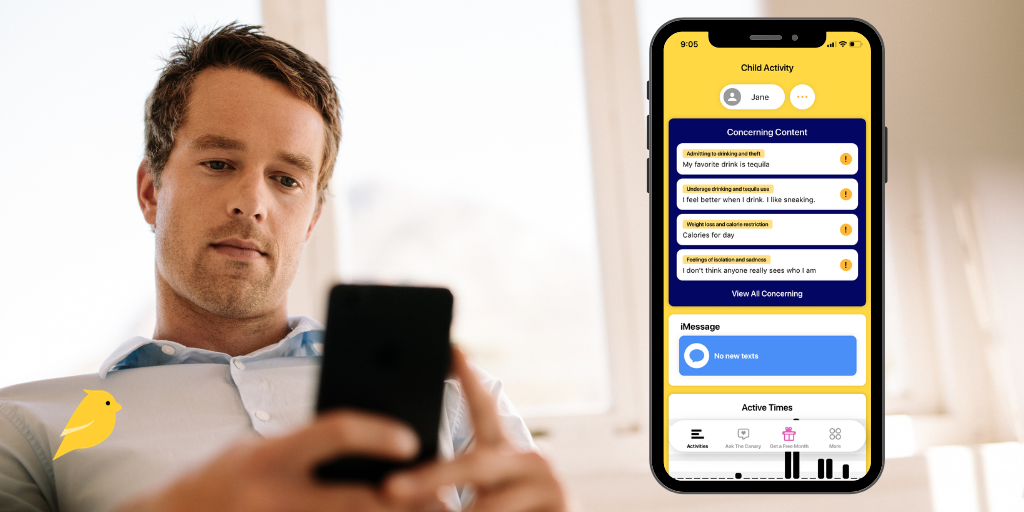
At BrightCanary, we believe you know what’s best for your child and that you deserve tools that empower you to make the digital choices that are right for your family. We’re committed to providing a monitoring product that supports that, which is why we’re thrilled to announce our new custom concerning content alerts. This new feature allows you to tell BrightCanary to monitor for specific issues that matter most to you.
Here’s everything you need to know about BrightCanary’s new custom concerning content alerts.
Setting up custom alerts on BrightCanary couldn’t be easier. The results will be displayed in an overview on your parent dashboard and included in your real-time alerts. Just follow these quick steps:
Need help setting up BrightCanary on your child’s device? Here's a guide! Once you’ve finished setup, you’re ready to add custom content alerts.
Ready to get started? Download BrightCanary right now to start your free trial and set up custom concerning content alerts today.

Sextortion is on the rise. This is an online crime where the perpetrator threatens or coerces a victim into sending explicit images or videos of themselves. From October 2022 to March 2023, the FBI reported a 20% increase in sextortion cases involving minors. To understand what parents need to know about sextortion, I chatted with Clayton Cranford, a leading child safety expert, former law enforcement officer, and founder of Cyber Safety Cop.
Predators can operate in violent online networks. Recently, a violent online group calling themselves 764 has begun coordinated targeting of children, extorting victims into producing child sexual abuse material (CSAM) and self-harm videos.
One of the newest trends that concerns Cranford is the use of AI. “Predators no longer need a real photo to make a threat credible — they can take an innocent picture off your child's Instagram and use 'nudify' apps to generate a fake explicit image, then use that fake to blackmail,” he says.
Part of the danger, Cranford warns, is that kids assume they’re safe because they haven’t sent any images. “That false sense of security is dangerous … an image being fake doesn't stop a criminal from using it as a weapon.”
Parents are often surprised at who victimizes their child. “Increasingly the threat comes from someone the child actually knows — an ex holding old photos, or a ‘friend of a friend’ who felt legitimate,” Cranford warns.
As kids have increasingly moved online, so have sextortionists. Grooming and sextortion can happen on any platform that allows for interaction, including:
The other trend that worries Cranford is the increased speed of financial sextortion. Largely aimed at teen boys, financial sextortion “now moves from ‘hey, you're cute’ to a full-blown money threat in a matter of hours, sometimes minutes.’”
We tell our kids not to talk to adults they don’t know online, but sextortion predators use fake ages and photos to pose as attractive peers, often aided by AI image generators.
Conversations typically start innocently, with the predator providing something they think the child craves, like praise, a listening ear, friendship, or romance. After establishing a connection, they systematically push boundaries, getting increasingly personal.
Cranford says he doesn’t want to scare parents; he simply wants them to be prepared. Here are actions you can take today to protect your child from sextortion:
Insisting sextortion could never happen to your child is exactly what leaves your family unprepared and vulnerable. “I’ve never once met a parent whose child was targeted who saw it coming,” says Cranford. “Sextortion doesn't discriminate. Predators have gone after kids as young as 9, honor students, star athletes, boys and girls, from the most loving and involved homes you can imagine.”
Cranford stresses that the single best protection isn’t a filter or an app. “It's building enough trust now that your child will come to you before [something happens and] the shame takes over. That's a conversation worth having whether you think it'll happen to your family or not.”
Here are the four steps Cranford recommends taking if your child is a victim of sextortion:
If your child is a victim of sextortion, it doesn’t mean they’re a “bad kid,” nor is it a reflection of your parenting. Remember: these criminals are professional manipulators.
“Coming at them with ‘What did you do?!’ only drives them back into silence right when they need you most,” says Cranford. Instead, “swallow the panic and lead with love: thank your child for telling you and make it crystal clear they're not in trouble.”
You don’t have to fight this alone. When sextortion is reported as soon as possible, law enforcement can trace accounts and sometimes intervene before images ever spread, and reporting can protect other kids, too.
Most kids do recover. Your unconditional support is what will carry your child through this difficult experience. Consider professional help as well; a therapist who specializes in adolescent trauma can help support your child learn how to process their feelings and cope.
Don’t assume sextortion can’t happen to your child; it’s a crime that doesn’t discriminate. Take steps to protect your child, monitor their online activity, and build trust so they feel safe coming to you for help. If your child is the victim of sextortion, respond with love instead of panic and reach out to law enforcement and mental health professionals for support. Remember that you aren’t alone and, with the proper support, most kids recover.

Since generative AI burst onto the scene, it's gotten heat for overt racism and harmful race-based stereotypes. Many AI companies have tried to correct these biases, including using human feedback. Unfortunately, they haven’t solved the problem; they’ve only made racial bias harder to spot.
Researchers at Stanford, the Allen Institute for AI, and the University of Chicago found that this discrepancy between covert and overt stereotypes is particularly pronounced for models trained with human feedback, indicating that human-feedback training obscures racism on the surface while racial stereotypes remain unaffected on a deeper, systemic level.
I’m a white woman raising white kids. If you're a BIPOC parent or a white parent raising a BIPOC kid, I acknowledge you have different considerations. It wouldn’t be respectful for me to advise you on how to guide your child through the unique harms that come from being a BIPOC child maneuvering covertly racist technology.
My intent is to highlight this important issue, give insight into current research on this emerging topic, and provide a jumping-off point so families can tailor their approach to their specific situation.
I recently evaluated Grok and Claude for their safety for kids. My tests were informal, but the patterns echoed what researchers have documented more rigorously.
For prompts with words like “successful,” “smart,” and “boss,” I was far more likely to be given images of white people and white-coded names.
For prompts with words like “housekeeper” and “criminal,” the results skewed heavily toward images of BIPOC individuals (largely Black and Hispanic) and non-white-coded names.
A 2024 study revealed that AI models are more likely to suggest that speakers of African American English (AAE) be given less prestigious jobs, convicted of crimes, and sentenced to death.
Shockingly, researchers uncovered a pattern of raciolinguistic stereotypes about AAE speakers that are more negative than any human stereotypes about African Americans ever experimentally recorded. You read that right: AI is even more racist than humans.
Rather than erase racial disparities in the classroom, the use of AI in schools has potentially created greater harm by obscuring, accelerating, and automating educational inequities.
Because many people view AI systems as objective, they’re therefore less likely to scrutinize its output. In a phenomenon known as algorithm appreciation, people are more likely to trust AI over humans, even when they’re aware of AI’s flaws and limitations. Since this bias has been well-documented in adults, it raises the question of whether even children who are otherwise skilled at spotting racial bias might be less likely to question it when it comes from AI.
AI is a huge systemic shift in our culture, and as a parent, it’s easy to feel powerless in the face of it. We may not have the ability to erase the racial bias embedded in AI, but we do have the power to provide a counterbalancing voice for our children and teach them to think critically about the racial bias they encounter when using it. Here are some tips:
Be explicit with your child about the human biases that are reflected and amplified in AI. Teach them that it’s not an objective or neutral tool.
Together with your child, ask AI to generate images or provide descriptions of people using various prompts. A few to try:
Identify racial stereotypes and biases you both notice and discuss how those might have made their way into AI data and the harm they cause.
Demonstrate (out loud) critical thinking when you use AI. This is particularly relevant when you spot racial bias, but it also helps build your child’s AI literacy, making them better equipped to evaluate its systemic flaws and spot racial bias.
Rather than using AI as their only stream of information and treating its responses as final, encourage your kids to turn to diverse resources for answers and to always cross-check AI output against other sources.
This isn’t a one-and-done conversation. For lasting learning that expands as your child matures, AI literacy is a skill that needs to be fostered over time and across contexts. It doesn’t have to be a huge talk every time. Start looking for small incidental moments where it’s relevant.
Far from being a neutral technology, AI echoes and often amplifies the racial biases of humans. The systemic racial biases embedded in AI stand to do real harm to children, especially since people are generally more inclined to take output from AI at face value rather than question it. More work needs to be done by AI companies to combat this, but parents can also help by teaching their children to identify and challenge racial bias on AI platforms.
Monitor what your child is asking AI — and how they use every other app and website on their device — with BrightCanary monitoring. You’ll get summaries, red-flag alerts, and more, all on your easy-to-use dashboard. Download now to start your free trial.
We believe privacy and independence are vital for children to help them develop the skills they need for when they’re older. Independence matters to the degree that’s appropriate for their age and maturity level. A younger child learning how to use a iPad for the first time needs a hands-on approach. An older child? They should have more leeway.
That’s why BrightCanary isn’t designed to be a permanent surveillance system. It’s a tool for helping you keep your child safe when they first go online, then gradually giving them more freedom as they earn your trust and demonstrate they’re ready. Here’s how it works.
Freedom online is a privilege. Trust must be built over time, not granted all at once.
When your child learned to cross the street, you supervised them until they could consistently look both ways. Unlike a child’s street-crossing skills, which you can see, their behavior online feels like a black box. BrightCanary gives you the insight that’s missing so you can feel confident granting your child more independence online.
Building independence is like climbing a ladder. We need to scaffold our kids as they learn how to use the internet safely, but the end goal is for them to stand on their own two feet at the top.
Here’s how to use BrightCanary's summaries, transcripts, and red-flag alerts to guide your child up the independence ladder:
Start at this step when your child starts using a smartphone or tablet independently.
At this step, your child is mature enough to not only follow your house rules, but also to use their device safely and responsibly.
Rather than relying on age, look for these signals of maturity and trustworthiness to indicate your child is ready for more independence:
A ladder goes in two directions. If things aren’t going well with your child’s new independence, it’s okay to dial back their freedom. Use these signals to help you assess if it’s time to take a step down:
When you move your child back to a more supervised stage, you risk them pushing back and trying to hide things from you. Instead, frame it as a partnership with the shared goal of keeping them safe.
Use these talking points as a starting point:
BrightCanary is your partner as you strive to raise a digitally literate child who can handle themselves safely on the internet. With our tools, you aren’t in the dark about your child’s online behavior. You’ll have the insight you need at each stage, while also granting your child an appropriate level of privacy. With BrightCanary, you can feel confident in your decision to let your child have more independence when the time is right. Download the app now to start your free trial.

I’ve reviewed many apps for BrightCanary to find out if they’re safe for kids. Never have I been so shocked during the testing process as I was with Polybuzz. (I literally kept throwing my phone across my desk in disgust!)
In this review, I’ll break down exactly why Polybuzz isn’t safe for kids, including wildly inappropriate content, weak age verification, and no parental controls.
Polybuzz is a chatbot that uses anime-inspired imagery and AI voices to let users create personalized role-plays. Users can generate their own AI chatbot through prompts and reference images or interact with bots created by others. The app was originally known as Poly.ai, but it was rebranded to Polybuzz in January 2026.
The options on Polybuzz are open-ended, allowing users to create an AI chatbot for many purposes, but it skews heavily toward relationship bots, romantic scenarios, and sexualized encounters.
Here’s how I tested Polybuzz:
The age rating for Polybuzz varies depending on a user’s device.
This inconsistency allows underage users to easily create accounts through the website, even if they’re blocked on their phone.
Did you know? Experts recommend monitoring your child's devices and making sure they're using age-appropriate apps.
In short, no — not an effective one.
While age verification is imperfect, it’s an important part of the puzzle for keeping kids safe online. That’s why we always look for strong age verification when reviewing an app's safety.
Polybuzz falls far short on this measure. Here’s what I found:
In answering this question, I discovered a huge discrepancy between what the company says and what they actually do.
This is what Polybuzz’s website tells users:
Here’s just a sampling of what I found on the front page of my Explore tab the very first time I opened the app. Keep in mind, this was using my test account set to 14 years old with Pure Mode activated.
Polybuzz has zero parental controls. In fact, there are no user controls either, except for Pure Mode, which, as found in my testing, appears to do very little.
Here’s a summary of the risks we uncovered during testing:
| Risk | Description |
| Explicit sexual and violent content | Found on the Explore page even in “Teen Mode.” |
| Weak or nonexistent age verification | Kids can easily create accounts, even under 13. |
| No parental controls | Parents can’t monitor or restrict content. |
| Psychological impact | Disturbing or sexualized scenarios can harm young users’ emotional well-being. |
If you’re worried about your child using Polybuzz or other chatbots, here are some steps you can take today:
Chatbots can seem like innocent fun to kids. Explain the risks and your concerns.
Make sure you have parental controls set on your child’s device through either Apple Family Sharing or Google Family Link, including setting their age and maturity level and requiring permission before they download new apps.
This will minimize the chances they’ll be able to use chatbots on their mobile devices without you knowing.
BrightCanary monitors what your child types on their device, and advanced, customizable alerts will let you know if they type anything concerning — like a worrisome interaction with a chatbot.
In case it isn’t crystal clear from my review, let me unequivocally state it here: Polybuzz is not safe for kids.
All chatbots present measurable risks for kids, but with weak age verification, no parental controls, and filters that are so flimsy it’s unclear if they even exist, Polybuzz stands out as exceptionally unsafe. Parents should monitor their children’s online activity to make sure they aren’t using Polybuzz.
BrightCanary helps you monitor your child’s activity online, including if they use chatbots like Polybuzz. Download today to get started for free.





